
LNG Terminal Financial Model Template
The LNG Terminal Financial Model Template is a fully integrated Excel project finance model for LNG regasification terminals, FSRU-style import projects and onshore receiving terminals. It covers the full asset life: a 3-year construction period, commissioning, ramp-up and 30 years of operations. Change one start date and every timeline, label and escalation index in the workbook updates automatically. This makes it a practical LNG terminal valuation template for developers, infrastructure investors, lenders, consultants and corporate finance teams who need a bankable model quickly.
Financial Model For An LNG Terminal
The model separates the drivers that matter in LNG regasification economics. Regasification capacity is shown in MTPA, MMSCMD, MMSCF/d and bcm. Contracted capacity is separated from available capacity, and take-or-pay capacity reservation fees from throughput-based regasification tariffs. LNG storage, boil-off gas (BOG), LNG losses, terminal fuel gas, berthing and unloading fees, pipeline transmission revenue and ancillary services are each modelled on their own lines. The result is a transparent LNG terminal revenue model that shows exactly how each cash flow is generated.
On the financing side, the model sizes senior debt against both a gearing cap and a target DSCR. It sculpts repayments to a constant DSCR and funds a DSRA and a minimum cash balance. Interest during construction is capitalised without creating circular references. It produces a full three-statement model, with P&L, cash flow statement and a balanced balance sheet, plus project and equity IRR, NPV, MOIC, payback, DSCR, LLCR and PLCR. A five-case scenario manager, live sensitivity levers and 22 automated integrity checks complete the model, ready for investment committee and lender review.
What’s Inside: Tab-by-Tab Guide
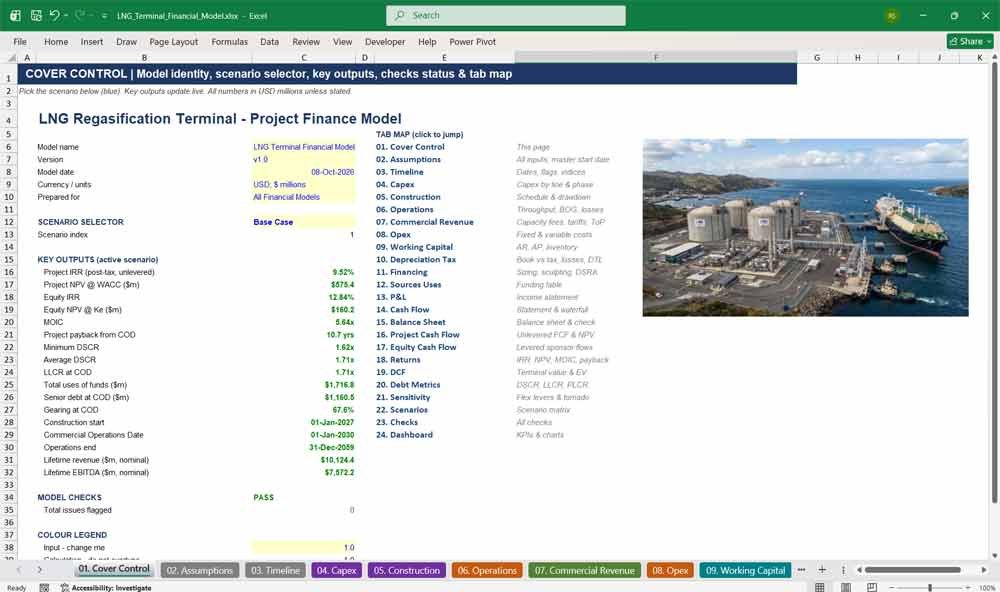
01. Cover Control
The Cover Control tab is the command centre of the LNG terminal financial model. It shows the model name, version, date and currency, the scenario selector, the headline returns and debt metrics, the model check status, and a clickable tab map for fast navigation.
- Scenario selector: Base, Upside, Downside, Stress and Custom cases
- Live key outputs: Project IRR, Equity IRR, NPV, MOIC, DSCR, LLCR
- Overall PASS/REVIEW status from the checks tab
- Hyperlinked table of contents and a colour legend
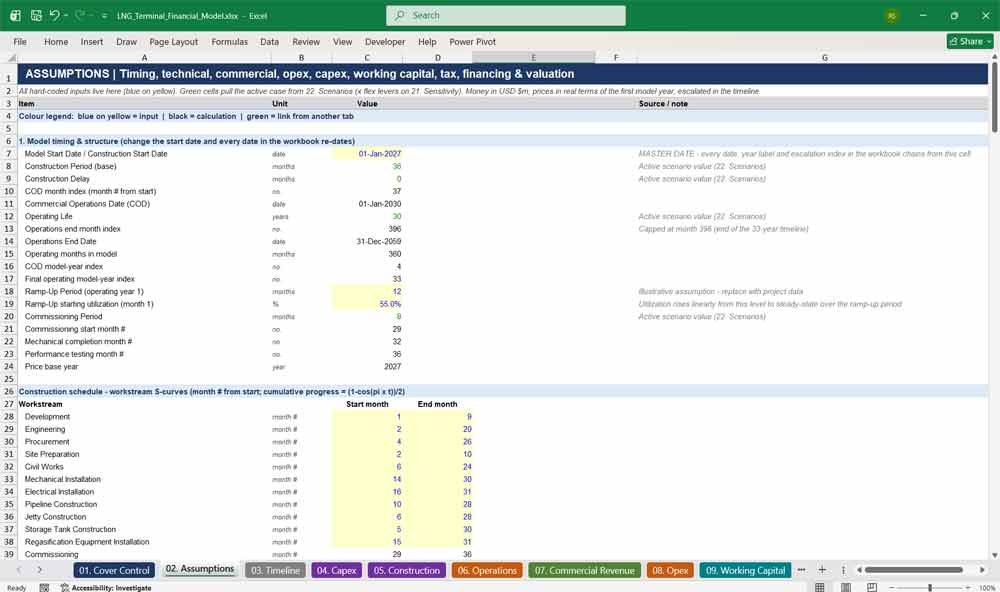
02. Assumptions
The Assumptions tab holds every input for the LNG regasification model in one place. It covers timing, technical capacity, commercial tariffs, opex, capex, working capital, tax, financing and valuation. Every input is clearly colour-coded, and each line carries a note explaining what it does.
- A single master start date drives every date in the workbook
- Capacity conversions: MTPA, MMSCMD, MMSCF/d, MMBtu/d and bcm/yr
- 38 capex line items, each with a class and an S-curve phasing selector
- Tariff, take-or-pay, debt, tax and WACC inputs, all on one tab
LNG Terminal Revenues & Capital
03. Timeline
The Timeline tab is the engine behind the model’s mixed periodicity. It runs 36 construction months, then operating years 1–10 monthly with annual roll-ups, then years 11–30 annually. It produces period flags, operating counters, debt period counters and escalation indices for every column.
- Monthly construction and early operations, annual long-term operations
- Construction, operations, ramp-up, grace and maturity flags
- CPI, tariff, opex and capex escalation indices
- Fully formula-driven calendar with no hardcoded years
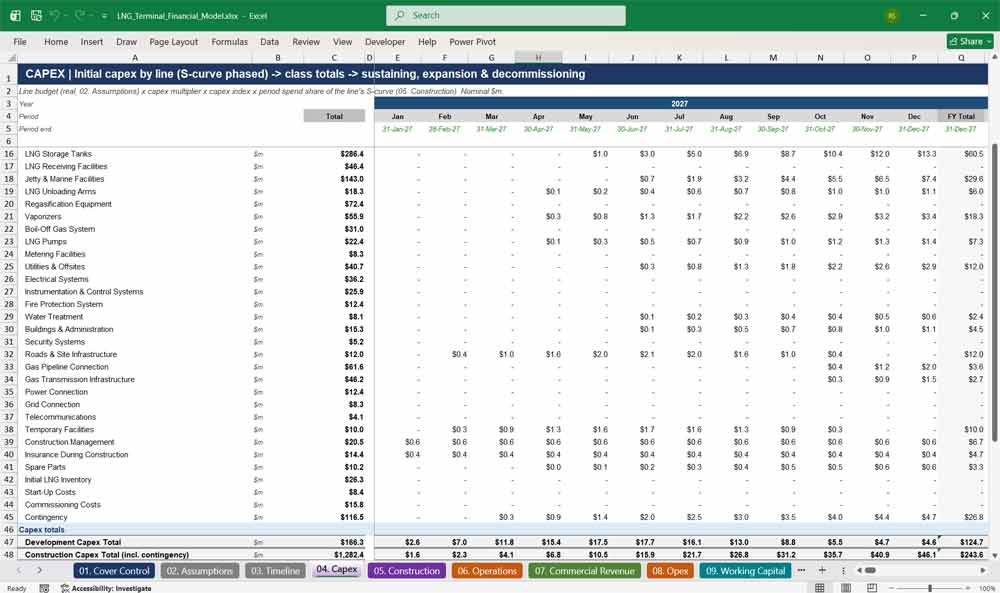
04. Capex
The Capex tab builds LNG terminal capital expenditure line by line. It covers storage tanks, the jetty, unloading arms, vaporizers, the BOG system, pipeline connection and grid connection. Each line is phased by its own construction S-curve and escalated to nominal dollars.
- 38 itemised capex lines grouped into Development, Construction and Other
- Contingency calculated as a percentage of construction items
- Maintenance, replacement, expansion and decommissioning capex
- Connection and pipeline capex shown separately for clarity
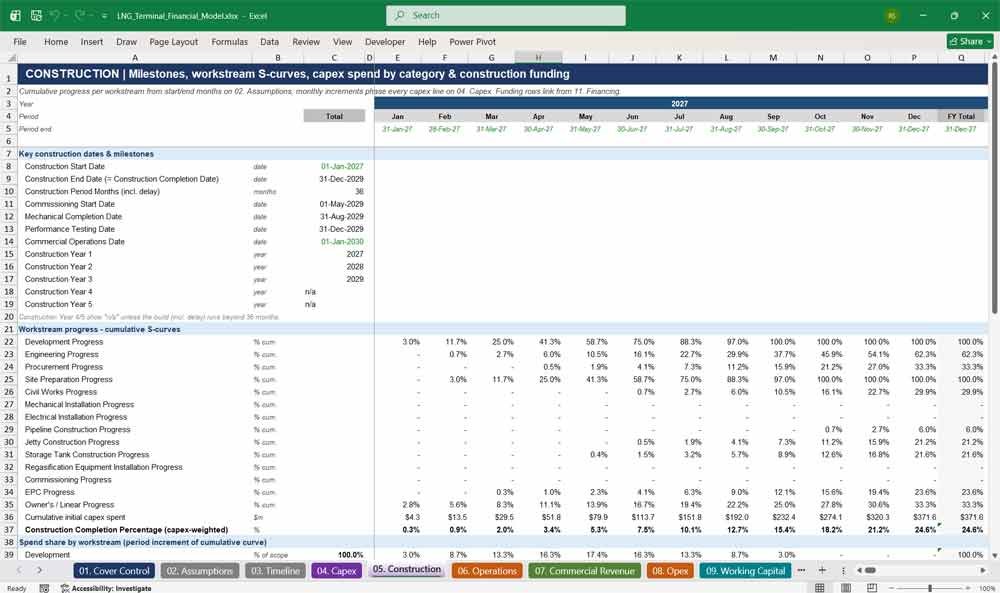
05. Construction
The Construction tab models the full LNG terminal build schedule: key milestones, workstream progress S-curves and capex drawdown by category. It also tracks construction funding, including debt drawdown, equity, interest during construction and the total funding requirement through to the commercial operations date.
- Milestones: mechanical completion, performance testing and COD
- 14 workstream S-curves (civil, tank, jetty, pipeline, regas and more)
- Capex-weighted construction completion percentage
- Construction delay months and delay cost logic
06. Operations
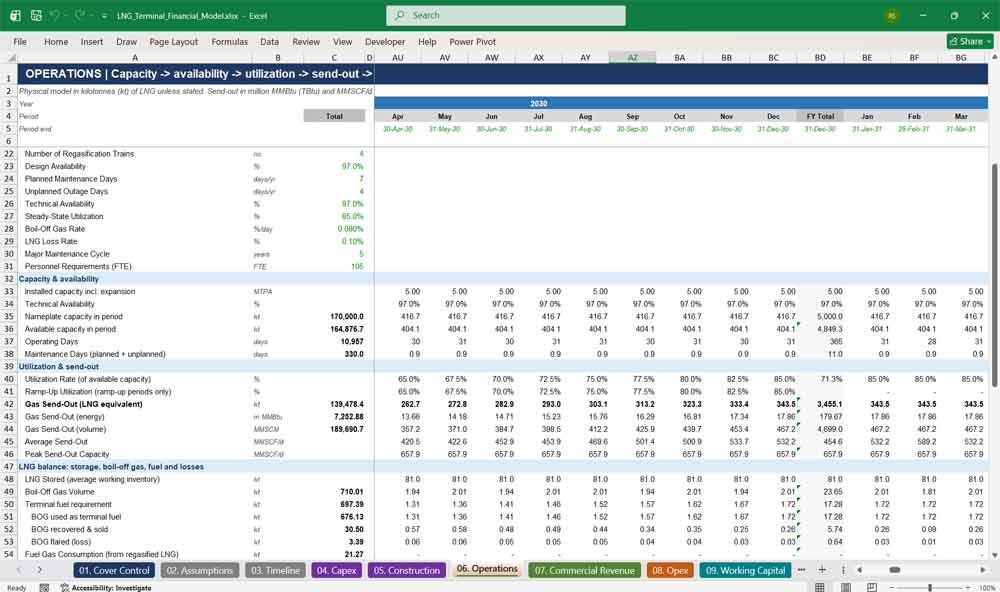
The Operations tab converts terminal capacity into physical LNG volumes. It models availability, ramp-up utilization, send-out, LNG unloaded, vessel calls, storage inventory, boil-off gas, fuel gas and LNG losses. This gives a complete LNG mass balance for every period of terminal operations.
- Technical availability net of planned and unplanned outage days
- Ramp-up utilization curve in the first operating year
- BOG used as fuel first, with any surplus sold or flared
- Vessel calls, berth utilisation, electricity and water consumption
07. Commercial Revenue
The Commercial Revenue tab is a detailed LNG terminal revenue model. It separates take-or-pay capacity reservation fees from throughput regasification tariffs. It also models storage, berthing, unloading, handling, pipeline transmission, BOG sales, connection fees, ancillary services and a minimum revenue guarantee.
- Contracted vs available vs uncontracted capacity
- Take-or-pay volume and shortfall payments
- Revenue split across three contracted customers plus spot users
- Fixed, variable and ancillary revenue totals with a tie-out check
08. Opex
The Opex tab calculates LNG terminal operating costs. Variable costs cover fuel gas, electricity, water, LNG losses and variable O&M. Fixed costs cover operating and maintenance personnel, insurance, regulatory costs, administration, routine maintenance and cyclical major maintenance, all escalated at the opex inflation rate.
- Variable costs driven by physical volumes and nominal prices
- Headcount-based personnel costs
- Major maintenance events on a configurable cycle
- Costs regrouped for P&L reporting, with a reconciliation check
09. Working Capital
The Working Capital tab calculates receivables, prepayments, payables and accrued expenses using days-outstanding assumptions. It tracks the initial LNG heel inventory from purchase to release at end of life and produces the cash flow impact of working capital movements.
- Receivable, payable, prepayment and accrual days inputs
- LNG inventory purchased as capex and released at end of life
- Working capital fully unwound in the final operating period
- Working capital funding reserve at COD
10. Depreciation Tax
The Depreciation Tax tab separates accounting depreciation from tax depreciation for LNG terminal assets. It handles amortisation of financing fees, the decommissioning provision, tax loss carry-forwards with a utilisation cap, cash taxes and the deferred tax liability, giving a realistic, bankable tax profile.
- Book depreciation (30 years) vs accelerated tax depreciation (15 years)
- Separate pools for initial and sustaining capex
- Tax losses carried forward, with a configurable utilisation cap
- Deferred tax liability and decommissioning provision accrual
LNG Terminal Financial Statements
11. Financing
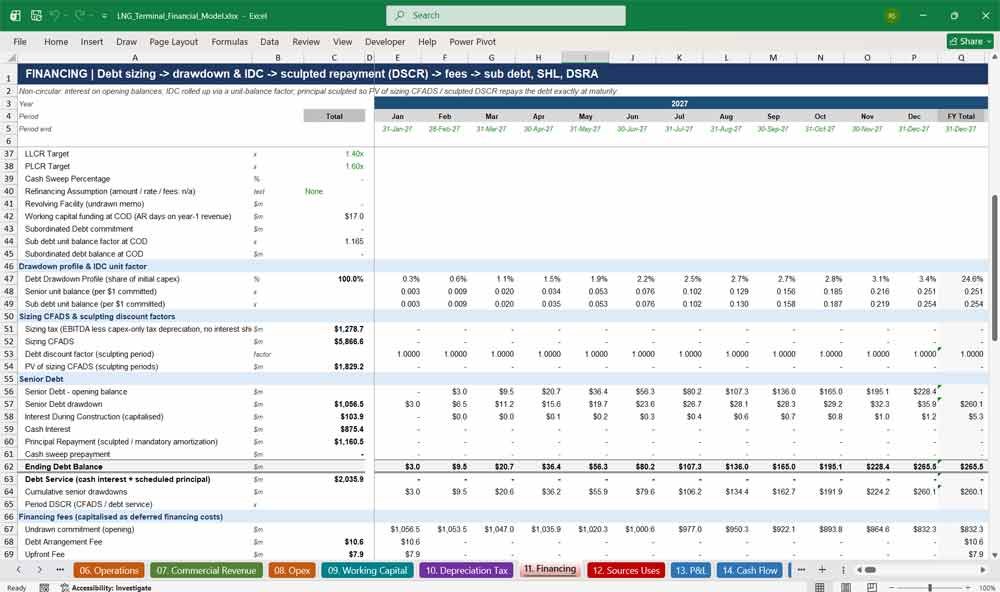
The Financing tab sizes and schedules the project debt. Senior debt is sized at the lower of the gearing cap and DSCR capacity, then sculpted to a constant DSCR. It covers fees, the DSRA, minimum cash, subordinated debt and shareholder loans, all without circular references.
- Debt sculpting against a target DSCR, repaid exactly at maturity
- Interest during construction capitalised using a unit-balance factor
- Arrangement, upfront, commitment and legal fees
- DSRA funding and release, plus an optional cash sweep
12. Sources Uses
The Sources Uses tab summarises the total funding requirement for the LNG terminal project. On the uses side: development, construction and commissioning capex, inventory, financing fees, IDC, the DSRA and minimum cash. On the sources side: senior debt, subordinated debt, shareholder loans, equity, grants and contributions.
- Full uses-of-funds table with percentage weights
- Sources split by debt, equity and other funding
- Sources-less-uses check, plus funding surplus and shortfall lines
- Shows the binding debt sizing constraint
13. P&L
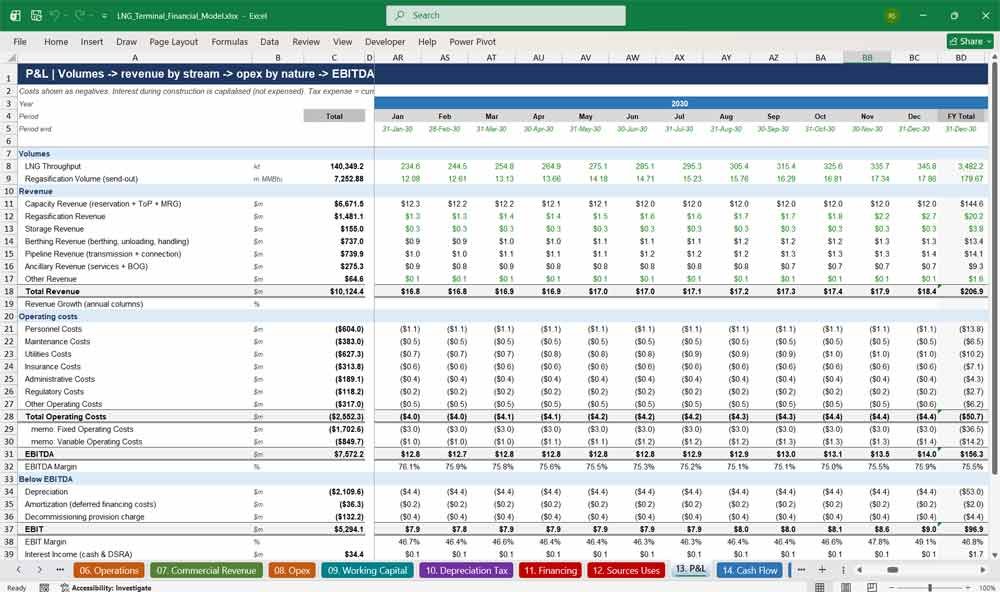
The P&L tab presents the LNG terminal income statement. It runs from throughput volumes and revenue by stream, through operating costs by nature, to EBITDA, depreciation, amortisation, EBIT, net finance costs, tax expense and profit after tax, with margins and annual revenue growth.
- Revenue split into capacity, regas, storage, berthing, pipeline and ancillary
- EBITDA, EBIT and net income margins
- Current plus deferred tax expense
- Monthly detail with FY totals
14. Cash Flow
The Cash Flow tab builds the statement of cash flows and the project finance cash waterfall. CFADS flows through senior debt service, subordinated debt service, the DSRA, an optional cash sweep, a distribution lock-up test, and then out to dividends and shareholder loan payments.
- Operating, investing and financing cash flows
- CFADS and cash available for distribution
- Distribution lock-up when DSCR falls below the trigger ratio
- Automatic sponsor equity cure if a cash shortfall arises
15. Balance Sheet
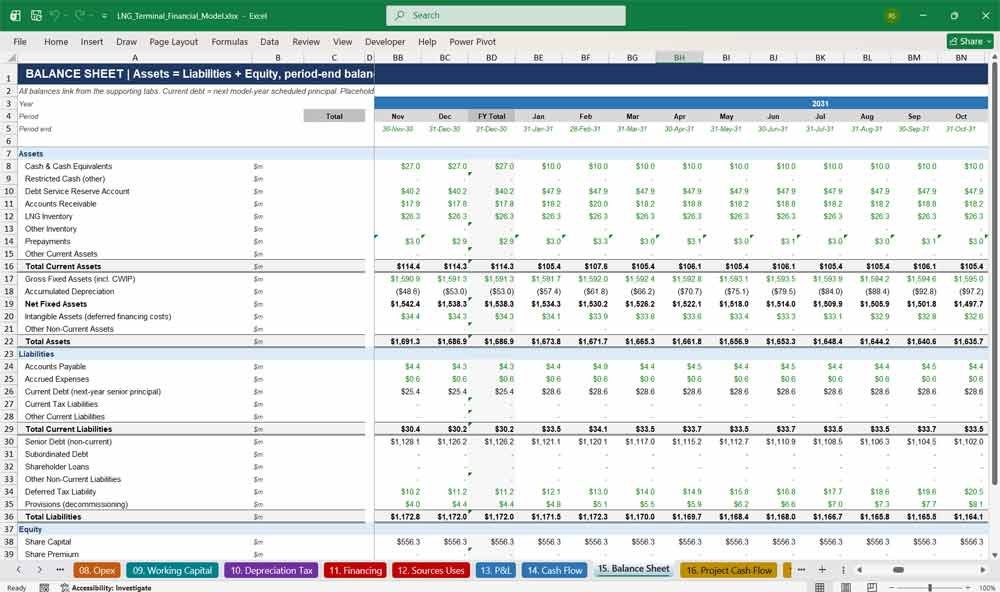
The Balance Sheet tab produces a fully balanced statement of financial position for every period. It covers cash, the DSRA, receivables, LNG inventory, fixed assets, deferred financing costs, payables, current and non-current debt, the deferred tax liability, the decommissioning provision and equity.
- Balance sheet check in every period, with zero tolerance
- Current portion of debt based on next-year repayments
- Deferred tax liability and provisions included
- Retained earnings roll-forward
16. Project Cash Flow
The Project Cash Flow tab calculates unlevered, pre-financing cash flows for the LNG terminal. It covers revenue, opex, unlevered cash taxes, working capital, development, construction, maintenance, expansion and decommissioning capex, plus an optional terminal value, all discounted at WACC.
- Unlevered taxes with no interest shield (true project basis)
- Development and construction capex shown separately
- Terminal value hook from the DCF tab
- Discount factors and present value per period
17. Equity Cash Flow
The Equity Cash Flow tab shows levered cash flows from the sponsor’s perspective. It runs from project cash flow, through debt drawdowns, interest, principal, fees and DSRA movements, to cash available to equity. It also tracks equity contributions, dividends and shareholder loan flows.
- Cash available to equity, before and after sponsor flows
- Equity investment vs distributions received
- Terminal value to equity, net of outstanding debt
- Reconciliation to the change in cash
Key Financial Metrics For An LNG Terminal
18. Returns
The Returns tab summarises investment returns for the LNG terminal. It shows Project IRR and NPV at WACC, Equity IRR and NPV at the cost of equity, MOIC, and project and equity payback periods. All are calculated on annual cash flows linked from the cash flow tabs.
- Project IRR, with and without terminal value
- Equity IRR and equity NPV
- MOIC (money-on-invested-capital multiple)
- Payback measured from model start and from COD
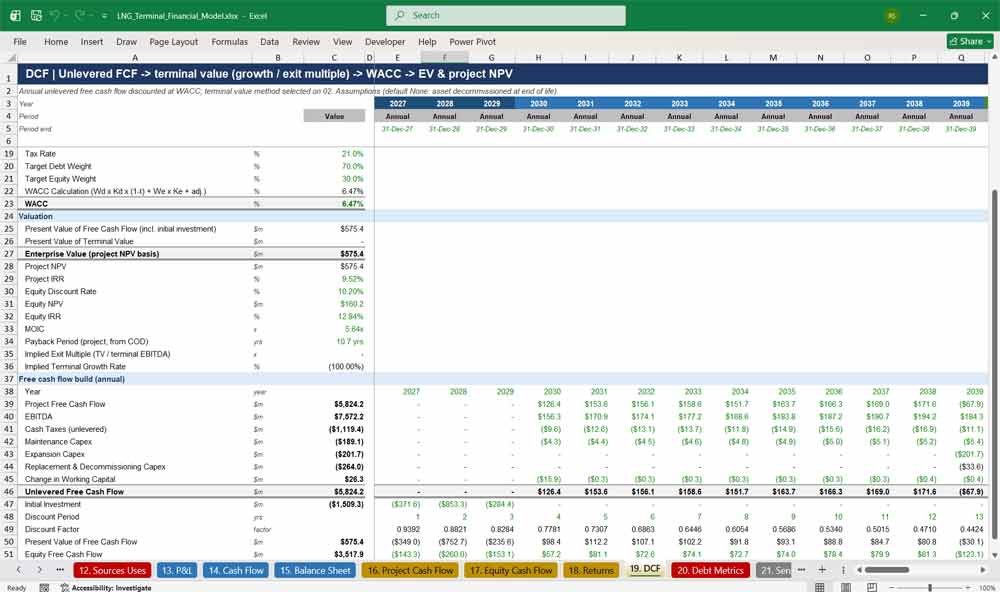
19. DCF
The DCF tab performs a discounted cash flow valuation of the LNG terminal. It builds a WACC from CAPM inputs, calculates unlevered free cash flow and applies a terminal value using perpetuity growth or an exit EBITDA multiple to derive enterprise value.
- WACC calculation with target debt and equity weights
- Terminal value: None, Perpetuity Growth or Exit Multiple
- Enterprise value and project NPV
- Implied exit multiple and implied terminal growth rate
20. Debt Metrics
The Debt Metrics tab reports annual lender coverage ratios: DSCR, LLCR and PLCR. It also shows minimum and average DSCR, headroom against the covenant, and the full debt sizing summary, including which constraint (gearing or DSCR) binds.
- Annual DSCR, LLCR and PLCR profiles
- Minimum DSCR vs covenant headroom
- Debt capacity at the target DSCR
- Peak debt and actual gearing at COD
21. Sensitivity
The Sensitivity tab lets you flex the key value drivers of the LNG terminal model live: tariff, capex, utilization, opex, LNG price, WACC and leverage. Live outputs update instantly, and a tornado table ranks the drivers by their impact on equity IRR.
- Seven live flex levers, applied on top of any scenario
- Instant read-out of IRR, NPV, MOIC and minimum DSCR
- Tornado table of low/high results for each driver
- Works with every scenario case
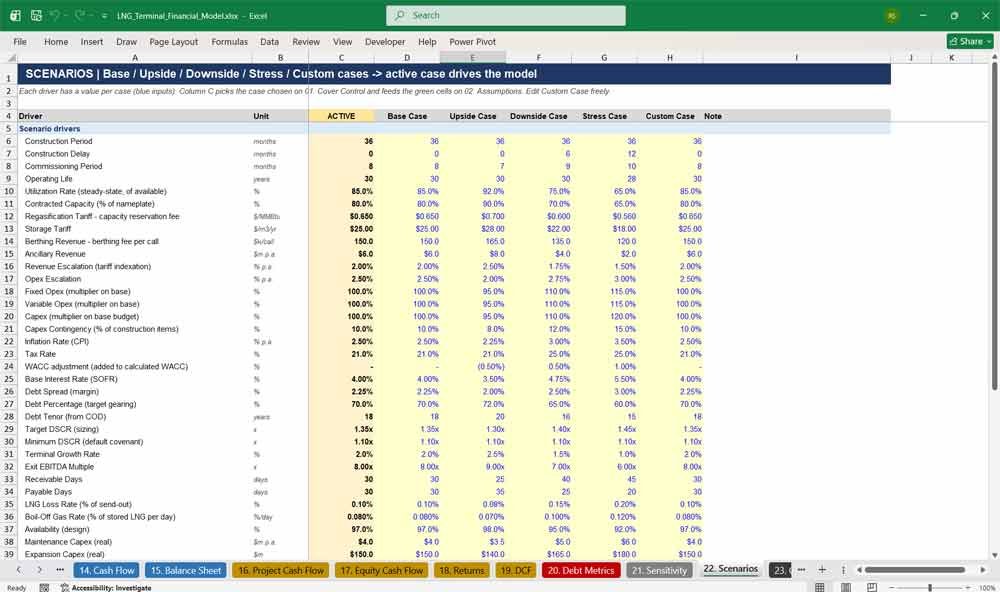
22. Scenarios
The Scenarios tab stores Base, Upside, Downside, Stress and Custom cases for 37 key drivers. These include utilization, contracted capacity, tariffs, capex, construction delay, inflation, interest rates, gearing, DSCR, boil-off and decommissioning cost. Each case is switched from the cover tab.
- Five fully editable scenario cases
- Construction delay and operating-life scenarios
- Side-by-side comparison of scenario outputs
- The active case flows through the entire model
23. Checks
The Checks tab gives you confidence in every number. It runs integrity checks every period and at model level: the balance sheet balances, sources equal uses, cash is never negative, debt is fully repaid, DSCR covenants are met, revenue and opex tie out, and roll-ups match.
- 14 period-level checks and 8 model-level checks
- Single PASS/REVIEW status fed to the cover tab
- Annual roll-up reconciliations
- No circular references by design
24. Dashboard
The Dashboard tab presents the LNG terminal’s key investment, financing and operating metrics on one page. Charts show revenue and EBITDA, annual DSCR, CFADS against debt service, and the senior debt balance, ready for investor presentations, lender packs and board reporting.
- Headline returns, financing and operating KPIs
- Four presentation-ready charts
- Annual chart data block linked to the model
- Updates instantly when you change scenario or inputs
Why Buy This Model?
Building a bankable LNG terminal financial model from scratch takes weeks of specialist time, and one hidden error can undermine an investment case. This model gives you a lender-grade starting point straight away. Its 24 integrated tabs cover the full regasification business: capacity, take-or-pay contracts, boil-off gas, storage and berthing revenue, DSCR debt sculpting, DSRA, tax versus book depreciation and decommissioning. Every formula is live, every input is clearly colour-coded, and every date updates from a single start date. It contains no hardcoded results, no circular references and no macros, and a built-in checks tab confirms that the balance sheet balances and sources equal uses. Whether you are raising project finance, preparing an investment committee paper, bidding on a terminal, or advising a client, this model saves time, reduces risk and gives your stakeholders numbers they can trust.
LNG Terminal Frequently Asked Questions
Q: I’m developing an FSRU project rather than an onshore terminal. Will this model still work for me?
A: Yes. The core economics of an FSRU are the same as an onshore terminal: regasification capacity, capacity reservation fees, throughput tariffs, storage, boil-off gas and berthing. You can adapt the capex lines (for example, replace storage tanks with FSRU charter or conversion costs) and keep all the revenue, financing and returns logic unchanged.
Q: Can I change the construction start date, and will the whole model update?
A: Yes. Every date in the workbook comes from one Model Start Date input on the Assumptions tab. Change it and all period headers, milestones, COD, debt maturity, escalation indices and year labels update automatically. No manual re-dating is needed.
Q: How is the debt sized? Can lenders follow the logic?
A: Senior debt is sized at the lower of a gearing cap and the debt capacity implied by your target DSCR. Repayments are then sculpted to a constant DSCR, so the debt repays exactly at maturity. The sizing, binding constraint and sculpted DSCR are shown clearly on the Financing and Debt Metrics tabs, in a format lenders will recognise.
Q: Does the model contain circular references or macros?
A: No. Interest is calculated on opening balances, and interest during construction is capitalised using a unit-balance factor, so the model has no circular references and needs no iterative calculation or VBA. It is stable, fast and easy to audit.
Q: Can I model take-or-pay contracts and merchant (spot) capacity at the same time?
A: Yes. You set the percentage of nameplate capacity that is contracted. Contracted capacity earns capacity reservation fees and take-or-pay shortfall payments, while uncontracted capacity earns a spot regasification tariff on actual throughput. A minimum revenue guarantee can also be switched on.
Q: Which units does the model use for capacity?
A: Nameplate capacity is entered in MTPA and automatically converted to MMSCMD, MMSCF/d, MMBtu per day and bcm per year. Physical volumes are tracked in kilotonnes of LNG, and send-out in million MMBtu and MMSCF/d.
Q: How are boil-off gas and LNG losses treated?
A: BOG is calculated as a daily percentage of stored LNG. It is used first as terminal fuel; the surplus is either recovered and sold (creating revenue) or flared (treated as a loss). LNG losses are a separate percentage of send-out and are costed at the gas price.
Q: Does it handle tax depreciation differently from accounting depreciation?
A: Yes. Book depreciation is straight-line over the asset life, while tax depreciation uses shorter, configurable lives. The timing difference creates a deferred tax liability on the balance sheet. Tax losses are carried forward, with an optional utilisation cap.
Q: Can I run different scenarios and sensitivities?
A: Yes. The model includes Base, Upside, Downside, Stress and a fully editable Custom case, all switched from the Cover tab. On top of that, seven live sensitivity levers let you flex tariff, capex, utilization, opex, LNG price, WACC and leverage instantly.
Q: What returns and metrics does the model produce?
A: Project IRR and NPV, Equity IRR and NPV, MOIC, project and equity payback, enterprise value, and annual DSCR, LLCR and PLCR, with minimum and average DSCR and covenant headroom. Everything is summarised on the Cover and Dashboard tabs.
Q: Is the model suitable for a lender or investment committee presentation?
A: Yes. It follows professional project finance formatting standards: colour-coded inputs, formulas and links, consistent section headers, a full three-statement build, a balanced balance sheet, sources and uses, and a dedicated checks tab. The Dashboard charts can go straight into presentations.
Q: Can I add an expansion phase or extend the terminal’s life?
A: Yes. The model includes an expansion capex input, with an added capacity uplift that starts the following operating year. Operating life is an input (up to 30 years), and decommissioning costs are accrued as a provision and paid at the end of life.
Q: Which version of Excel do I need?
A: Any modern version of Microsoft Excel (Excel 2010 or later, including Microsoft 365) on Windows or Mac. The model uses standard Excel functions only, with no add-ins, macros or external links.
Q: Are the numbers in the model real project data?
A: The model ships with realistic illustrative assumptions for a 5 MTPA regasification terminal so you can see it working immediately. All inputs are clearly marked, so you can replace them with your own project data, and every output updates automatically.
Q: Can I edit and customise the model for my own project?
A: Absolutely. The model is fully unlocked. You can rename capex lines, change S-curve phasing, adjust tariffs, add customers, change the debt terms, and tailor any tab to your project’s specific structure.
Further Reading
Midstream Model: Are you looking to evaluate infrastructure assets, project pipeline cash flows, or pitch to energy investors? Master your valuation with this Institutional-Grade Midstream Oil & Gas Financial Model—fully dynamic, pre-structured for tariff revenue, and built to handle complex volumetric forecasting.
- Upstream Version: Maximize your acquisition or drilling returns with this investor-ready Upstream Oil & Gas Financial Model, built specifically to stress-test complex production curves, fiscal regimes, and volatile oil prices in seconds.
- Pure Play Downstream Model: Maximize your returns and pitch with confidence using the industry’s most trusted Downstream Oil & Gas Financial Model, engineered specifically to streamline refinery valuations, petrochemical forecasting, and supply chain margins.
Final Notes on the Financial Model
- Interdependencies: Cash flow projections directly influence the income statement and balance sheet through interest income, reserves, and tranche payments.
- Scenario Analysis: Embedded functionality to test various market assumptions like property value depreciation, default rates, and interest rate spikes.
- Investor Reporting: Schedules for interest/principal payouts and performance updates tailored to tranche type
This structure helps the LNG Terminal Financial Model address a broad market spectrum, offering the right balance between cost, production capacity, support, and customization at each subscription level.