Cloud ERP Data Migration Tool, Excel Trial Balance & Subledger Validation Engine
Migrating your general ledger to a new cloud ERP platform is one of the highest-risk projects a finance team will ever run, and nothing exposes bad data faster than a trial balance that will not tie out. This ERP Cloud Data Migration, Source-to-Target Trial Balance & Subledger Validation Engine is a ready-to-use Excel workbook built specifically for finance and IT teams migrating from a legacy or mid-market accounting system — such as Zoho Books, QuickBooks, Xero, or Sage — into a modern cloud ERP like NetSuite, SAP S/4HANA, Microsoft Dynamics 365, or Oracle Fusion. Instead of building reconciliation spreadsheets from scratch under deadline pressure, you get a complete, pre-engineered trial balance and subledger validation framework with live formulas, exception tracking, and audit trails already built in.
Cloud ERP Data Migration Tool, Subledger Validation Engine
Whether you are a financial controller preparing for cutover, an ERP implementation consultant running client migrations, an internal or external auditor validating data integrity, or a CFO who needs assurance before go-live, this Excel template gives you a structured, repeatable way to prove that source and target balances actually match. It covers the full data migration testing lifecycle — trial balance reconciliation, AP, AR and fixed asset subledger tie-outs, tax code and FX validation, chart of accounts mapping, and a fully documented 25-point integrity audit — so nothing falls through the cracks during a high-stakes ERP cutover weekend.
Inside you will find 23 professionally formatted, colour-coded tabs covering everything from an executive readiness dashboard and control panel to a centralised exception register, exception analytics, a step-by-step implementation guide, an operational cutover runbook, and a formal sign-off template. Every reconciliation tab is powered by live Excel formulas — SUMIFS, COUNTIFS, and INDEX/MATCH — not static values, and the workbook ships pre-populated with a realistic Zoho Books to NetSuite sample dataset so you can see exactly how it works before you ever load your own numbers.
Why Buy This ERP Engine
Why buy this model? Because rebuilding a trial balance and subledger reconciliation framework from scratch for every ERP migration wastes days of skilled finance time and still risks missing a control that an auditor or steering committee will ask about later. This template compresses months of Big 4-style migration testing methodology into a single, formula-driven Excel workbook: 25 explicit integrity controls, a live exception register, tax and FX validation, full mapping trackers, and an operational cutover runbook — all cross-linked so one executive dashboard shows true migration readiness in real time. It was built once by someone who understands ERP data migration testing end to end, so you do not have to design it under deadline pressure. Buy it once, and reuse it on every entity, every subsidiary, and every future migration project you run.
Tab-by-Tab Descriptions + Highlights
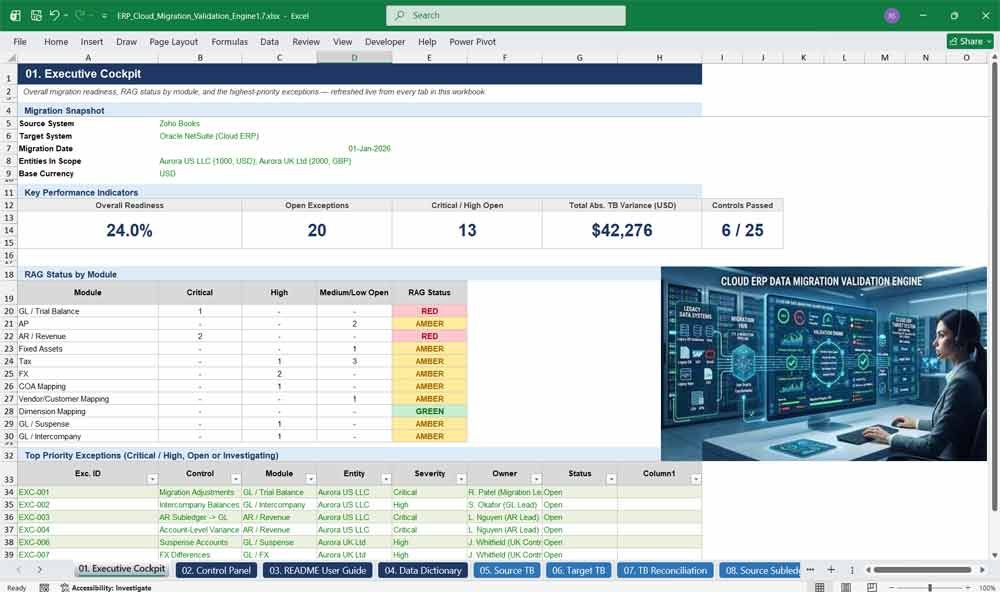
01. Executive Cockpit
The Executive Cockpit is your one-screen ERP migration readiness dashboard, giving CFOs and migration leads an instant, formula-driven view of overall readiness percentage, RAG status by module, and the highest-priority open exceptions — perfect for steering committee updates and go or no-go cutover decisions.
- Live readiness score pulled automatically from all 23 tabs
- Red / Amber / Green status by module — GL, AP, AR, Tax, FX, Mapping
- Top-priority exceptions surfaced automatically by severity
- Zero manual updates — every figure recalculates as source data changes
02. Control Panel
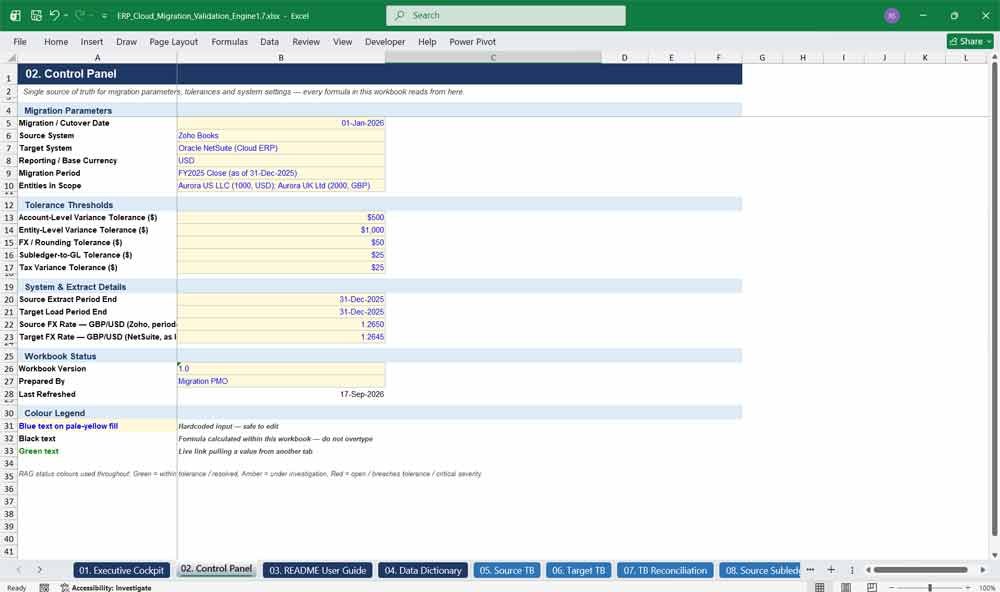
The Control Panel is the single source of truth for your migration: cutover date, source and target ERP systems, entities in scope, base currency, and every tolerance threshold. Change one input here and every reconciliation, control, and exception test across the workbook updates instantly.
- Centralised migration parameters and tolerance thresholds
- Drives every formula in the workbook from one place
- Built-in colour legend for inputs, formulas, and links
- Ideal for multi-entity, multi-currency ERP migrations
Cloud ERP Subledger Engine
03. README / User Guide
The README / User Guide walks new users through exactly how to operate the workbook step by step, from loading extracts and confirming mappings to reviewing reconciliations and running cutover — so any finance team member can pick it up and use it correctly from day one.
- Step-by-step operating instructions for every phase
- Full workbook map showing what each tab does
- Colour and status conventions explained clearly
- Reduces onboarding time for new team members
04. Data Dictionary
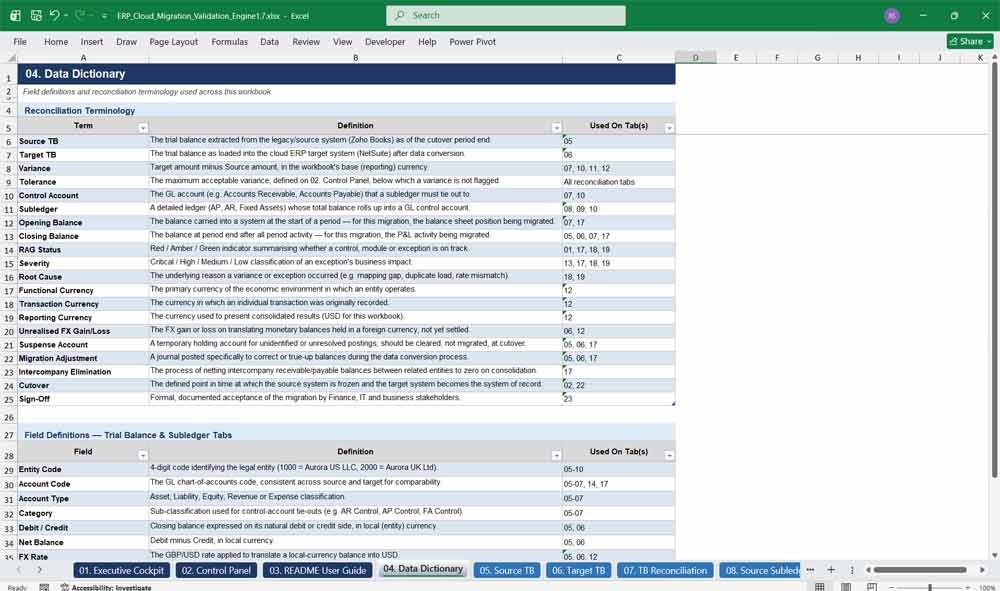
The Data Dictionary defines every reconciliation term, field, and abbreviation used across the workbook — from control accounts and tolerance to functional currency and suspense accounts — ensuring finance, IT, and audit stakeholders speak the same language throughout a complex ERP data migration.
- Plain-English definitions of migration and reconciliation terminology
- Field-level definitions for every trial balance and subledger column
- Cross-referenced to the tabs where each term is used
- Speeds up stakeholder alignment and audit review
05. Source TB
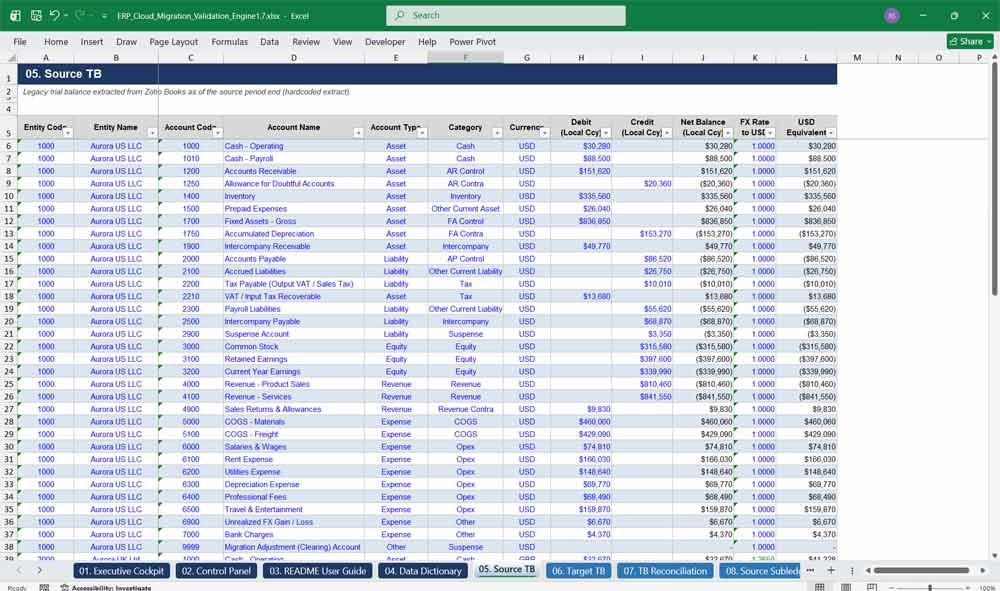
The Source TB tab holds your legacy system’s trial balance extract — Zoho Books, QuickBooks, or any ERP — in a clean, formula-ready format by entity and account, forming the baseline every target-system comparison and control in this workbook is measured against.
- Entity- and account-level trial balance structure
- Built-in debit / credit balance check
- Automatic local-currency to USD translation
- Pre-populated with a realistic demonstration dataset
06. Target TB
The Target TB tab captures your new cloud ERP’s post-load trial balance in the exact same structure as the source, enabling row-for-row and SUMIFS-based comparison so every migration variance, however small, is caught and documented long before go-live.
- Mirrors Source TB for direct, like-for-like comparison
- Automatic FX translation using target-system rates
- Built-in balance check confirms the target TB is in balance
- Flags migration adjustments and load errors instantly
07. TB Reconciliation
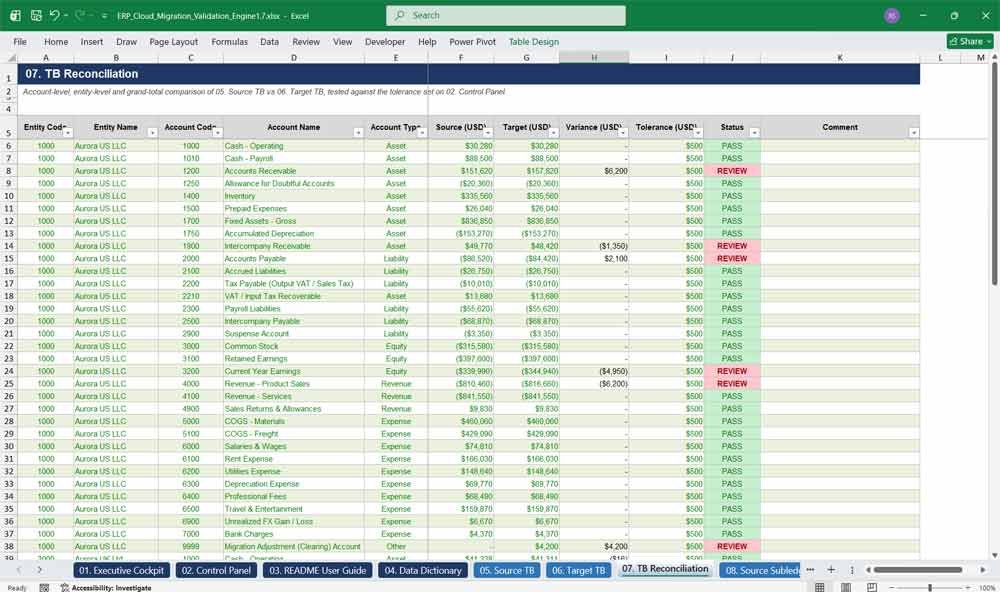
TB Reconciliation is the heart of the engine, comparing every account and entity between source and target trial balances against your tolerance threshold, with automatic PASS/REVIEW status, entity subtotals, and a grand-total variance — the definitive proof your migration actually balanced.
- Account-level and entity-level variance testing
- Automatic PASS / REVIEW status with colour-coded flags
- Grand total and entity subtotal variance rollups
- Directly feeds the 25-point integrity audit
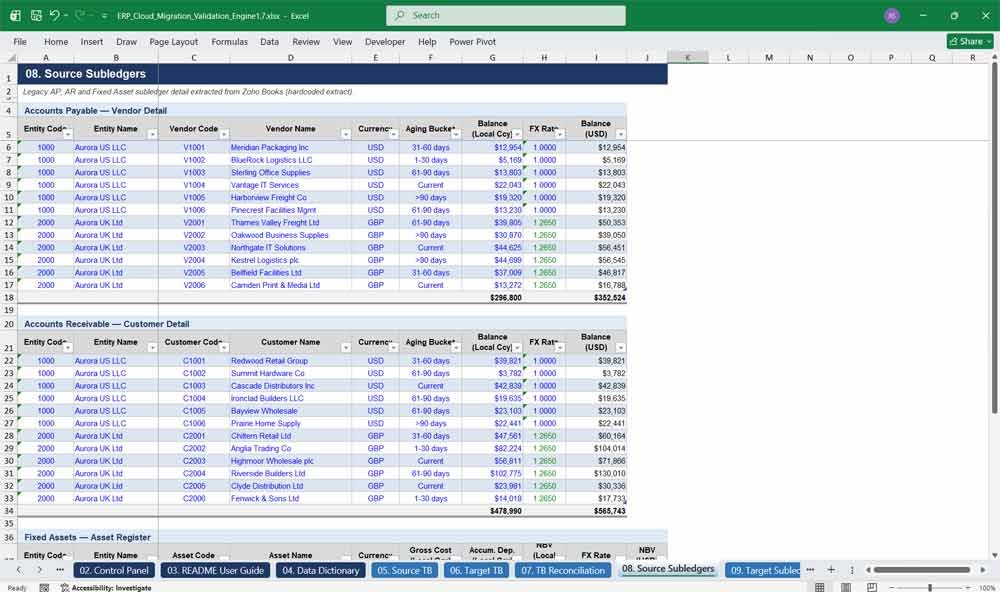
08. Source Subledgers
Source Subledgers captures your legacy AP, AR, and fixed asset detail — vendor and customer balances, ageing buckets, and asset registers — giving you the granular subledger data required to prove every control account ties out before you ever touch the target system.
- Full AP, AR, and fixed asset subledger detail
- Vendor and customer ageing bucket tracking
- Asset register with gross cost and accumulated depreciation
- Feeds subledger-to-GL control account reconciliation
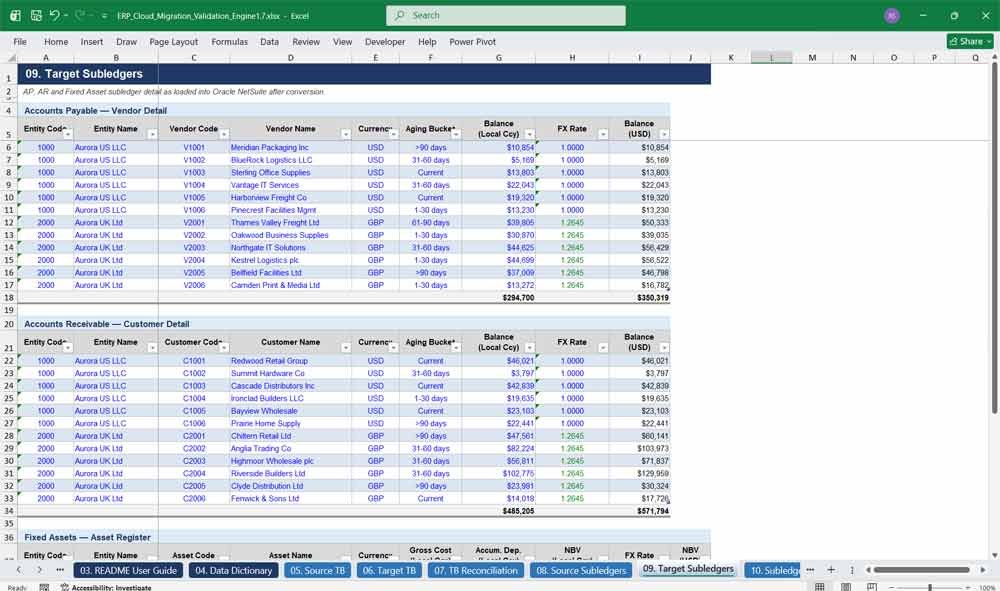
09. Target Subledgers
Target Subledgers mirrors your new ERP’s loaded AP, AR, and fixed asset detail, structured identically to the source tab so every vendor, customer, and asset balance can be validated post-load — critical for catching duplicate, missing, or misloaded subledger records early.
- Post-load AP, AR, and fixed asset detail
- Identical structure to Source Subledgers for easy comparison
- Surfaces duplicate or missing vendor and customer records
- Supports ageing bucket and net book value validation
10. Subledger Reconciliation
Subledger Reconciliation ties every AP, AR, and fixed asset subledger to its GL control account in both systems, then compares source to target — the exact control-account testing methodology auditors and ERP implementation partners rely on during cutover validation work.
- Subledger-to-GL control account tie-out, source and target
- Source-vs-target subledger variance testing
- Automatic tolerance-based PASS / REVIEW status
- Covers AP, AR, and Fixed Assets in one consolidated view
Cloud ERP Account Mapping & Audit Mechanics
11. Tax Validation
Tax Validation tests every transaction’s tax code mapping, rate, taxable amount, and inclusive-versus-exclusive treatment between source and target, automatically flagging missing tax codes and unexpected variances — essential for VAT, sales tax, and use tax compliance during any ERP migration.
- Transaction-level tax code and rate comparison
- Automatic missing tax code detection
- Inclusive vs. exclusive treatment mismatch flagging
- Covers input, output, sales, use, and VAT scenarios
12. Checks
The Checks tab validates transaction, functional, and reporting currency layers, exchange rate differences, FX conversion, unrealised FX, and rounding tolerance between source and target systems — catching the subtle multi-currency migration errors that standard trial balance checks alone will miss.
- Transaction, functional, and reporting currency validation
- Source-vs-target FX rate variance testing
- Unrealised FX and rounding tolerance checks
- Purpose-built for multi-entity, multi-currency migrations
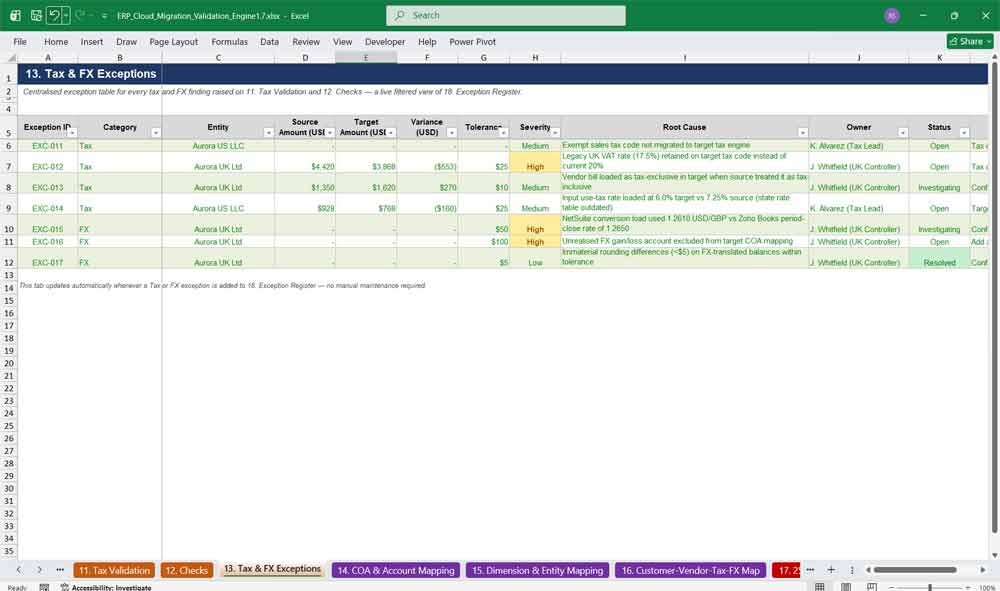
13. Tax & FX Exceptions
Tax & FX Exceptions is a centralised, live-linked table of every tax and currency finding raised elsewhere in the workbook, complete with severity, owner, status, and resolution — giving your tax and treasury teams a single place to manage their piece of the migration.
- Live filtered view of all tax and FX findings
- Severity, owner, and resolution tracking
- Auto-updates whenever new exceptions are logged
- Keeps tax and treasury workstreams organised and accountable
14. COA & Account Mapping
COA & Account Mapping is your chart-of-accounts crosswalk between legacy and target systems, tracking mapped, unmapped, and under-review accounts — the reference table that every account-level control in this workbook checks against before your migration goes live.
- Full source-to-target account crosswalk
- Automatic mapped / unmapped / review status flagging
- Live mapping completion percentage
- Prevents unmapped accounts from silently dropping balances
15. Dimension & Entity Mapping
Dimension & Entity Mapping crosswalks legal entities, departments, classes, and locations between your legacy and target ERP, flagging invalid or unmatched dimension codes before they corrupt reporting — a must-have for multi-entity, multi-subsidiary cloud ERP rollouts of any size.
- Entity and subsidiary mapping table
- Department, class, and location dimension crosswalks
- Invalid dimension code detection
- Supports multi-subsidiary NetSuite and SAP structures
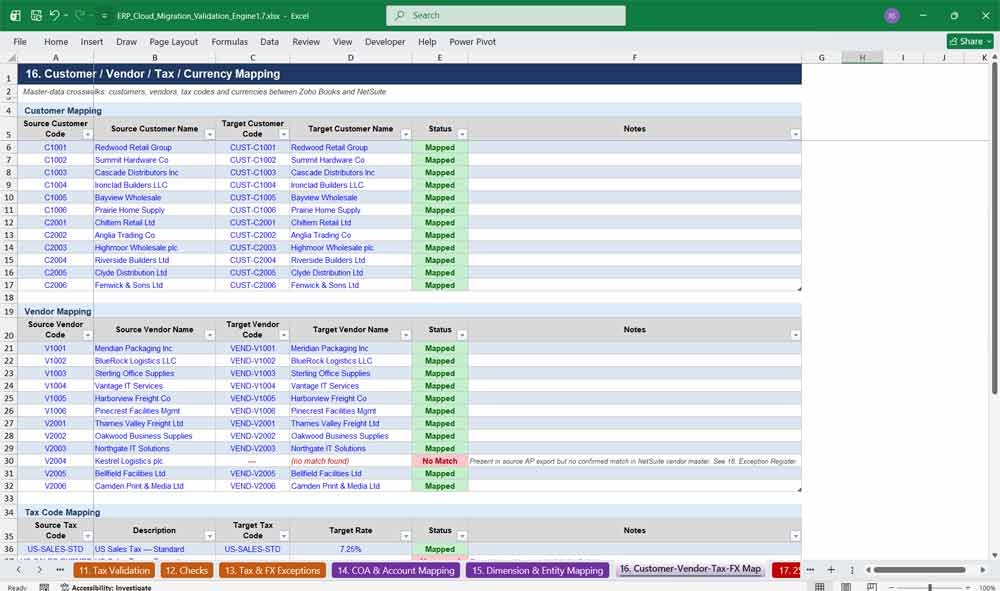
16. Customer / Vendor / Tax / Currency Mapping
This master-data mapping tab crosswalks every customer, vendor, tax code, and currency between source and target systems, catching unmatched vendors and deprecated tax codes before they break your AP, AR, or tax reporting processes after go-live.
- Full customer and vendor master-data crosswalk
- Tax code and currency mapping in one consolidated view
- No-match and deprecated-code flagging
- Protects AP / AR and tax processes post-migration
17. 25-Point Integrity Audit
The 25-Point Integrity Audit is the standout feature of this template: every control, from debit and credit balance to intercompany elimination, is made fully explicit with its own test logic, live result, and PASS/REVIEW status — never buried inside one giant, unreadable formula.
- 25 explicit, individually documented migration controls
- Live, formula-driven PASS / REVIEW result for each control
- Direct links to every related exception
- Big 4-style audit methodology, ready to use immediately
18. Exception Register
The Exception Register is the centralised issue log for the entire workbook — every variance, mismatch, and control failure lands here with severity, root cause, owner, status, and resolution, giving your migration team one place to manage every open item through to closure.
- Single centralised issue-management log
- Severity, root cause, owner, and status tracking
- Automatic ageing calculation for every open item
- Feeds the Cockpit, Analytics, and Sign-Off tabs live
19. Exception Analytics
Exception Analytics turns your exception register into instant management insight — open exceptions by severity, module, entity, owner, and ageing, plus total financial exposure — all computed live with COUNTIFS and SUMIFS, with absolutely no manual pivot tables required.
- Live breakdowns by severity, module, entity, and owner
- Ageing and status analysis for every open item
- Total financial value of open exceptions
- Zero manual pivoting — fully formula-driven throughout
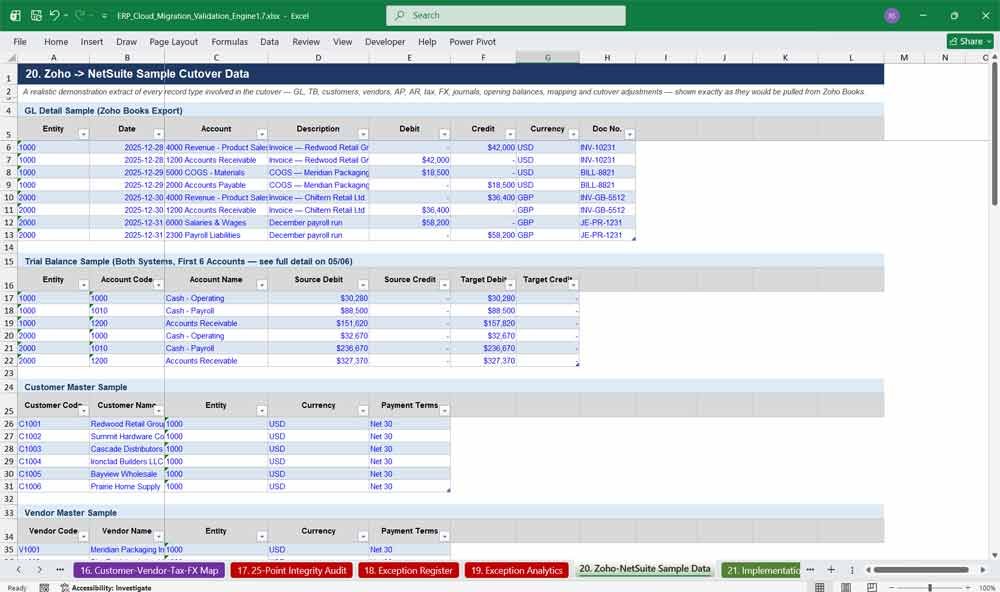
20. Zoho → NetSuite Sample Cutover Data
This tab delivers a realistic, ready-to-explore Zoho Books to NetSuite sample dataset — GL, TB, customers, vendors, AP, AR, tax, FX, journals, opening balances, mapping, and cutover adjustments — so you can see exactly how the workbook behaves before loading your own live data.
- Realistic sample data across every migration record type
- Demonstrates GL, AP, AR, tax, and FX extracts side by side
- Shows exactly what a raw ERP export should look like
- Perfect for team training and live demo purposes
Cloud ERP Validation Sign Off
21. Implementation Guide
The Implementation Guide lays out a proven, phase-by-phase ERP migration methodology — discovery, design, build, extraction, validation, cutover, and stabilisation — so migration leads follow a repeatable, best-practice process instead of improvising under deadline pressure.
- Seven-phase migration implementation methodology
- Clear deliverables and owners for every phase
- Built-in guiding principles for data migration best practice
- Suitable for internal teams and implementation partners alike
22. Cutover Runbook
The Cutover Runbook is the operational checklist your team follows on go-live weekend — Extract, Freeze, Transform, Load, Reconcile, Investigate, Approve, Cutover, Validate, Sign Off — complete with a live go/no-go gate pulled straight from your audit and exception data.
- Ten-step operational cutover sequence
- Owner and go/no-go criteria defined for every step
- Live-linked readiness gate before final cutover approval
- Battle-tested structure for high-pressure weekend go-lives
23. Sign-Off Template
The Sign-Off Template is your formal migration acceptance document — scope, variances, exceptions, and materiality thresholds pulled live from the workbook, plus signature blocks for management, finance, and IT — giving stakeholders documented, audit-ready proof the migration is complete.
- Live-linked migration results summary
- Automatic within-threshold YES / NO testing
- Formal approval blocks for management, finance, and IT
- Creates a defensible, audit-ready acceptance record
Cloud ERP Validation Frequently Asked Questions (Faq)
Q: What ERP systems does this template work with?
A: It’s built around a Zoho Books to NetSuite example, but the structure — trial balance, subledgers, tax, FX, mapping, and controls — works for any source-to-target combination, including QuickBooks, Sage, Xero, SAP S/4HANA, Microsoft Dynamics 365, Oracle Fusion, Acumatica, and Workday. Simply replace the sample entities, accounts, and figures with your own.
Q: Do I need advanced Excel skills to use this?
A: No. Every formula is already built using standard functions such as SUMIFS, COUNTIFS, and INDEX/MATCH. You only need to enter your own data into the clearly marked blue input cells — the reconciliations, controls, and dashboards update automatically.
Q: Is this a static template, or does it actually calculate?
A: It’s fully live. Every reconciliation, control, exception count, and dashboard KPI is a real Excel formula, not a hardcoded number. Change a balance on the Source or Target TB tab and the entire workbook recalculates within seconds.
Q: Can I use this for more than two entities or a different currency pair?
A: Yes. The sample file ships with two entities (USD and GBP) to demonstrate multi-currency logic, but every tab is built to be extended — simply copy the row pattern down for additional entities, accounts, vendors, or currencies.
Q: What version of Excel do I need?
A: The workbook was built and tested for Microsoft Excel 2016 and later, including Microsoft 365 and Excel for the web. It also opens cleanly in LibreOffice Calc and Google Sheets with full formula support.
Q: Is the sample data real company data?
A: No. Every entity, account balance, customer, vendor, and transaction is fictional and created purely to demonstrate how the workbook functions. Simply replace it with your own migration data before use.
Q: Who is this template designed for?
A: Financial controllers, ERP implementation consultants, internal and external auditors, data migration leads, CFOs, and finance transformation teams running or overseeing an ERP cloud migration project of any size.
Q: Does it cover tax and multi-currency FX validation, or just the trial balance?
A: Both, and more. Beyond trial balance and subledger reconciliation, it includes dedicated tax code validation, FX rate and currency layer checks, chart-of-accounts and dimension mapping, and a centralised exception register — a complete migration validation toolkit, not just a TB check.
Q: What exactly do I receive after purchase?
A: One Excel (.xlsx) workbook containing all 23 tabs, fully formatted, formula-linked, colour-coded, and pre-populated with a realistic sample dataset — ready to open and adapt immediately.
Q: Can I use this on multiple projects or for multiple clients?
A: Yes — once purchased, you can reuse the template on as many of your own entities, subsidiaries, or client migrations as you like under the standard single-purchaser licence. It is not for resale or redistribution as a template product.
Q: What if my migration only involves one entity, not two?
A: That’s completely fine — simply delete or ignore the second entity’s rows. The formulas are written with SUMIFS and COUNTIFS, so the workbook functions correctly whether you have one entity, five entities, or fifty.
Further Reading
Merger & Acquisitions Model: Download a professional M&A financial model. Dynamic valuation, accretion/dilution analysis, synergies, and debt schedules.
- LBO Model: Ready to master corporate finance? Download our proven, step-by-step LBO financial model template to analyze leveraged buyouts, project debt paydown, and forecast returns like a seasoned private equity professional.
- Globe Pillar Model: Navigating the complexities of the OECD’s new international tax framework requires robust, reliable analytical tools. Our comprehensive GloBE Pillar Two Global Minimum Tax Model in Excel simplifies this process by automating effective tax rate (ETR) calculations.