
AI Factory Financial Model Template
This AI Gigafactory Financial Model is a complete Excel project finance model for building, financing and operating a large-scale AI data centre campus. It is built for developers, investors, lenders and consultants evaluating GPU cloud and AI compute infrastructure. The model covers a 3-year monthly construction period followed by 20 years of operations, with full three-statement financials, debt sizing, equity returns and DCF valuation. Every number flows from clearly marked inputs, so you can turn a concept into a bankable investment case in hours rather than weeks.
Financial Model for an AI Factory
At the core of this AI gigafactory financial model is a building-by-building campus phasing engine. It maps construction milestones, grid energisation, GPU deliveries and commercial operation dates onto one master timeline. From there the model calculates power scaling and cooling demand, PUE, GPU Clusters, GPU fleet size, Compute Capacity, available and billable GPU hours, utilisation ramp-up, reserved and on-demand revenue, operating costs and hardware refresh cycles. This gives you a realistic, granular view of how an AI gigafactory earns revenue as each building comes online.
The model is fully formula-driven and lender-ready. Change the model start date and every period, milestone and label re-dates automatically. Switch between Base, Downside and Upside scenarios with a single selector, and review project IRR, equity IRR, DSCR, LLCR, NPV and enterprise value on the Dashboard. Colour-coded inputs, built-in integrity checks and a balancing balance sheet make this GPU cloud financial model a trusted starting point for investment committees, bank credit papers and fundraising.
Model Tabs
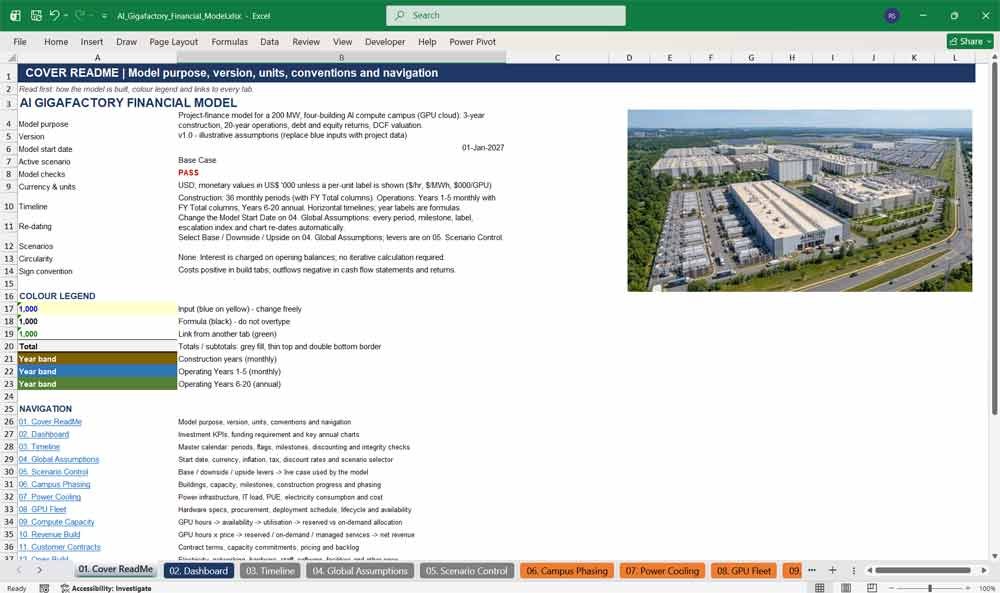
01. Cover ReadMe
The Cover ReadMe tab introduces the AI gigafactory financial model, explaining its purpose, version, currency, units and modelling conventions. It includes a colour legend for inputs, formulas and links, an explanation of the timeline structure, and clickable navigation to every tab, so new users can understand and use the model immediately.
- Model purpose, version, units and conventions
- Colour legend for inputs, formulas and links
- Clickable navigation to all 29 tabs
- Live model check status
02. Dashboard
The Dashboard tab summarises the investment case for your AI data centre on one page. It shows headline KPIs, funding requirement, gearing, stabilised revenue and EBITDA, project and equity IRR, NPV, enterprise value and debt coverage ratios, plus an annual summary and charts that update instantly with every scenario.
- Investment KPIs for the selected scenario
- Funding requirement and gearing
- Project IRR, equity IRR, NPV and EV
- Annual charts: revenue, EBITDA, capex, debt, DSCR, utilisation
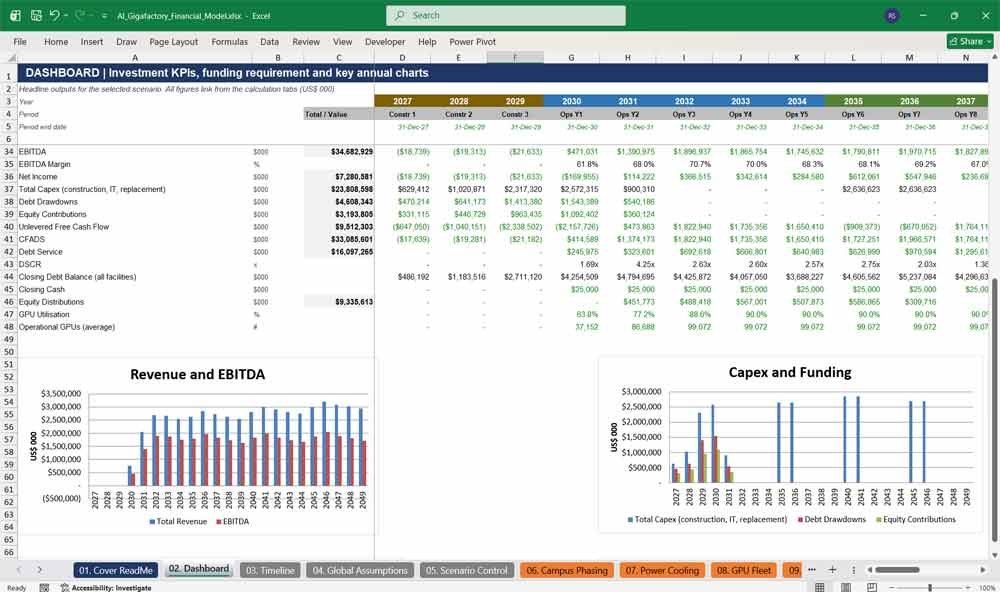
AI Factory Revenue & Expenses
03. Timeline
The Timeline tab is the master calendar for the whole financial model. It creates one continuous set of monthly and annual periods covering construction, commissioning and operations, with period flags, fiscal years, discount factors, milestone dates and timeline integrity checks. Every other tab links to this single, formula-driven calendar.
- 36 monthly construction periods, Years 1–5 monthly, Years 6–20 annual
- Construction, commissioning, operating and debt flags
- Milestone, financing, tax and valuation timelines
- Discount factors and timeline integrity checks
04. Global Assumptions
The Global Assumptions tab holds the model’s master inputs. Set the model start date, currency, units, inflation and escalation rates, tax rates, WACC, cost of equity, terminal growth and minimum cash. It also contains the scenario selector, so one cell switches the entire model between Base, Downside and Upside cases.
- Model start date drives every date in the model
- Inflation, escalation and tax assumptions
- WACC, cost of equity and terminal growth
- One-click scenario selector
05. Scenario Control
The Scenario Control tab manages Base, Downside and Upside cases for the AI gigafactory. Key levers include GPU utilisation, GPU hour pricing, ramp-up period, electricity price, PUE, GPU capex, construction overrun, delay, interest rates and exit multiple. A live column feeds the selected case into every calculation across the model.
- Base, Downside and Upside levers side by side
- Revenue, cost, capex, financing and exit levers
- Live case column used throughout the model
- Scenario probabilities for weighted outcomes
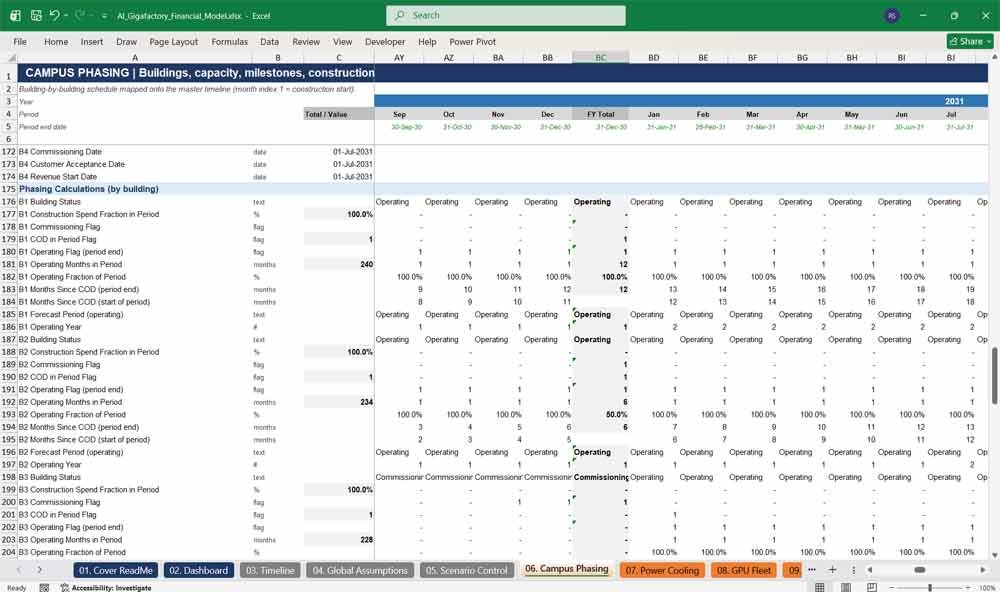
06. Campus Phasing
The Campus Phasing tab maps each AI data centre building onto the master timeline. It sets construction start, duration, energisation, testing and commercial operation dates, and calculates building capacity, rack counts, GPU counts, construction progress and project costs by building and phase, creating a realistic staggered ramp-up.
- Building-by-building schedule and COD dates
- IT and facility capacity in MW, racks and GPUs
- Monthly construction progress and spend fractions
- Phase-level capex, revenue start and utilisation
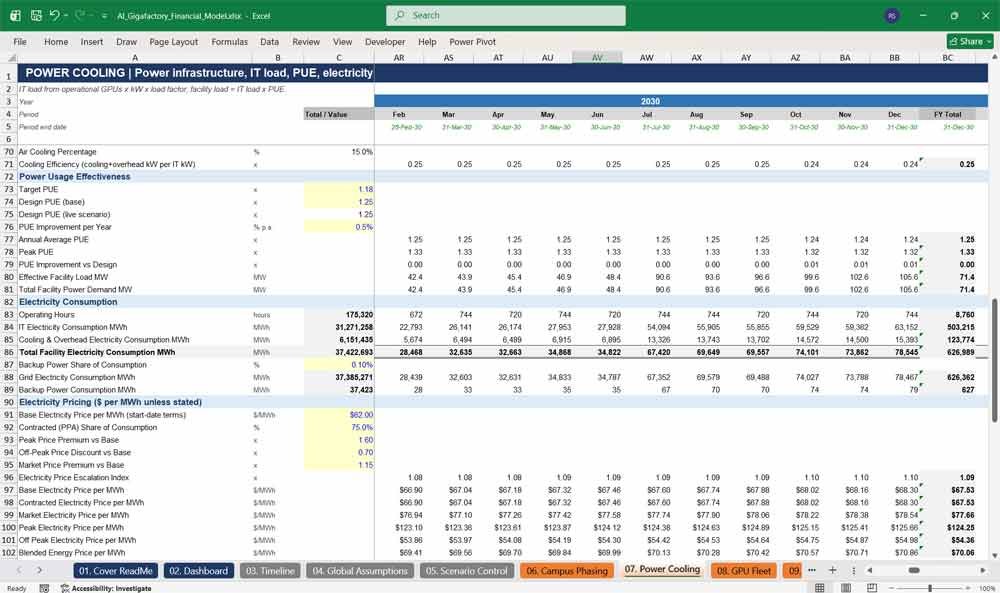
07. Power Cooling
The Power Cooling tab models electrical and cooling infrastructure for a high-density AI campus. It calculates installed and operational IT load, PUE, cooling capacity and electricity consumption in MWh, then prices power using PPA and market rates, demand charges, network charges, taxes and renewable premiums to deliver a detailed electricity cost forecast.
- Grid, transformer, generator and UPS capacity
- IT load, PUE and cooling utilisation
- Electricity consumption and blended power price
- Total electricity cost per MWh and per GPU hour
08. GPU Fleet
The GPU Fleet tab defines the hardware that powers the AI gigafactory. It covers GPU Clusters & specifications, rack power density, power-limited GPU counts per building, procurement costs per GPU, purchase order and delivery dates, useful life, residual value and availability assumptions, giving a complete view of GPU deployment and lifecycle.
- GPU, server and rack specifications
- Power-limited GPU count by building
- Landed cost per GPU and procurement timing
- Useful life, refresh year and residual value
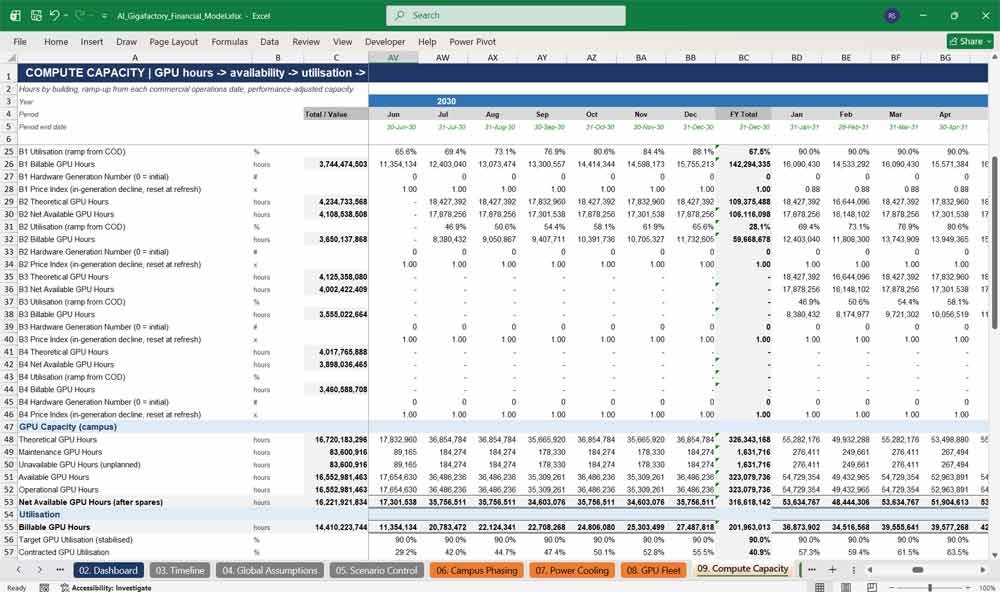
09. Compute Capacity
The Compute Capacity tab converts installed GPUs into sellable compute. It calculates theoretical, available and billable GPU hours by building, applies utilisation ramp-up from each commercial operations date, splits capacity into reserved, on-demand, spot and managed compute, and tests power, cooling and network constraints.
- Theoretical, available and billable GPU hours
- Utilisation ramp-up by building
- Reserved, on-demand, spot and managed allocation
- Capacity constraint and bottleneck checks
10. Revenue Build
The Revenue Build tab forecasts revenue for the GPU cloud business. It prices reserved capacity, take-or-pay, on-demand and spot GPU hours, adds managed services such as inference, training, model hosting and storage, then deducts discounts, credits, rebates and bad debt to arrive at net revenue and key revenue metrics.
- Reserved, on-demand and spot GPU revenue
- Managed services and AI service revenue streams
- Pricing decline within GPU generations
- Revenue per GPU, per GPU hour and per MW
11. Customer Contracts
The Customer Contracts tab models anchor customer agreements for the AI data centre. It captures contract timing, capacity commitments, pricing terms, escalation, minimum revenue commitments, payment terms, deposits and contract risks, then calculates contracted backlog, weighted average contract term, customer concentration and revenue under contract.
- Three illustrative anchor contracts
- Capacity commitments and take-or-pay terms
- Price escalation and renewal assumptions
- Backlog, concentration and contract risk metrics
AI Factory Financial Statements
12. Opex Build
The Opex Build tab forecasts every operating cost of the AI gigafactory. It covers electricity, networking, hardware maintenance, GPU repairs, staffing by function, software licences, facilities maintenance, insurance, property taxes and corporate overheads, each escalating with its own inflation index, plus unit cost metrics per GPU, GPU hour and MW.
- Electricity, networking and hardware operations
- Headcount and fully loaded staff costs
- Software, facilities, insurance and property tax
- Opex per GPU, per GPU hour and per MW
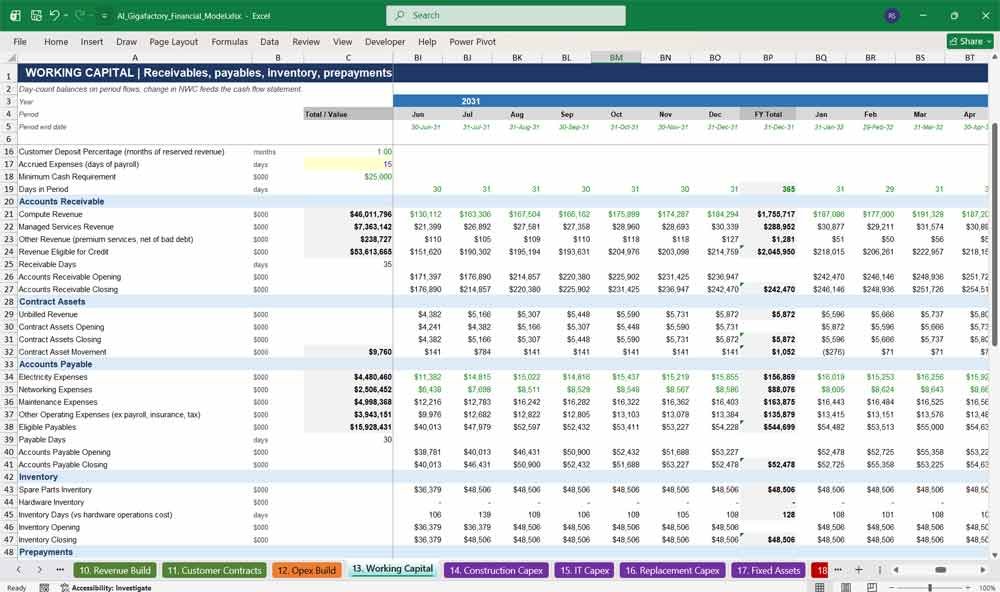
13. Working Capital
The Working Capital tab calculates the cash tied up in daily operations. It models receivables, unbilled revenue, payables, spare parts inventory, prepayments, power deposits, accrued expenses, customer deposits and deferred revenue, producing net working capital and the change in working capital that feeds the cash flow statement.
- Receivable and payable day assumptions
- Inventory, prepayments and power deposits
- Customer deposits and deferred revenue
- Change in net working capital
14. Construction Capex
The Construction Capex tab builds the data centre construction budget from detailed cost lines. It covers land and development, civil works, electrical and grid infrastructure, cooling systems, building systems and external infrastructure, with cost per MW, escalation, contingency and overrun allowances, and a monthly spend profile for each building.
- Detailed cost per MW by category
- Land, development and external infrastructure
- Escalation, contingency and overrun allowances
- Monthly construction spend by category
15. IT Capex
The IT Capex tab calculates the investment in GPUs and supporting IT hardware. It covers GPU, server, networking, storage, rack and deployment costs per GPU, cost factors by fleet, procurement timing with deposits and delivery payments, and summary metrics such as total IT capex, IT capex per GPU and per MW.
- GPU, server, network and storage costs
- Rack, integration and deployment costs
- Deposit and delivery payment timing
- IT capex per GPU and per MW
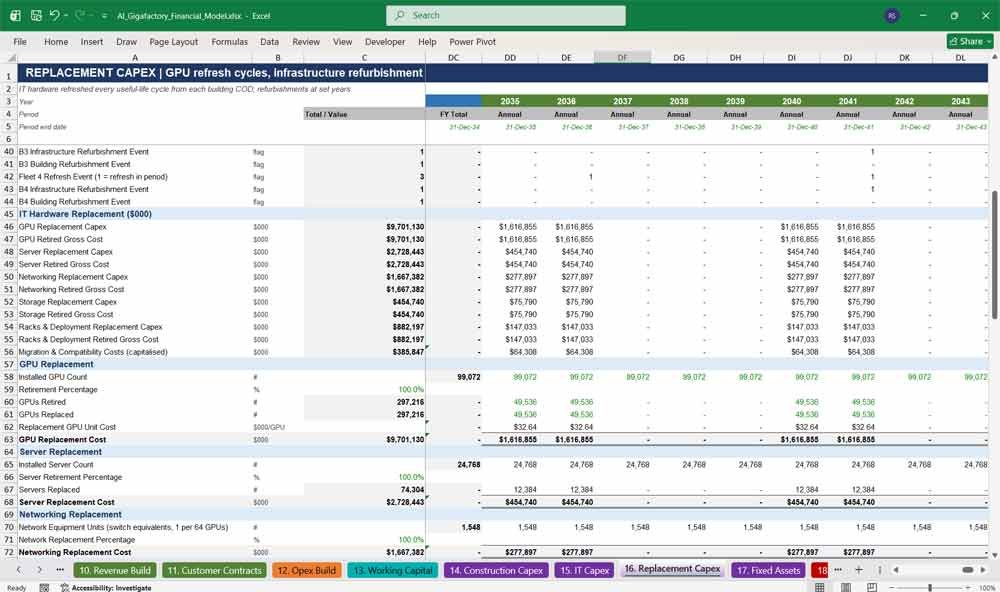
16. Replacement Capex
The Replacement Capex tab models the GPU refresh cycle that defines AI infrastructure economics. It schedules hardware refreshes from each building’s commercial operations date, adds infrastructure refurbishments, models technology transition costs, and runs a replacement reserve account that pre-funds future refreshes from operating cash.
- GPU, server, network and storage refresh cycles
- Cooling, electrical, UPS and building refurbishments
- Technology transition and migration costs
- Replacement reserve account
17. Fixed Assets
The Fixed Assets tab tracks every asset class from construction to retirement. It moves costs from work in progress into service at each building’s commercial operations date, calculates straight-line depreciation by asset class, records refresh retirements, disposal proceeds and gains or losses, and produces a full net book value roll-forward.
- Asset register by class
- CWIP transfers at commercial operations
- Straight-line depreciation by asset class
- Disposals and net book value roll-forward
18. Construction Drawdown
The Construction Drawdown tab funds the project month by month during construction. It calculates eligible project spend, debt availability, loan-to-cost drawdowns, equity injections, interest and commitment fees during construction, capitalised interest, cost to complete and completion tests, ensuring every dollar of construction spend is funded.
- Monthly eligible project spend
- Debt drawdowns at loan-to-cost
- Equity funding and shortfall checks
- Interest during construction and capitalised fees
19. Sources Uses
The Sources Uses tab presents the full funding picture for the AI gigafactory. It lists project uses, including land, construction, GPUs, IT equipment, financing fees and interest during construction, against equity, debt and other funding sources, with a funding reconciliation and check that sources exactly equal uses.
- Total project uses by category
- Equity, debt and other funding sources
- Funding timing and gearing
- Sources and uses balance check
20. Debt Schedule
The Debt Schedule tab models senior construction-to-term debt and equipment financing for GPU refreshes. It covers facility terms, pricing, drawdowns, interest, commitment fees, grace periods, straight-line amortisation, cash sweep, DSCR and LLCR covenants, and a debt service reserve account sized on upcoming debt service.
- Senior construction-to-term loan
- Equipment financing for GPU refreshes
- DSCR, LLCR and loan-to-value covenants
- Debt service reserve account
21. Equity Returns
The Equity Returns tab runs the cash flow waterfall from CFADS to equity distributions. It applies debt service, reserve funding, minimum cash and distribution lock-up tests, tracks preferred return and return of capital, allocates cash between investors and calculates equity multiple, IRR, cash yield and payback.
- Full cash flow waterfall
- Distribution lock-up and minimum cash tests
- Preferred return and return of capital tracking
- Investor allocation and equity metrics
22. Tax Schedule
The Tax Schedule tab calculates corporate tax for the AI data centre business. It starts from accounting profit, applies tax adjustments and an interest deductibility limit with carry-forward, uses tax losses within utilisation limits, and calculates cash tax, effective tax rate, deferred tax and property tax incentive periods.
- Accounting profit to taxable income
- Interest deductibility limit with carry-forward
- Tax loss carry-forward and utilisation
- Cash tax and effective tax rate
23. Income Statement
The Income Statement tab presents the profit and loss of the AI gigafactory. It shows revenue by stream, direct operating costs, gross profit, operating expenses, EBITDA, depreciation by asset class, EBIT, finance costs, profit before tax, tax and net income, with margins calculated for every period.
- Revenue by stream, net of adjustments
- Gross profit, EBITDA and EBIT margins
- Depreciation by asset class
- Finance costs, tax and net income
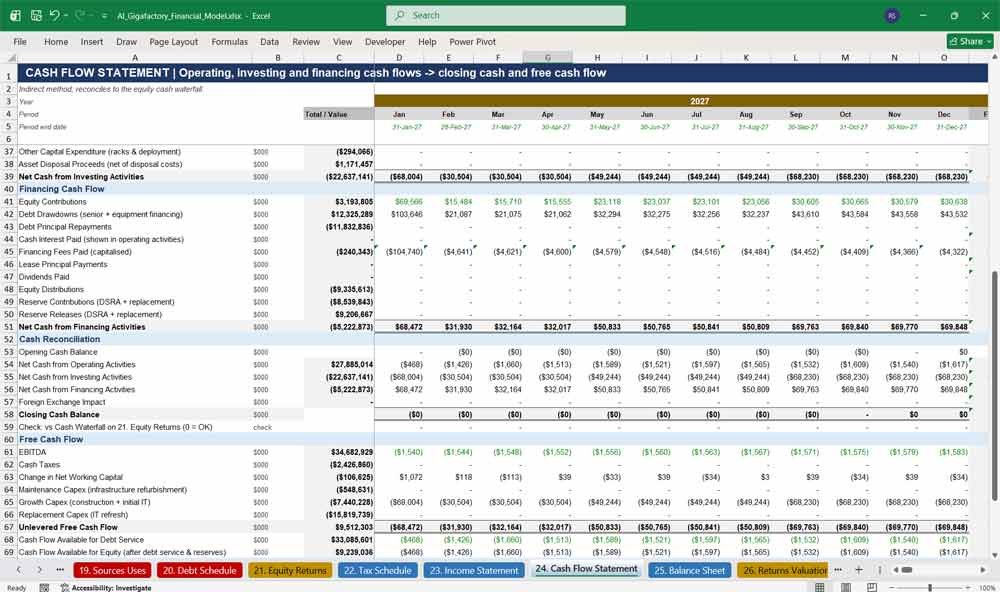
24. Cash Flow Statement
The Cash Flow Statement tab uses the indirect method to show operating, investing and financing cash flows. It reconciles to the equity cash waterfall, calculates unlevered free cash flow, CFADS and cash available for equity, and summarises liquidity including restricted cash, undrawn debt and undrawn equity.
- Operating, investing and financing cash flows
- Reconciliation to the cash waterfall
- Unlevered free cash flow and CFADS
- Liquidity headroom
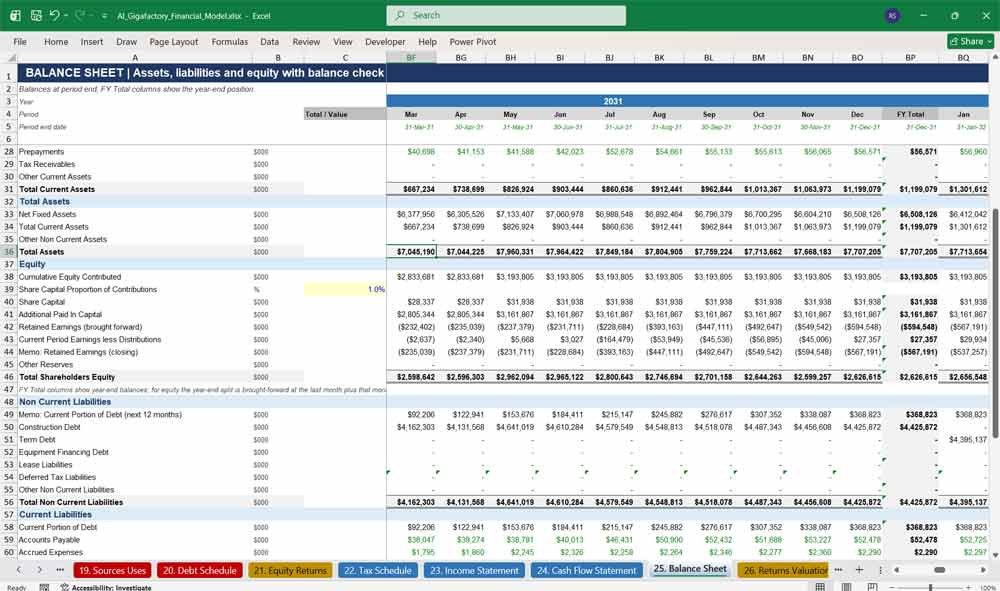
25. Balance Sheet
The Balance Sheet tab shows assets, liabilities and equity at every period end. It includes fixed assets by class, work in progress, cash, restricted reserves, working capital balances, senior and equipment debt, and shareholders’ equity, with a balance sheet check that confirms the model balances in every period and scenario.
- Fixed assets by class and CWIP
- Cash, reserves and working capital
- Senior and equipment financing debt
- Balance sheet check in every period
Key Financial Metrics For An AI Factory
26. Returns Valuation
The Returns Valuation tab measures investment performance on an annual basis. It builds project and equity cash flows, calculates project IRR, equity IRR, NPV, payback and cash yield, values the exit using an EBITDA multiple, and calculates the loan life coverage ratio at the start of repayment.
- Project and equity cash flows
- Project IRR, equity IRR and NPV
- Exit valuation on an EBITDA multiple
- LLCR and payback periods
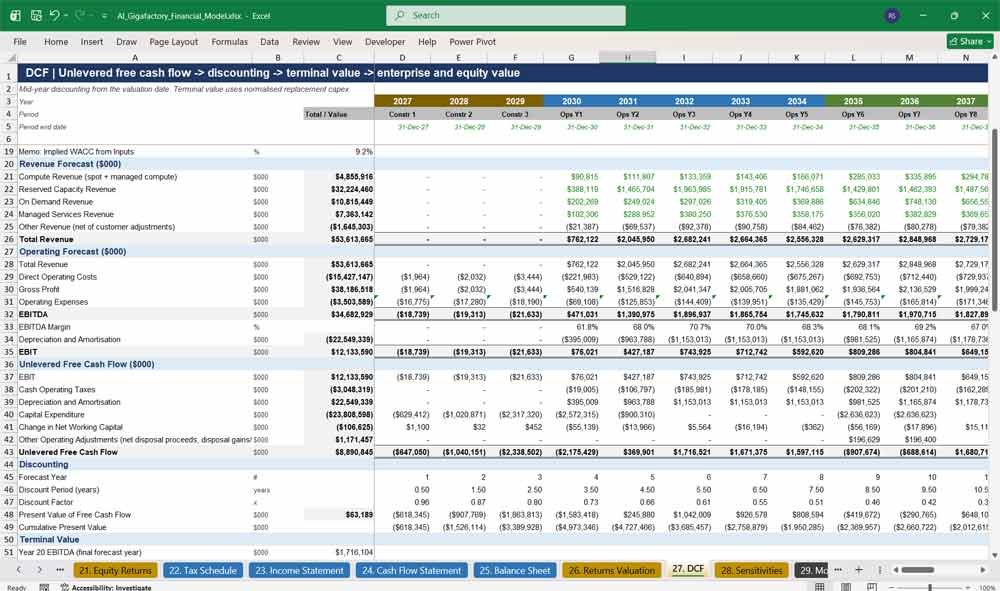
27. DCF
The DCF tab values the AI gigafactory using discounted unlevered free cash flow. It forecasts revenue, EBITDA and free cash flow, applies mid-year discounting at WACC, calculates a Gordon growth terminal value with normalised hardware capex, and bridges enterprise value to equity value with a WACC and growth sensitivity table.
- Unlevered free cash flow forecast
- Mid-year discounting at WACC
- Terminal value with normalised refresh capex
- EV sensitivity to WACC and terminal growth
28. Sensitivities
The Sensitivities tab stress-tests the AI data centre investment case. It includes revenue, power, capex, financing and returns sensitivities, six live two-variable tables, downside and upside lever comparisons, and a scenario summary of IRR, enterprise value, funding requirement and DSCR across Base, Downside and Upside cases.
- Six live two-variable sensitivity tables
- Utilisation, pricing, power and capex stress tests
- Downside and upside lever comparison
- Scenario summary with probability weighting
29. Model Checks
The Model Checks tab gives confidence that the financial model is working correctly. It tests the balance sheet, cash balances, cash flow reconciliation, debt repayment, funding, capacity limits, revenue and opex reconciliation, fixed assets, CWIP and timeline integrity, and returns a single PASS or REVIEW model status.
- Period-by-period integrity checks
- Balance sheet, cash and funding checks
- Revenue, opex and fixed asset reconciliations
- Single PASS / REVIEW model status
Why Buy This Model
Building an AI gigafactory financial model from scratch can take weeks of specialist work, and a single error can undermine an investment case. This model gives you a professional, fully integrated Excel framework designed specifically for AI data centres and GPU cloud businesses, covering what generic data centre models miss: GPU fleet sizing, utilisation ramp-up, GPU hour pricing, hardware refresh cycles and equipment financing. It is formula-driven, re-dates automatically, includes Base, Downside and Upside scenarios, and is checked from end to end, so you can focus on your assumptions and your deal rather than on spreadsheet mechanics. Whether you are raising capital, preparing a credit paper or testing a new campus, it gives you a credible, lender-ready model from day one.
AI Factory Frequently Asked Questions (Faq)
Who is this AI Gigafactory Financial Model for?
It is designed for AI data centre developers, infrastructure investors, private equity, lenders, consultants and corporate finance teams who need to evaluate the construction, financing and operation of a GPU cloud or AI compute campus.
Can I use my own project assumptions?
Yes. All inputs are clearly marked in blue on yellow. The model ships with illustrative assumptions, and you can replace them with your own capacity, capex, GPU, pricing, power, financing and tax inputs.
What happens if my construction start date changes?
Simply change the Model Start Date on the Global Assumptions tab. Every period, milestone, label, escalation index and chart across the model updates automatically.
What time periods does the model cover?
It covers 3 years of monthly construction, then 20 years of operations. Operating Years 1–5 are monthly with annual totals, and Years 6–20 are annual.
Can I change the number of buildings or MW capacity?
Yes. Building IT capacity, construction timing and commercial operation dates are inputs on the Campus Phasing tab, and GPU counts, power, costs and revenue recalculate automatically.
Does the model handle GPU refresh cycles?
Yes. Hardware is refreshed on a configurable useful life from each building’s commercial operations date. Refreshes are funded by a combination of equipment financing and a replacement reserve, and old hardware is retired with resale proceeds.
Which revenue streams are included?
Reserved capacity (take-or-pay), on-demand, spot and managed compute, plus managed services such as cluster management, model hosting, inference, training, storage, networking and software services.
Is the model suitable for presenting to banks and investors?
Yes. It follows lender-style formatting with colour-coded inputs, formulas and links, a full three-statement model, debt covenants (DSCR, LLCR, LTV), a debt service reserve, sources and uses, and a model checks tab confirming the balance sheet balances.
Can I run different scenarios?
Yes. A single selector switches between Base, Downside and Upside cases. The Sensitivities tab also includes six live two-variable tables, so you can test utilisation, pricing, power cost, capex, delays, WACC and debt terms instantly.
Does the model contain macros or circular references?
No. The model uses standard Excel formulas only, with no macros and no circular references, so it is transparent, stable and easy to audit.
What valuation methods are included?
The model calculates project and equity IRR, NPV, payback and an EBITDA-multiple exit valuation, plus a full DCF with terminal value and an enterprise value to equity value bridge.
Which version of Excel do I need?
A recent version of Microsoft Excel (Excel 2019, 2021 or Microsoft 365) is recommended.
Final Notes on the Financial Model
This 20 Year AI Factory Financial Model focuses on balancing capital expenditures with steady revenue growth from reliable revenue services. By optimizing operational costs, and power efficiency, and maximizing high-margin services like ingot sales, this model ensures sustainable profitability and cash flow stability.
Further Reading
Data Center Construction Model: Looking for a model that’s more dedicated to the construction finances, it spans a 5-year (60-month) construction phase followed by a 15-year (180-month) operating phase.
- Data Center 15 Year Model: This advanced template models multi-phase expansions, shifting energy markets, and long-term depreciation schedules.