
Construction Plant Hire Financial Model Template
This Construction Plant Hire Financial Model Template is a professional Excel financial model built for equipment rental companies, plant hire businesses and the lenders, investors and advisors who work with them. It forecasts five years on a monthly basis (60 months plus annual roll-up columns) in USD. It links fleet utilisation, hire rates and fleet investment directly to a fully integrated income statement, balance sheet and cash flow statement. Whether you run excavators, powered access, telehandlers, compaction equipment, site dumpers or generators and lighting towers, this plant hire business plan template turns your operational assumptions into bank-ready financial projections.
Financial Model for a Construction Plant Hire Company
At the heart of the model is a detailed fleet register and roll-forward. It tracks every asset batch from purchase to disposal, including capitalised cost, depreciation, net book value, residual value, replacement timing and compliance status. Fleet units flow into a utilisation and hire rate engine that models available hire days, planned maintenance, downtime, seasonality and rate escalation. That engine then builds revenue line by line, from equipment hire through delivery, collection, fuel surcharge, damage waiver and ancillary income. Fleet operating costs, staff, overheads, capital expenditure, hire purchase finance, IFRS 16 leases, working capital and corporation tax are all modelled in dedicated schedules.
The model is designed to the standards lenders and investors expect. Inputs, calculations and links are colour-coded, and each tab has a summary title band. A single start date re-dates the entire workbook automatically. Built-in Base, Downside and Upside scenarios, break-even and sensitivity analysis, covenant testing and a 17-point model checks tab let you stress-test your equipment rental business with confidence. Use it to raise finance, plan fleet investment, value a plant hire company or prepare an annual budget.
What’s Inside: Tab-by-Tab Guide
01. Cover & Control
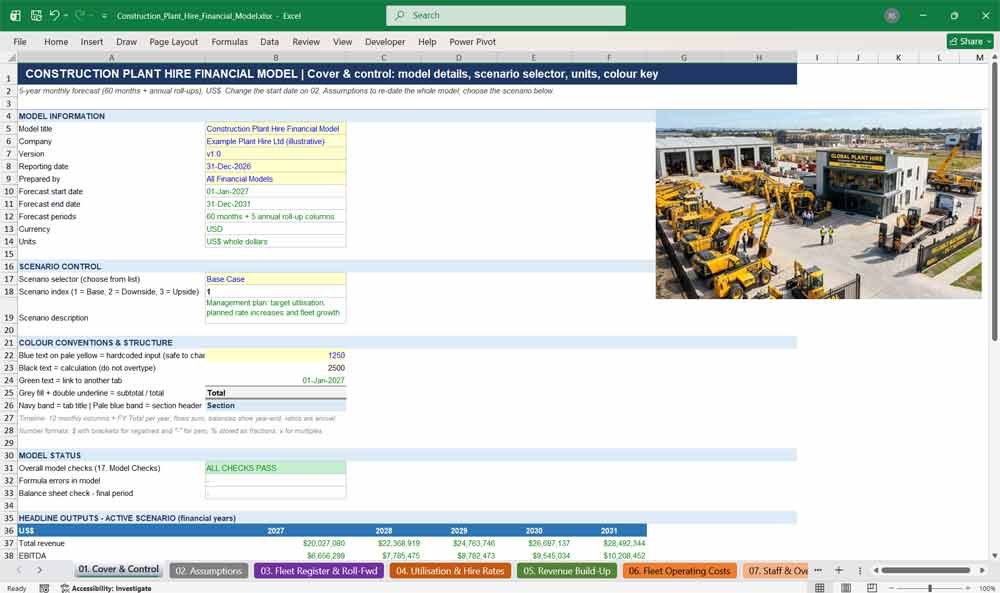
The Cover & Control tab is the command centre of this plant hire financial model. Choose Base, Downside or Upside scenarios from a dropdown, set the reporting date, view five-year headline results and confirm model integrity at a glance with a live status check.
- Scenario selector dropdown driving the whole model
- Model title, version, reporting date, currency and units
- Colour-coding legend for inputs, calculations and links
- Live model status and balance sheet check
- Five-year headline outputs: revenue, EBITDA, cash, net debt, fleet and utilisation
- Hyperlinked tab index
02. Assumptions
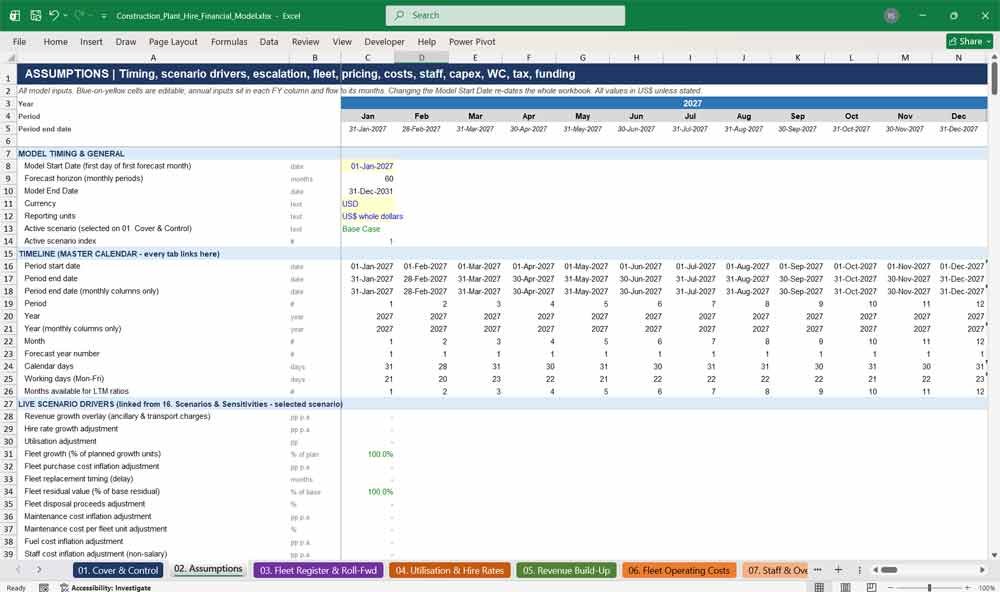
Every driver of your equipment rental forecast lives on one clearly organised Assumptions tab. Set inflation, hire rate increases, utilisation targets, maintenance costs, salaries, tax, interest rates, working capital and funding. Change the start date once and every date updates.
- Single Model Start Date re-dates the entire workbook
- Six configurable equipment categories with rates, costs, lives and residuals
- Annual inflation, hire rate, salary, fuel and maintenance escalation indices
- Monthly seasonality profile for utilisation
- Staffing plan, overheads, other capex, working capital and tax inputs
- Term loan, hire purchase, RCF, lease and covenant inputs
- Opening balance sheet with automatic balancing check
- Annual budget inputs for variance analysis
Construction Plant Hire Revenues & Costs
03. Fleet Register & Roll-Forward
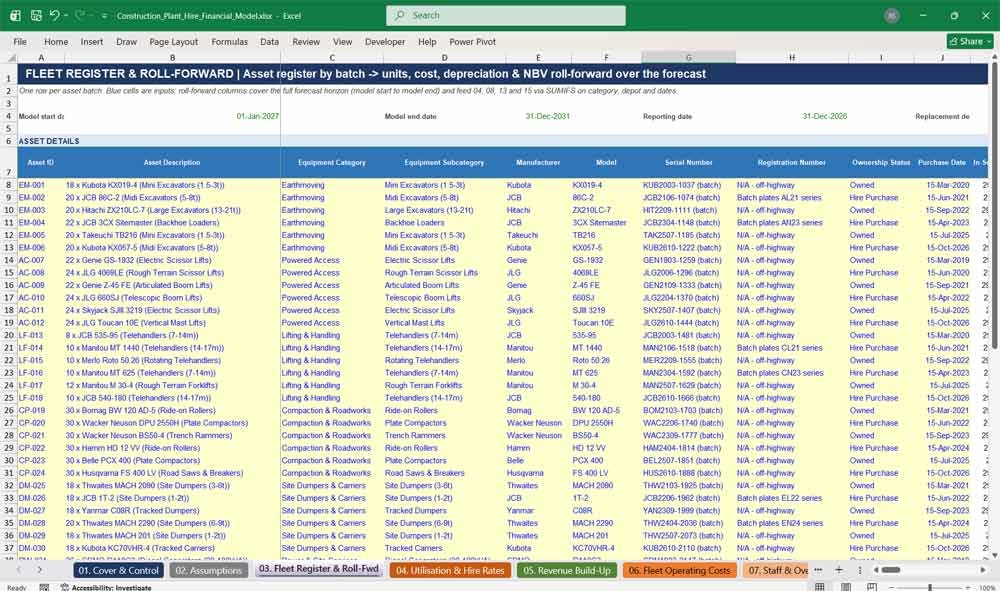
A complete plant and equipment asset register with all 54 fields fleet managers and auditors need. It tracks each batch’s purchase cost, depreciation, net book value, residual value, disposal date, replacement priority, finance references, insurance, warranty and inspection compliance across the full forecast.
- Asset ID, category, manufacturer, model, serial and registration details
- Ownership status, depot, location, operating division and hire availability
- Unit, cost, depreciation and net book value roll-forward
- Residual values, disposal dates, remaining life and fleet age
- Replacement priority, replacement year and replacement cost estimate
- Inspection due dates with automatic compliance status (including LOLER)
- Committed future fleet orders included
04. Utilisation & Hire Rates
This tab converts fleet size into revenue-earning capacity. It models opening, new, disposed and closing units by category. It then works out available hire days after planned maintenance and downtime, time and financial utilisation, and daily, weekly, monthly, short-term and long-term hire rates.
- Fleet unit roll-forward for each equipment category
- Scheduled operating days, maintenance and unplanned downtime
- Time, physical and financial utilisation percentages
- List, net and realised daily hire rates with annual escalation
- Weekly and monthly rate equivalents and seasonal adjustments
- Fleet ownership split and average fleet age
- Rate and utilisation variance against budget
05. Revenue Build-Up
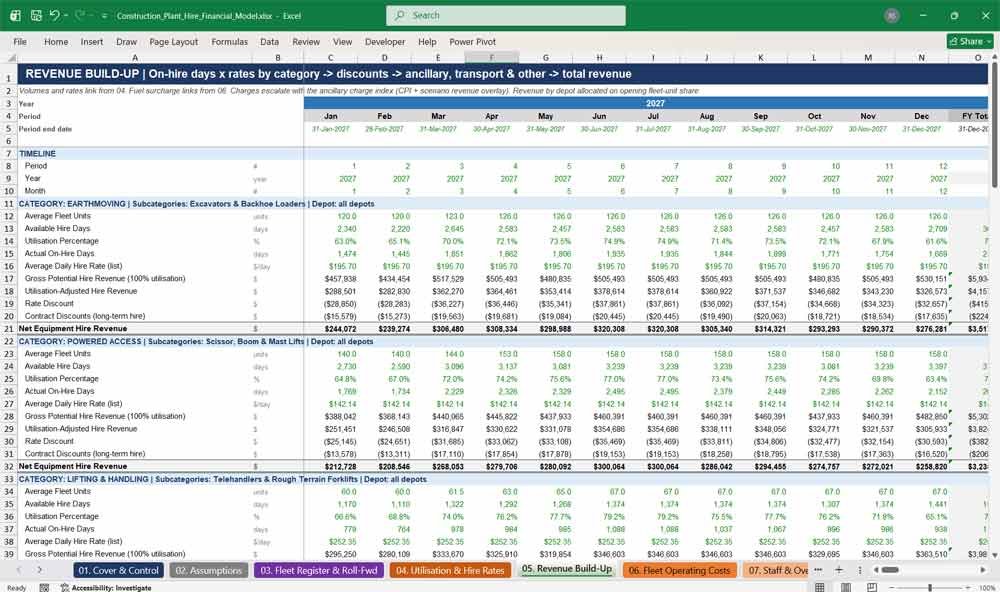
A transparent plant hire revenue model built from on-hire days multiplied by hire rates for each category. It then adds operator, transport, fuel surcharge, damage waiver, attachment, cleaning and other ancillary income, less discounts, rebates, credit notes and bad debt adjustments.
- Gross potential and utilisation-adjusted hire revenue by category
- Rate discounts and long-term contract discounts
- Short-term, long-term, contract, dry and wet hire analysis
- Delivery, collection, transport and fuel surcharge revenue
- Damage waiver, ancillary, standby, overtime and cancellation income
- Revenue per fleet unit, per hire day, per depot and per customer
- Revenue budget variance and revenue by depot
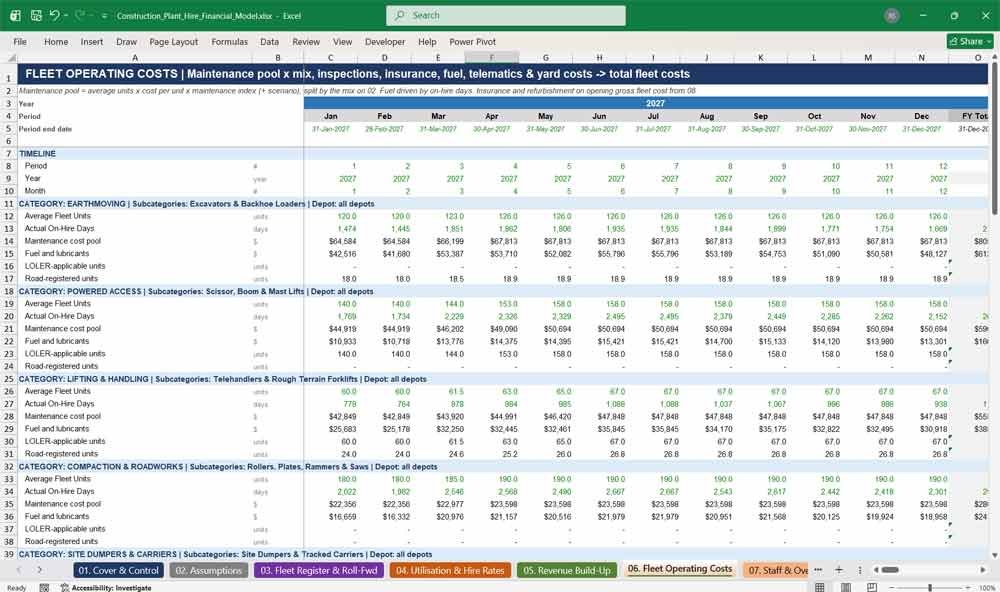
06. Fleet Operating Costs
Forecast the true cost of running a hire fleet. The maintenance budget is split into servicing, repairs, parts, tyres and tracks. The tab also covers LOLER inspections, MOT, insurance, fuel, telematics, storage, yard handling and security, less warranty recoveries, supplier rebates and customer recharges.
- Maintenance cost per unit, per operating hour and per on-hire day
- Planned, preventative, reactive and emergency repair costs
- LOLER, MOT, testing and certification costs
- Equipment and motor insurance, road tax and registration fees
- Fuel and lubricants, with recharged and net fuel analysis
- Warranty recoveries, supplier rebates and maintenance recharges
- Fleet cost KPIs and budget variance
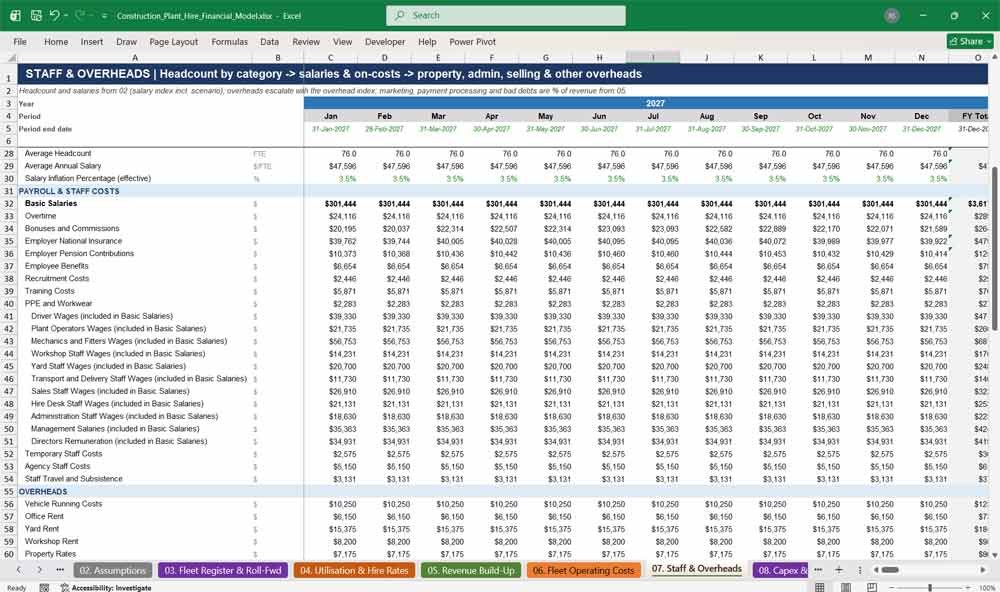
07. Staff & Overheads
Plan headcount and overheads for every department of a plant hire company, from drivers, fitters and yard staff to hire desk, sales, management and directors. The tab also models salary inflation, National Insurance, pensions, benefits, recruitment and training, plus property, administrative, selling and other overheads.
- Headcount by employee category, department and cost centre
- Starters, leavers, turnover and average salary
- Basic salaries, overtime, bonuses, commissions, NI and pensions
- Rents, rates, utilities, IT, telematics software and professional fees
- Marketing, insurance, bank charges, bad debts and compliance costs
- Staff and overhead ratios and budget variance
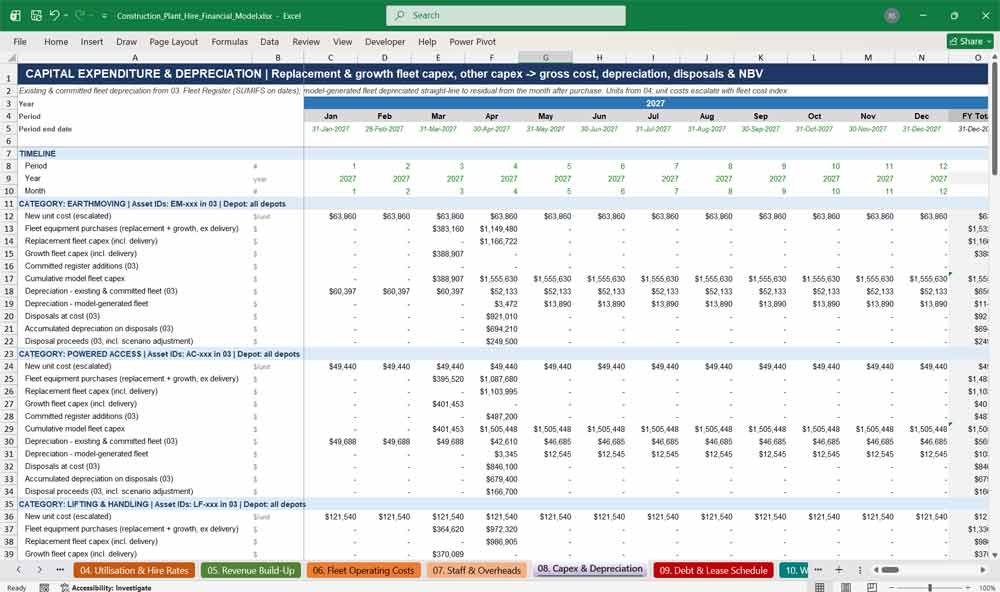
08. Capital Expenditure & Depreciation
Model fleet investment with confidence. Replacement capex is triggered automatically when register assets reach disposal, and growth capex follows your expansion plan. Depreciation runs straight-line to residual value. The tab also calculates disposal proceeds, gains and losses, and net book value.
- Replacement, growth, used equipment and committed fleet purchases
- Non-fleet capex: workshop, vehicles, yard, buildings and IT
- Capitalised delivery, installation and refurbishment costs
- Maintenance, growth and replacement capex classification
- Gross cost, accumulated depreciation and NBV roll-forward
- Disposal proceeds, disposal costs and gain or loss on disposal
- Capex budget variance and capex per fleet unit
09. Debt & Lease Schedule
A complete equipment finance and debt schedule. It covers an amortising term loan with interest rate hedging, hire purchase drawdowns linked to fleet capex, and a revolving credit facility that maintains minimum cash. It also includes IFRS 16 leases, finance costs and lender covenant testing.
- Facility register with lenders, references, dates and limits
- Term loan, hire purchase and RCF roll-forwards
- IFRS 16 lease liabilities and right-of-use assets
- Interest, swap settlements, arrangement and commitment fees
- Debt maturity profile, current and non-current split
- Net debt, gearing, interest cover and DSCR
- Covenant headroom and compliance status by month
Construction Plant Hire Company Financial Statements
10. Working Capital
Understand the cash tied up in your hire business. This tab models trade receivables with ageing and expected credit losses, trade payables, accruals, prepayments, spare parts inventory, quarterly VAT, customer and supplier deposits, and the resulting net working capital movement.
- Debtor days, creditor days and inventory days
- Receivables ageing buckets and expected credit loss provision
- Customer receipts, supplier payments and bad debt write-offs
- Payroll, interest and other accruals
- Quarterly VAT collected, reclaimed and paid
- Net working capital and cash flow impact
11. Tax Schedule
A detailed corporation tax schedule built for capital-intensive plant hire. It starts from accounting profit and works through capital allowances, including full expensing, the Annual Investment Allowance and writing down allowances, before computing tax losses, current tax, deferred tax and tax payment timing.
- Add-backs for depreciation, disallowable expenses and interest restriction
- Full expensing, AIA and main and special rate pool WDAs
- Balancing charges and pool written down values
- Tax losses brought forward, utilised and carried forward
- Current tax, deferred tax and effective tax rate
- Corporation tax payable roll-forward and payment timing
12. Income Statement
A fully linked monthly and annual income statement for your plant hire company. It shows revenue by stream, direct fleet costs, gross profit, operating expenses, EBITDA, depreciation, operating profit, finance costs, tax and profit after tax, with growth rates and budget variances.
- Revenue analysed into six income streams
- Direct fleet costs and gross profit margin
- Operating expenses grouped by type
- EBITDA, operating profit and net profit margins
- Revenue, EBITDA, operating profit and PAT growth
- Budget versus forecast variance analysis
13. Balance Sheet
A monthly balance sheet that balances in every period, linked directly to the fleet, debt, working capital and tax schedules. It shows current and non-current assets, net fleet assets, right-of-use assets, borrowings, lease liabilities, deferred tax and retained earnings.
- Fleet, non-fleet and right-of-use assets at cost and NBV
- Current and non-current borrowings and lease liabilities
- Working capital balances, VAT and corporation tax
- Share capital, reserves and retained earnings roll-forward
- Balance sheet check in every month
- Net working capital, net debt and tangible net assets
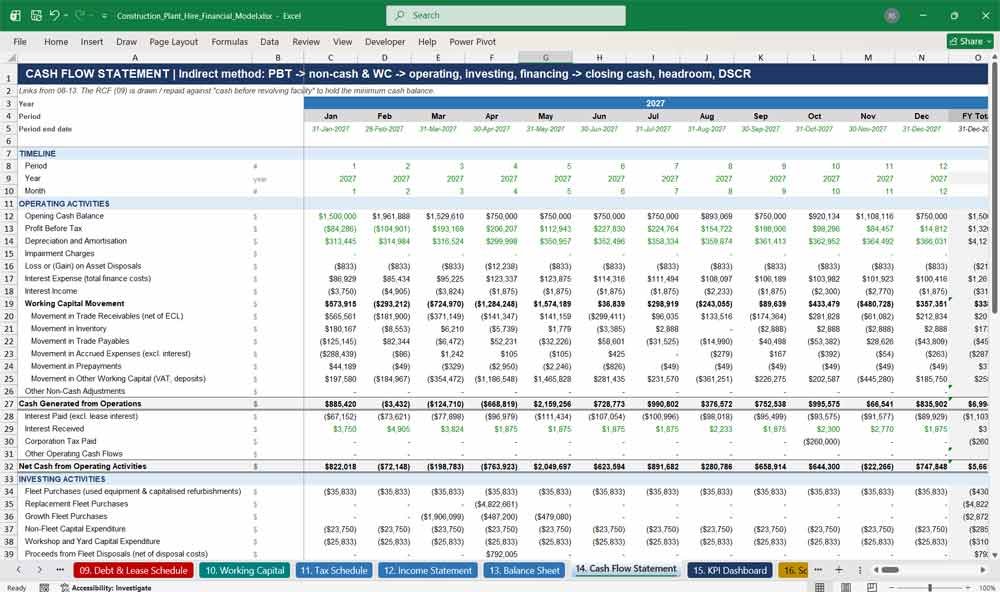
14. Cash Flow Statement
An indirect-method cash flow statement showing exactly how your hire business generates and uses cash. It covers operating cash flow, fleet and non-fleet investment, disposal proceeds and financing flows, plus available headroom, free cash flow and debt service coverage.
- Cash generated from operations and working capital movements
- Interest and corporation tax paid
- Replacement, growth and non-fleet capex cash flows
- Loan drawdowns, repayments, leases, equity and dividends
- Minimum cash balance and available cash headroom
- Free cash flow, cash available for debt service and DSCR
Construction Plant Hire KPIs
15. KPI Dashboard
Every key performance indicator a plant hire owner, investor or lender monitors, in one place. It covers fleet size and value, utilisation, hire rates, revenue per unit, margins, cost ratios, capex, return on assets, cash, leverage, working capital and budget variances.
- Owned, financed and leased fleet units and fleet age
- Fleet net book value, market value and replacement value
- Utilisation, financial utilisation and realised hire rates
- Margins, maintenance cost and staff cost ratios
- Return on fleet assets and return on capital employed
- Net debt to EBITDA, interest cover, DSCR and covenant headroom
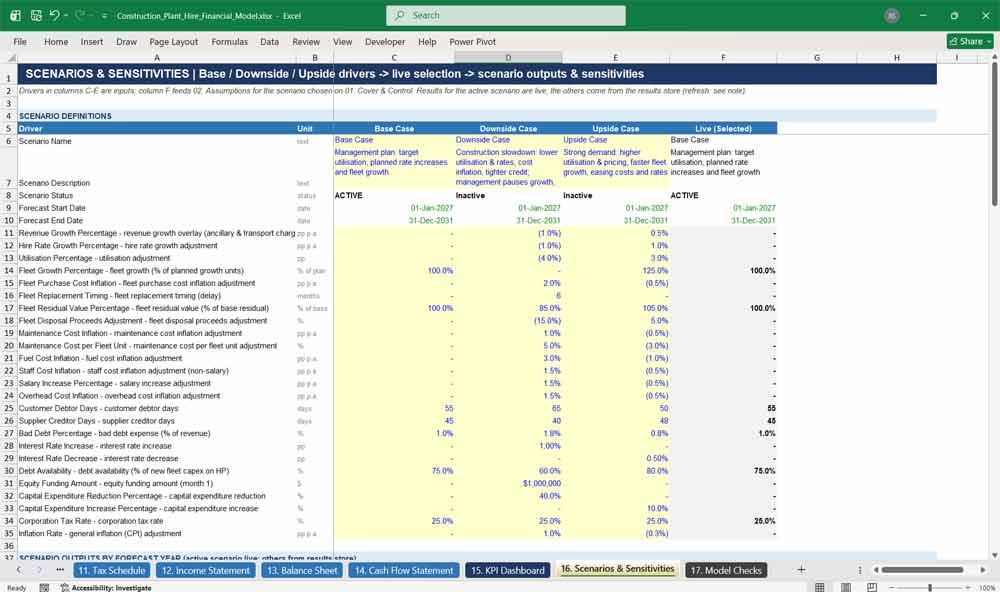
16. Scenarios & Sensitivities
Stress-test your equipment rental business across 25 scenario drivers. Compare Base, Downside and Upside outcomes side by side, then review break-even utilisation and hire rates, affordability limits, sensitivity results and automatic covenant breach and liquidity shortfall warnings.
- 25 drivers covering utilisation, rates, costs, inflation, funding and tax
- Side-by-side scenario outputs for each forecast year
- Break-even utilisation and break-even hire rate
- Maximum affordable fleet capex and interest rate
- Sensitivities to utilisation, rates, maintenance, capex and debtor days
- Covenant breach and liquidity shortfall indicators
17. Model Checks
Build trust in every number with a dedicated integrity tab. It runs 20 period checks, including balance sheet, cash, fleet movement, debt roll-forward and profit and loss tie-outs, plus register reconciliations and formula error counts, rolled up into one overall status.
- Balance sheet balances in every period
- Cash roll-forward and cash-to-balance-sheet tie-out
- Fleet unit movement and register reconciliation
- Debt, lease and retained earnings roll-forwards
- Revenue, cost, EBITDA and depreciation tie-outs
- Formula error count on every tab and an overall PASS / REVIEW status
Why Buy This Model
Building a credible plant hire financial model from scratch can take weeks. Most generic templates miss what actually drives an equipment rental business: fleet utilisation, hire rates, asset replacement cycles, residual values and asset finance. This model is built specifically for construction plant hire. A detailed fleet register feeds utilisation, revenue, capex, depreciation, debt and tax, so every assumption flows through to integrated, balancing financial statements. It’s ready to present to banks, asset finance providers and investors. Colour-coded inputs, a one-cell start date, built-in scenarios and 17 tabs of transparent formulas mean you can tailor it to your fleet in hours rather than weeks. You can then use it with confidence to raise finance, plan fleet investment, set budgets or value a business.
Construction Plant Hire Frequently Asked Questions
Is this model suitable for my type of plant hire business?
Yes. The model includes six equipment categories: earthmoving, powered access, lifting and handling, compaction and roadworks, site dumpers, and power and site services. You can rename each category and change its rates, costs, useful life and residual value, so it works for general plant hire, specialist access hire, tool hire and mixed fleets.
Can I change the start date and forecast years?
Yes. Enter a new Model Start Date on the Assumptions tab and every date in the workbook updates automatically: month labels, year headers, escalation, tax and dividend timing, and fleet register calculations. The model always forecasts 60 months with an annual roll-up column for each year.
Do I need advanced Excel skills to use it?
No. Blue cells on a yellow background are inputs, black cells are calculations and green cells are links. You only change the input cells, and the model does the rest. A hyperlinked tab index and summary bands at the top of every tab make it easy to find your way around.
How do I enter my own fleet?
Add or edit asset batches on the 03. Fleet Register tab with the purchase date, cost, units in the batch, residual value, useful life and estimated disposal date. The register automatically feeds opening fleet units, depreciation, disposals and like-for-like replacement capex throughout the model.
Does the model work in currencies other than US dollars?
The model is presented in USD, but every calculation works in any currency. Update the currency label on the Assumptions tab and enter your figures in your local currency.
Will the model help me raise bank or asset finance?
Yes. It includes a term loan, hire purchase or asset finance linked to fleet purchases, a revolving credit facility and IFRS 16 leases. It calculates net debt to EBITDA, interest cover, DSCR, covenant headroom and month-by-month compliance, which is exactly what lenders want to see.
Can I run different scenarios?
Yes. Pick Base, Downside or Upside from a dropdown on the Cover & Control tab. Twenty-five drivers, including utilisation, hire rates, cost inflation, debtor days, interest rates, debt availability and capex, adjust the whole model. The Scenarios tab also shows break-even utilisation, break-even hire rates and key sensitivities.
How is tax handled?
The tax schedule uses a UK-style corporation tax computation. It includes full expensing, the Annual Investment Allowance, writing down allowances, tax losses and deferred tax. All tax rates and allowances are editable inputs, so you can adapt them to your own jurisdiction.
How do I know the numbers are right?
The 17. Model Checks tab runs 20 checks every month. These include the balance sheet balancing, cash reconciliation, fleet unit movement, debt roll-forwards and P&L tie-outs, plus formula error counts on every tab. A single overall status shows “ALL CHECKS PASS” when everything reconciles.
Can I add budgets and compare actual performance?
Yes. Enter annual budgets for revenue, utilisation, hire rates, fleet costs, staff and overheads, capex, EBITDA, profit before tax, tax and cash flow. The model shows budget variances throughout the operating schedules, the income statement and the KPI dashboard.
Can I edit the formulas and structure?
Yes. The model is fully unlocked, with no macros and no hidden sheets, so you can see every formula and adapt it to your business.
Is the example data real?
No. The model ships with realistic illustrative data for an example plant hire company. It shows how every schedule works and gives you a sensible starting point. Replace it with your own assumptions to produce your forecast.
Conclusion For The Financial Model
This financial model for a construction Plant Hire company should be dynamic and project-driven, allowing for:
- Scenario analysis for delays, cost overruns, or economic downturns.
- Cash flow forecasting to manage liquidity.
- Project-specific profit analysis.
- Debt management planning.
Integrating revenue forecasts, cost structures, and financing details to ensure sustainable growth and profitability. By carefully monitoring cash flows and key financial ratios, the company can optimize fleet utilization, manage debt, and maximize returns for stakeholders.
Download Link On Next Page