
Biofuel Plant Financial Model Template
This Biofuel Production Plant Financial Model Template is a fully dynamic, investor-ready Excel template built for anyone evaluating, financing, or developing a bioethanol and biodiesel production facility. Spanning an 18-tab, bank-grade structure, the model integrates construction financing, commissioning ramp-up, 20 years of operations, and a complete set of financial statements into one seamless workbook. Whether you’re a project developer, private equity analyst, lender, or renewable energy consultant, this Excel financial model template gives you a professional foundation for feasibility studies, investment memos, and lender due diligence — without building a model from scratch.
20-Year DCF Financial Model for a Biofuel Production Plant
Built to real project finance standards, this biofuel plant Excel model features a single master start date that automatically re-dates every tab, a Year-2 operations refinancing event, scenario-driven escalation (Base, Upside, Downside, Custom), and full sensitivity analysis on feedstock price, product price, yield, capex, and leverage. Every formula is dynamically linked — change one assumption and the entire 23-year construction-and-operations model recalculates instantly, including the income statement, cash flow statement, balance sheet, and returns analysis. Colour-coded inputs, formulas, and links make the model easy to audit, adapt, and present to investors or lending committees.
Perfect for renewable energy developers, biodiesel and bioethanol project sponsors, investment bankers, financial modeling students, and consultants preparing feasibility studies or board presentations, this downloadable Excel financial model template saves weeks of build time. With built-in balance sheet checks, DSCR calculations, IRR and NPV analysis, and a management-ready dashboard with charts, it’s designed to be both technically rigorous and presentation-ready from day one. Buy once, customize the inputs to your project, and have a bankable biofuel financial model ready for due diligence in minutes, not months.
Tab-by-Tab Guide
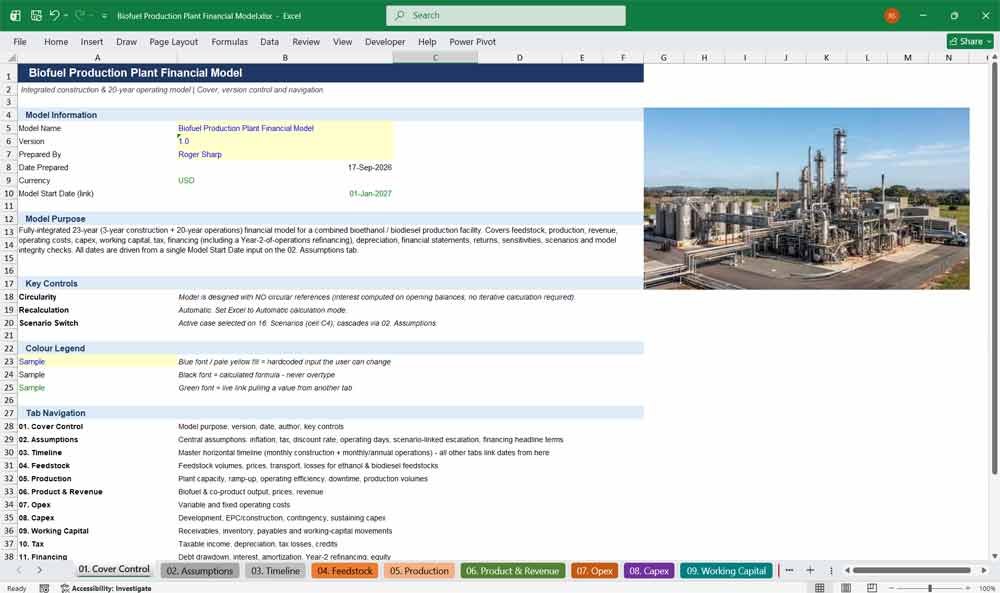
01. Cover Control
The Cover Control tab anchors this biofuel financial model with version tracking, model purpose, author details, and full workbook navigation. It gives investors and lenders a professional, audit-ready entry point into a fully linked bioethanol and biodiesel project finance Excel template.
- Model version, author, and preparation date tracking
- One-click navigation links to all 18 tabs
- Colour-coded legend explaining inputs, formulas, and links
- Key controls summary for lenders and reviewers
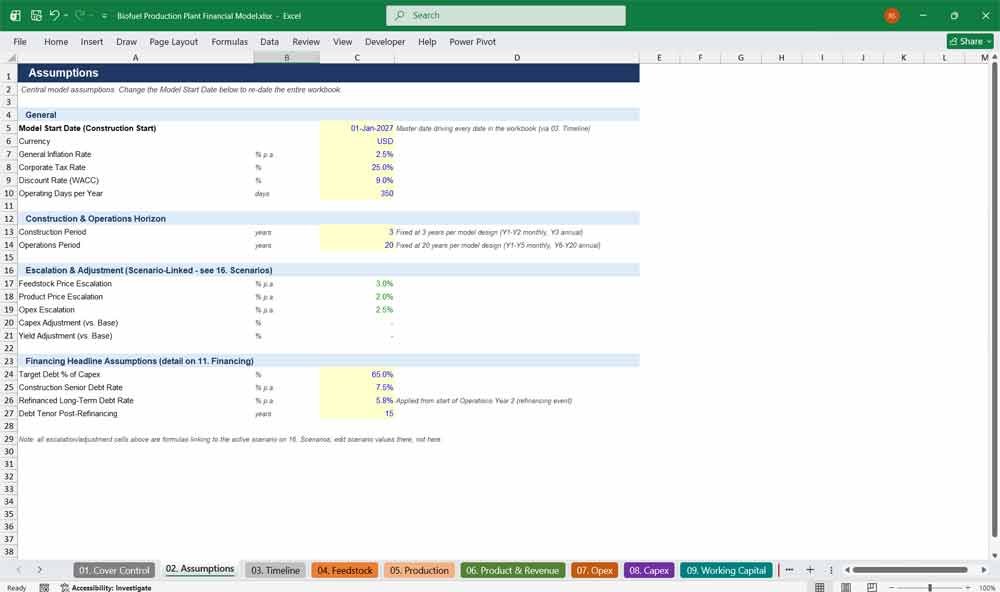
02. Assumptions
The Assumptions tab centralizes every driver of this biofuel plant financial model — inflation, tax rate, WACC, and operating days. Change the model start date once and every date across the workbook updates automatically, keeping the entire project finance analysis fully dynamic.
- Single master start date drives the entire 23-year timeline
- Scenario-linked escalation for feedstock, pricing, and opex
- Editable tax rate, discount rate, and financing assumptions
- Built for fast sensitivity testing and investor due diligence
Biofuel Production Plant Revenue & Opex
03. Timeline
The Timeline tab is the master horizontal schedule behind this biofuel Excel model, mapping three years of construction and twenty years of operations into monthly and annual periods that every other tab inherits automatically for full consistency.
- Monthly detail through construction and commissioning ramp-up
- Automatic annual roll-up columns for later operating years
- Single source of truth for every date in the workbook
- Built to support construction-to-operations transition modeling
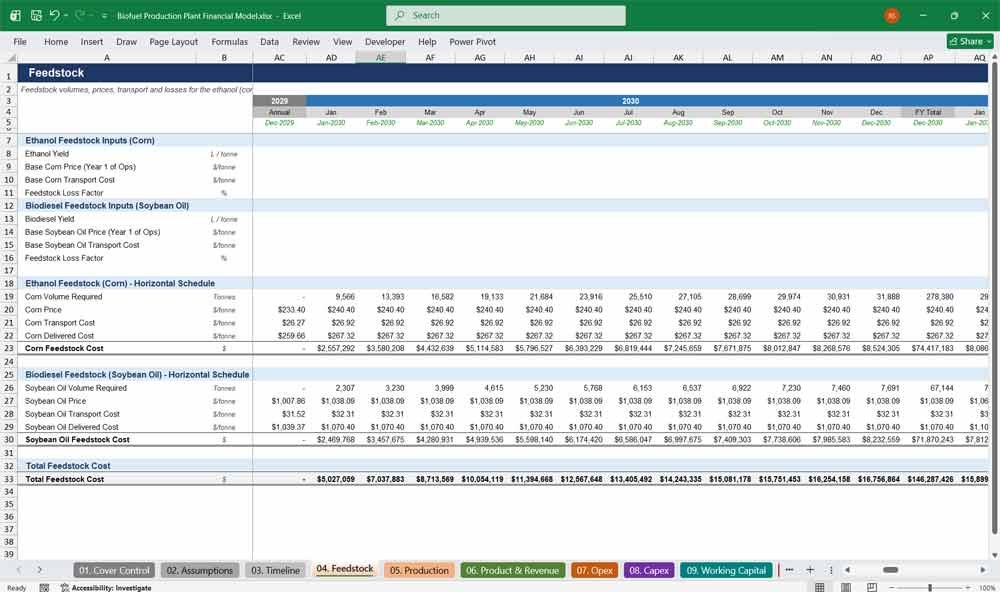
04. Feedstock
The Feedstock tab models corn and soybean oil input costs for a combined bioethanol and biodiesel production plant. Escalating prices, transport costs, and loss factors give investors a transparent view of raw material risk and delivered cost.
- Separate ethanol and biodiesel feedstock schedules
- Escalating price and transport cost assumptions
- Built-in feedstock loss factor
- Fully linked to production volumes
05. Production
The Production tab drives plant output for this biofuel financial model, capturing nameplate capacity, commissioning ramp-up, operating efficiency, and downtime. Realistic month-by-month ramp curves make this template ideal for assessing technical and operational risk.
- Monthly ramp-up curve for Year 1 commissioning
- Steady-state efficiency and downtime assumptions
- Separate bioethanol and biodiesel capacity inputs
- Output adjustable via the scenario switch
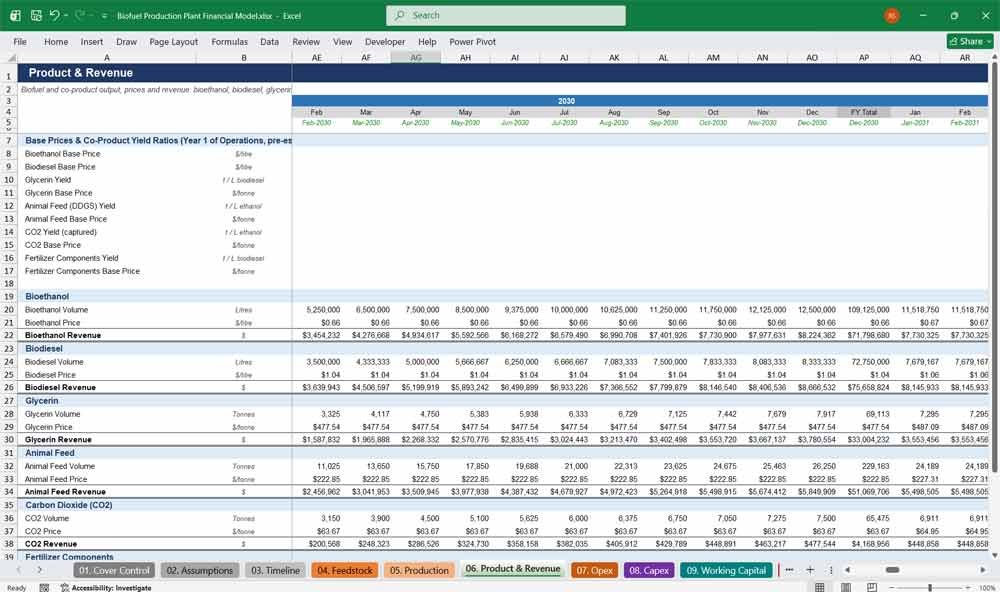
06. Product & Revenue
The Product & Revenue tab forecasts income from bioethanol, biodiesel, glycerin, animal feed, CO2, and fertilizer co-products. This multi-revenue-stream Excel model gives buyers a realistic, escalating pricing structure for evaluating total plant profitability.
- Six revenue lines covering biofuels and co-products
- Escalating pricing tied to scenario assumptions
- Co-product yields linked directly to production volumes
- Clear revenue build-up for investor presentations
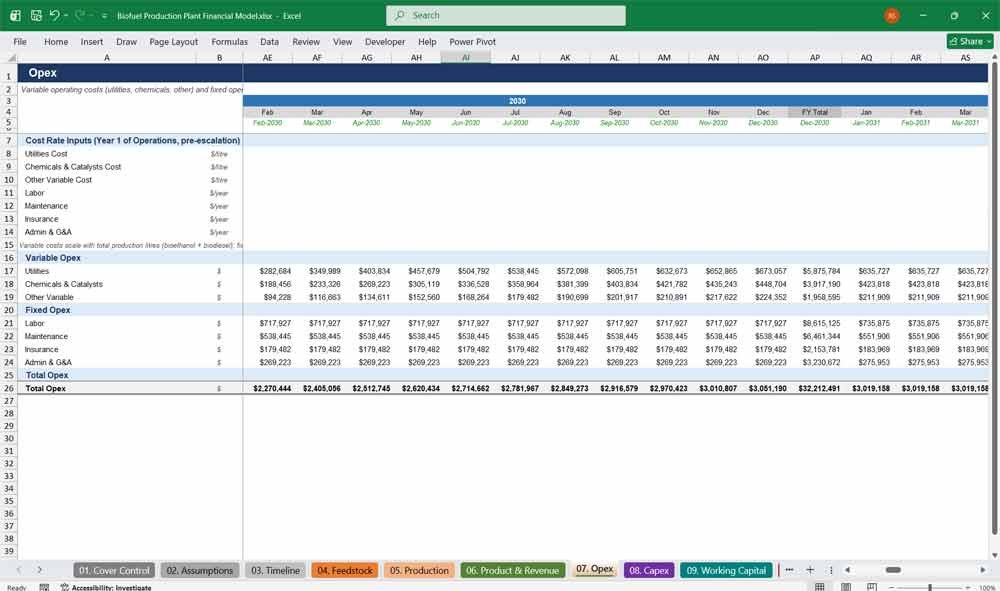
07. Opex
The Opex tab captures variable and fixed operating costs — utilities, chemicals, labor, maintenance, insurance, and G&A — for this biofuel plant model. Costs scale automatically with production volume and inflation for realistic operating cost forecasting.
- Variable costs scale automatically with production output
- Fixed costs escalate with inflation
- Separate utilities, chemicals, and other variable cost lines
- Clean cost base for margin and profitability analysis
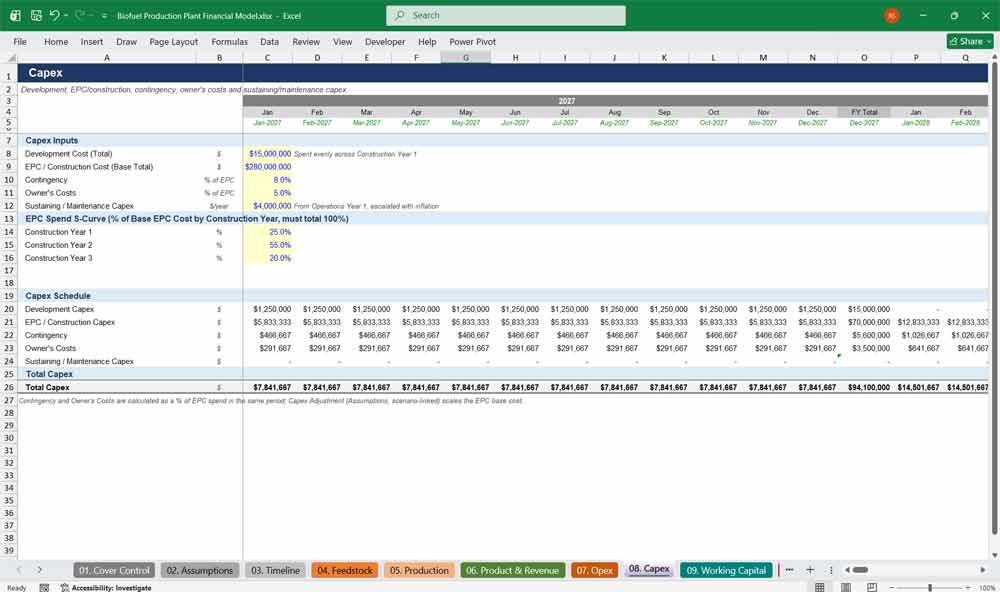
08. Capex
The Capex tab schedules development, EPC, contingency, owner’s costs, and sustaining capital expenditure across construction. With an adjustable spend S-curve, this financial model template helps developers plan funding drawdowns precisely.
- Adjustable EPC spend S-curve across all 3 construction years
- Contingency and owner’s costs built as % of EPC
- Sustaining capex modeled throughout operations
- Scenario-linked capex adjustment factor
09. Working Capital
The Working Capital tab models receivables, inventory, and payables using DSO, DIO, and DPO assumptions, translating operating activity into realistic cash flow timing for more accurate liquidity planning across the biofuel plant model.
- DSO, DIO, and DPO-driven balances
- Automatic net working capital calculation
- Cash flow impact flows directly into financial statements
- Fully editable for different credit terms
10. Tax
The Tax tab calculates taxable income, depreciation, tax loss carryforwards, and blending credits for this biofuel project finance model, giving investors a clear, formula-driven view of cash tax liability across the full project life.
- Tax loss carryforward and utilization tracking
- Biofuel blending tax credit input
- Fully linked to depreciation and interest expense
- Transparent, auditable cash tax payable calculation
Biofuel Plant Financial Statements
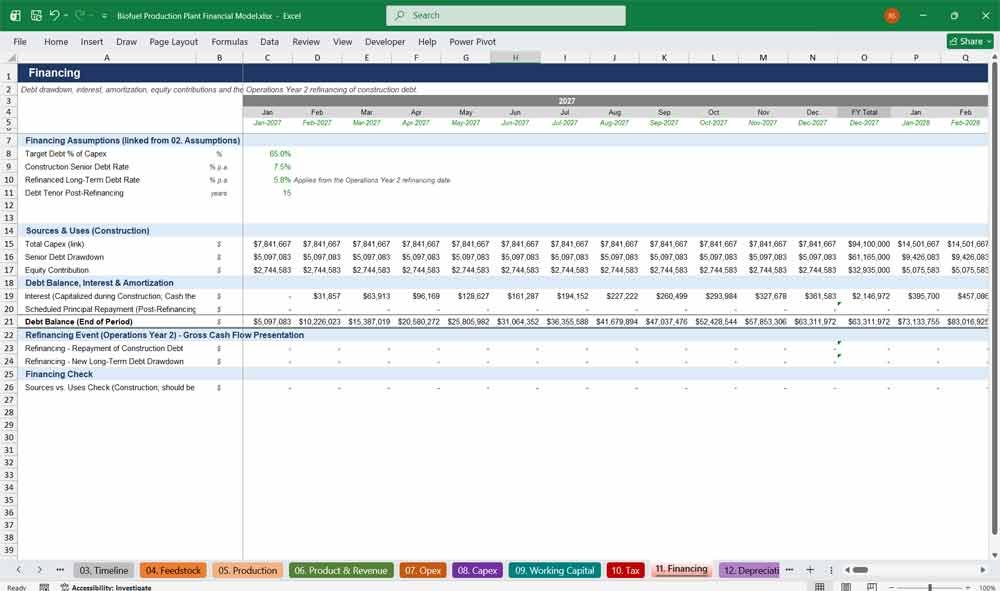
11. Financing
The Financing tab models senior debt drawdown, capitalized construction interest, and a Year-2 operations refinancing into long-term debt — a standout feature that makes this model ideal for structuring real-world biofuel project finance transactions.
- Construction debt with capitalized interest
- Automatic Year 2 refinancing event built in
- Straight-line post-refinancing amortization schedule
- Sources-and-uses and equity contribution check
12. Depreciation
The Depreciation tab applies straight-line depreciation to construction and sustaining capital costs from the commercial operations date onward, with clean, auditable schedules that are easy to adapt across jurisdictions and accounting standards.
- Straight-line depreciation from commercial operations date
- Gross cost, accumulated depreciation, and NBV tracked
- Adjustable useful life assumption
- Feeds directly into tax and financial statements
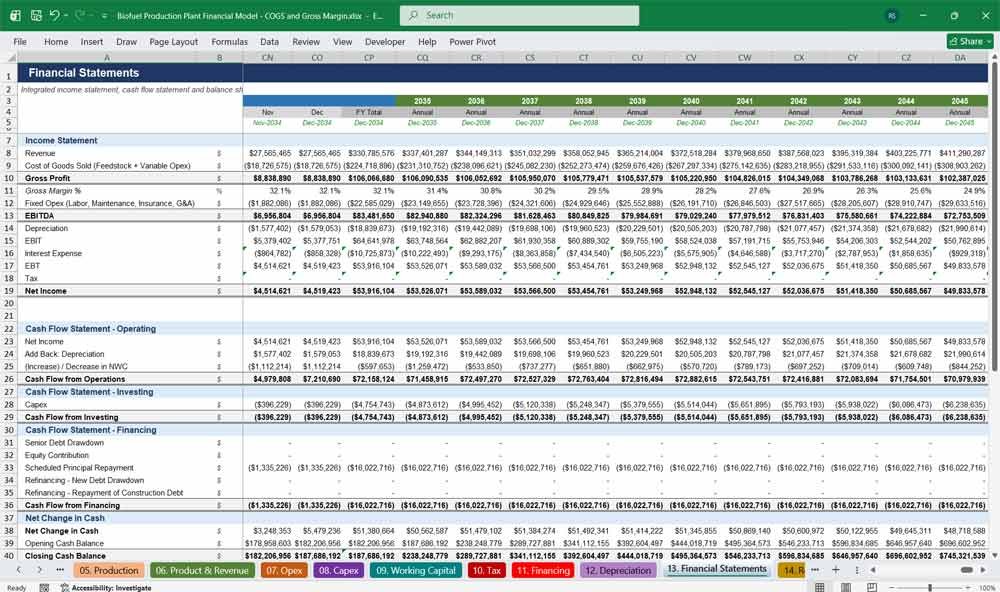
13. Financial Statements
The Financial Statements tab consolidates the income statement, cash flow statement, and balance sheet into one fully integrated view, where every number ties out automatically for total confidence in the model’s accuracy.
- Fully integrated three-statement model
- Automatic balance sheet tie-out check
- Both monthly and annual reporting periods
- Investor-ready presentation formatting throughout
14. Returns Valuation
The Returns Valuation tab calculates Project IRR, Equity IRR, NPV, MOIC, DSCR, and payback from a clean 23-year annual cash flow summary — the tab investors check first when evaluating a biofuel plant opportunity.
- Project and equity IRR calculated automatically
- NPV at your chosen discount rate
- Equity MOIC and payback period shown
- Minimum DSCR for lender covenant testing
15. Sensitivities
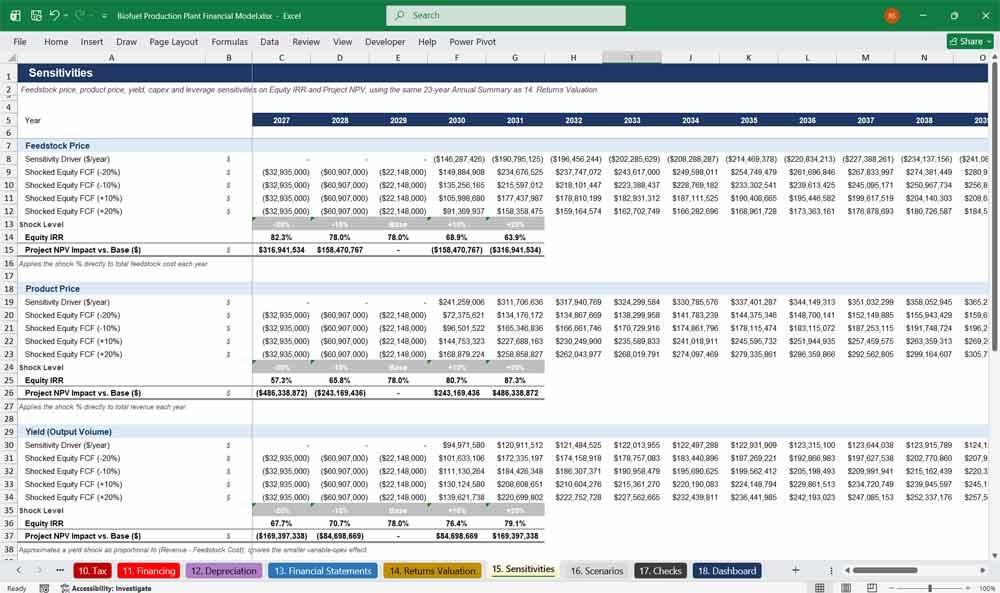
The Sensitivities tab stress-tests feedstock price, product price, yield, capex, and leverage against equity IRR and project NPV, helping buyers quickly understand downside risk and upside potential in their investment case.
- Five key variables stress-tested automatically
- Equity IRR shown across every shock level
- Project NPV impact clearly quantified
- Built for investment committee presentations
16. Scenarios
The Scenarios tab lets users switch between Base, Upside, Downside, and Custom cases with one click, instantly recalculating the entire biofuel financial model — a major time-saver when comparing investment outcomes.
- One-click Base / Upside / Downside / Custom switch
- Cascades automatically through the entire 18-tab model
- Fully editable Custom case for your own assumptions
- Perfect for board and lender presentations
17. Checks
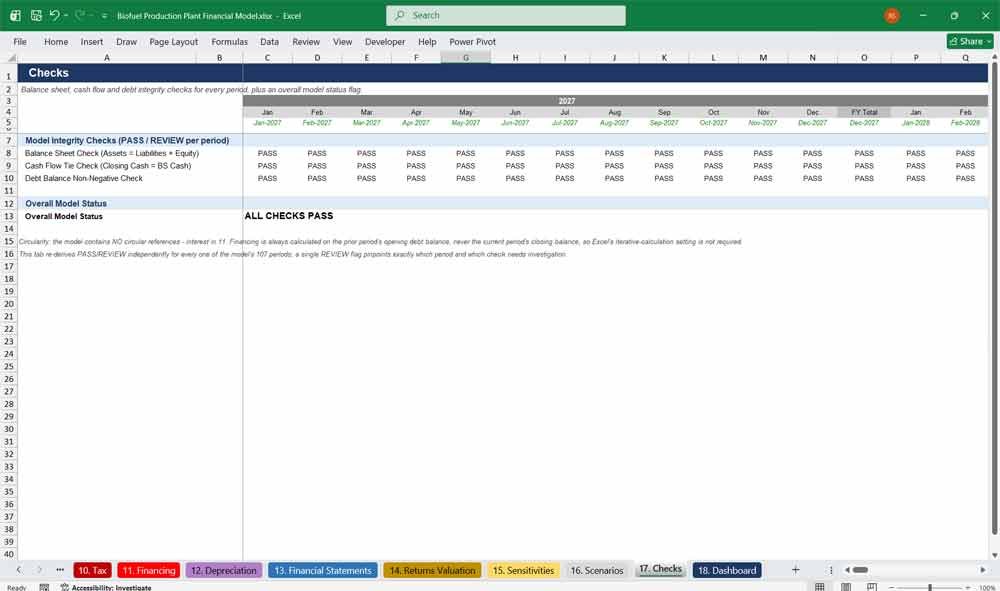
The Checks tab automatically verifies balance sheet, cash flow, and debt integrity across every period of the model, flagging PASS or REVIEW instantly to give buyers confidence the model is error-free.
- Automatic PASS/REVIEW status for every period
- Balance sheet and cash flow tie-out checks
- Debt balance integrity check included
- No circular references or iterative calculation required
18. Dashboard
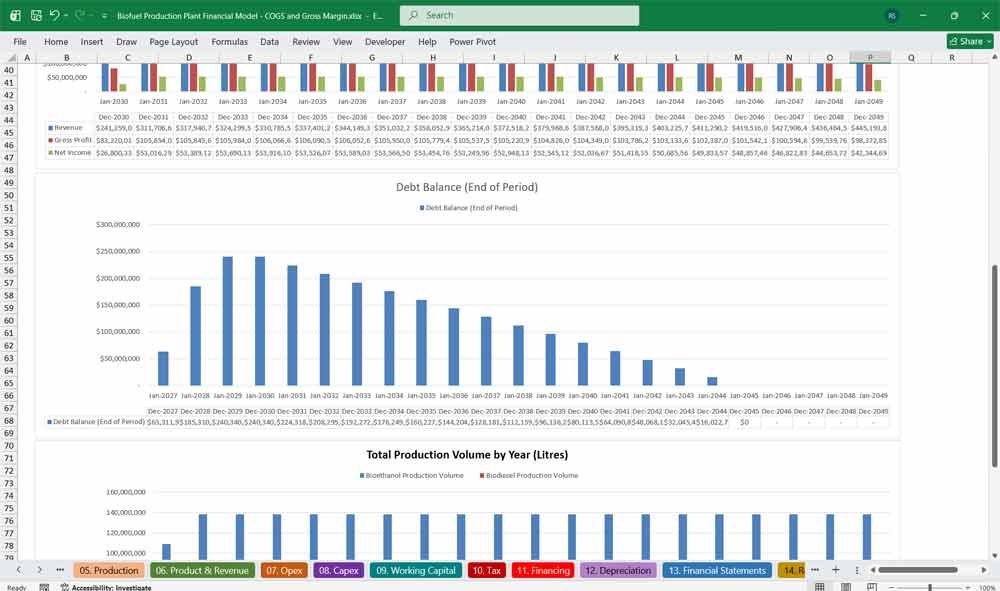
The Dashboard tab summarizes key outputs — IRR, NPV, MOIC, DSCR, and payback — alongside revenue, EBITDA, and debt charts, making the biofuel financial model presentation-ready for management and investor meetings.
- KPI cards for every key return metric
- Revenue and EBITDA chart across 23 years
- Debt balance and production volume charts
- Ready to present to your board or investors
Why Buy This Biofuel Model
Building a bankable, 18-tab biofuel project finance model from scratch takes weeks of careful formula work, date-chaining, and cross-checking — and one broken link can undermine an entire investment case. This model gives you that finished, tested foundation instantly: a fully dynamic construction-and-operations build with a Year-2 refinancing structure, scenario switching, sensitivity analysis, and automated integrity checks already in place, so you spend your time refining assumptions and telling your project’s story instead of debugging spreadsheets. It’s built to the same colour-coding, formatting, and tie-out standards lenders and investment committees expect, so you can hand it to a bank, a board, or a co-investor with confidence. Whether you’re raising capital for a real biofuel facility, running a feasibility study, or teaching project finance, this template turns months of modeling work into an afternoon of customization.
Biofuel Production Frequently Asked Questions (Faq)
Is this model suitable for a real bioethanol or biodiesel project, or is it just a generic template?
It’s a genuine project finance structure — construction financing, commissioning ramp-up, 20 years of operations, debt refinancing, tax, depreciation, and full financial statements are all built and linked. The unit economics (prices, yields, capex, opex) are illustrative placeholders you replace with your own project’s numbers; the financial engine underneath is built to real bankable-model standards.
Do I need to know how to build financial models to use this?
No. Every input cell is colour-coded in blue so you know exactly what to change. You update capacity, pricing, cost, and financing assumptions on a handful of tabs, and the rest of the 18-tab model — including the financial statements and returns analysis — recalculates automatically.
What happens if I change the project start date?
Every date in the workbook updates automatically. The model is built around a single Model Start Date on the Assumptions tab, so shifting your financial close date re-dates all 23 years of construction and operations across every tab with no manual rework.
Does the model cover both bioethanol and biodiesel, or do I need to delete parts I don’t use?
It covers both production trains together, plus co-products (glycerin, animal feed, CO2, and fertilizer components). If your project is biodiesel-only or ethanol-only, you can simply zero out the unused product’s capacity input and its related lines will fall to zero throughout the model.
How does the refinancing in Year 2 of operations work?
The model automatically pays off the higher-cost construction-period debt at the start of Operations Year 2 and replaces it with new long-term debt at your specified refinancing rate and tenor, amortized straight-line from that point. You can edit the timing logic if your deal structure refinances at a different point.
Can I run different scenarios or investment cases?
Yes. The Scenarios tab has a Base, Upside, Downside, and Custom case selector. Switching the case instantly changes escalation, pricing, capex, and yield assumptions throughout the entire model, so you can compare outcomes without rebuilding anything.
How do I know the model doesn’t have broken formulas or balance sheet errors?
The Checks tab independently re-verifies the balance sheet, cash flow, and debt balances for every single period in the model and flags a clear PASS or REVIEW status, so you can confirm model integrity at a glance before presenting it to anyone.
Will this work in Google Sheets, or only Excel?
The model is built and tested in Excel using standard formulas (no macros or add-ins required), so it opens cleanly in Excel on Windows and Mac. It can be uploaded to Google Sheets, though some formatting and native charts may need minor adjustment after import.
Can I customize the model for my own project, or add more tabs?
Yes, it’s fully unlocked and editable. You can rename line items, add rows, extend the co-product list, or insert additional tabs — the underlying formula and colour-coding structure is designed to be extended, not just filled in.
Final Notes on the Financial Model
This 20 Year Biofuel Production Plant Financial Model focuses on balancing capital expenditures with steady revenue growth from a diversified production line. By optimizing operational costs, and power efficiency, and maximizing high-margin services, the models ensure sustainable profitability and cash flow stability.
Download Link On Next Page, view the template description