
Waste To Energy Plant Financial Model Template
This Waste-to-Energy (WtE) financial model is a fully built, ready-to-use Excel project finance template designed for developers, investors, lenders, and consultants evaluating a waste-to-energy plant under a long-term power purchase agreement (PPA). Built across 25 linked tabs, the model covers the full asset lifecycle — a two-year monthly construction period, twenty-five years of operations under the PPA, and an optional two-year extension — all on real calendar-year timelines rather than generic “Year 1, Year 2” placeholders. Whether you’re preparing an investment committee memo, structuring project debt, running a feasibility study, or teaching project finance, this waste-to-energy Excel model gives you a bankable, audit-ready starting point instead of building a capital structure from a blank spreadsheet.
25-year Financial Model for a Waste To Energy Plant (Wte)
Unlike generic renewable energy templates that bury every input in one catch-all assumptions tab, this model gives feedstock, plant operations, revenue, cost, and financing assumptions each their own dedicated, fully documented tab — covering waste tonnage and calorific value, nameplate capacity and availability, gate fees and electricity pricing, fixed and variable O&M, and full debt structuring including leverage, tenor, DSCR sculpting, and a debt service reserve account (DSRA). Every driver is a labeled, colour-coded input cell so you can immediately see what to change for your own project, your own market, and your own capital structure, without hunting through nested formulas or hidden sheets.
Under the hood, this waste-to-energy project finance model uses industry-standard mechanics: a circular, DSCR-sculpted debt repayment schedule with an iterative-calculation toggle, monthly-to-annual “Grid A / Grid B” period architecture for granular ramp-up modelling, a fully integrated three-statement output (P&L, balance sheet, cash flow), unlevered and levered IRR/NPV valuation, a scenario switch (Base / Downside / Upside / Custom), a first-order sensitivity table, an executive dashboard, and a dedicated Checks tab that validates the balance sheet, cash balance, debt repayment, and DSCR covenant automatically. If you need a defensible, transparent, and fully formula-driven waste-to-energy financial model — not a static PDF or a black-box calculator — this template is built to be opened, stress-tested, and trusted.
Why Buy This Wte Model
Building a bankable waste-to-energy financial model from scratch can take a skilled analyst several weeks — sourcing realistic feedstock, revenue, and cost assumptions, structuring a circular DSCR-sculpted debt schedule that actually converges, and tying a three-statement output into a balanced, error-free workbook. This model compresses that effort into a single download: every tab is pre-built, cross-linked, colour-coded, and stress-tested so the balance sheet ties to zero in every period, cash never runs negative, and the debt fully amortizes under covenant — with zero formula errors anywhere in the workbook. Instead of paying for analyst hours or reinventing project finance mechanics you already understand, you’re buying a proven, transparent structure you can immediately re-key with your own feedstock contracts, PPA terms, and financing quotes — saving weeks of build time while giving your investment committee, lenders, or students a model they can actually open up and trust.
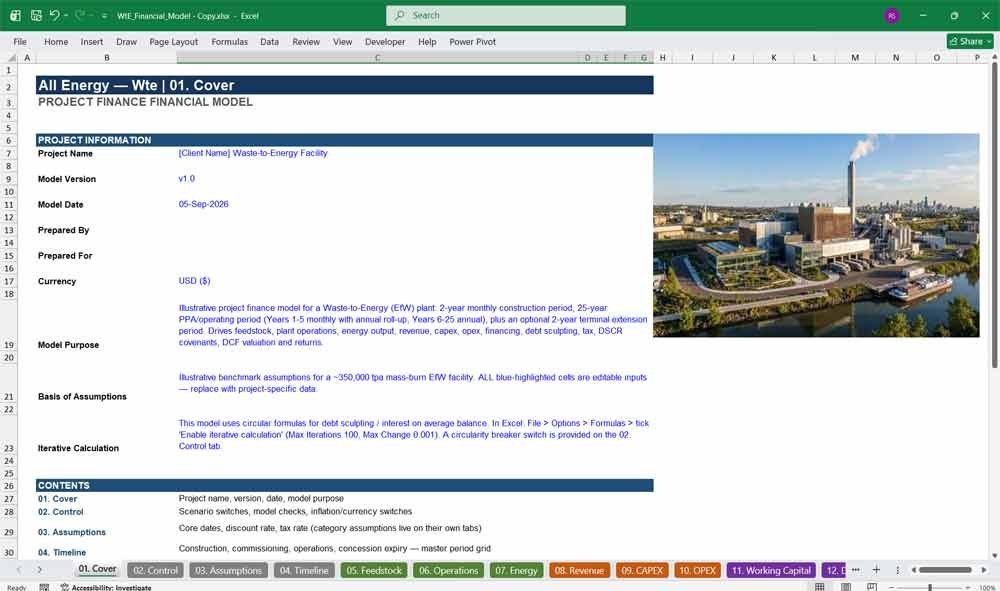
01. Cover
A professional cover tab establishing the waste-to-energy project finance model’s scope, currency, and structure at a glance — the first impression for investors, lenders, and internal reviewers opening the Excel financial model before they dig into any assumption or formula.
- Clean, presentation-ready title tab
- Sets expectations on currency (USD), jurisdiction, and model scope
- Ideal first page for investor and lender packages
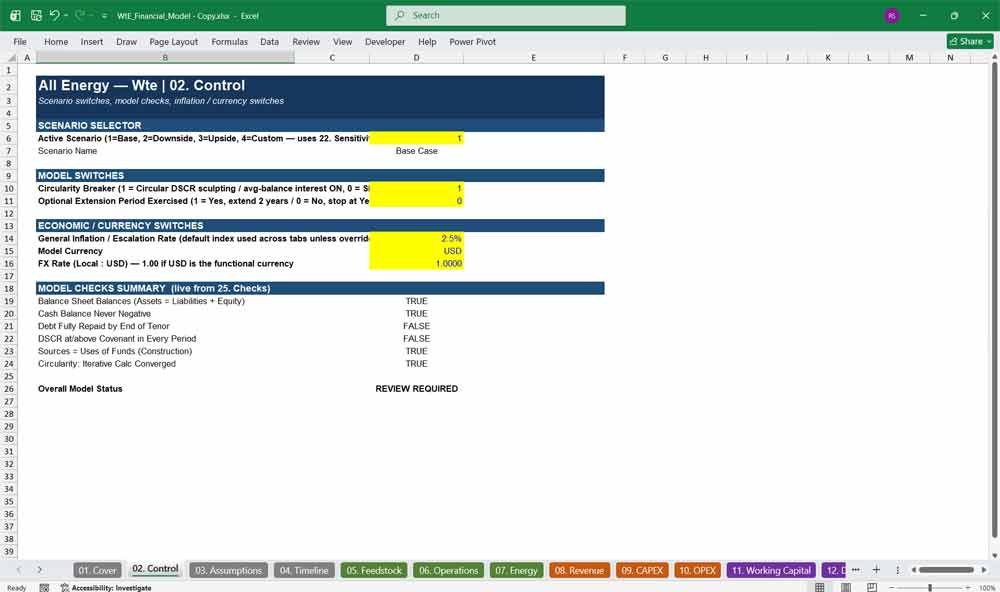
02. Control
The master control panel driving every switch in the model: active scenario selection, the optional extension toggle, and the circularity breaker for iterative DSCR calculations — the command center for running this waste-to-energy financial model under different assumptions instantly.
- One-click scenario switching (Base / Downside / Upside / Custom)
- Extension period exercised/not-exercised toggle
- Circularity breaker switch for safe, controlled iterative calculation
03. Assumptions
A high-level assumptions summary tying together the model’s key inputs and global settings, giving analysts and reviewers a single reference point before drilling into the dedicated feedstock, operations, revenue, cost, and financing tabs that drive this detailed WtE project finance model.
- Central reference for model-wide settings and dates
- Cross-links to every dedicated input tab
- Fast orientation for new reviewers or diligence teams
04. Timeline
The horizontal calendar-year timeline engine underpinning the entire model — mapping real years (2027–2055+) across construction, monthly and annual operating periods, and the optional extension, so every tab in this waste-to-energy financial model speaks the same period language.
- Real calendar years, never generic “Year 1/Year 2” labels
- Seamless monthly-to-annual transition after Year 5 of operations
- Powers every cross-sheet formula’s period alignment
Waste To Energy Plant Revenue / Operations
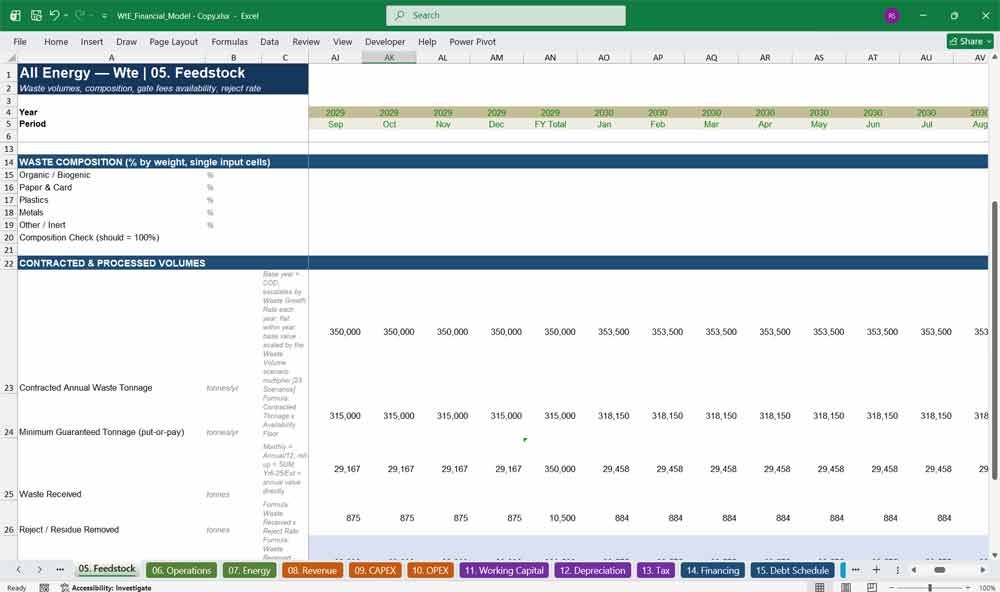
05. Feedstock
A dedicated feedstock tab modelling annual waste tonnage, growth, calorific value, moisture content, waste composition, and reject rates — critical inputs for any waste-to-energy plant financial model, since feedstock volume and quality drive throughput, energy output, and ultimately project revenue.
- Waste availability, growth, and minimum tonnage guarantees
- Calorific value, moisture, and composition assumptions
- Reject rate modelling for realistic net throughput
06. Operations
A full plant operations tab covering nameplate capacity, tonnes-per-hour throughput, availability, ramp-up curve, conversion efficiency, parasitic load, planned outages, and degradation — the technical backbone that separates a credible waste-to-energy model from a purely financial spreadsheet.
- Ramp-up and availability curves by operating year
- Conversion efficiency and parasitic load assumptions
- Planned outage and long-term degradation modelling
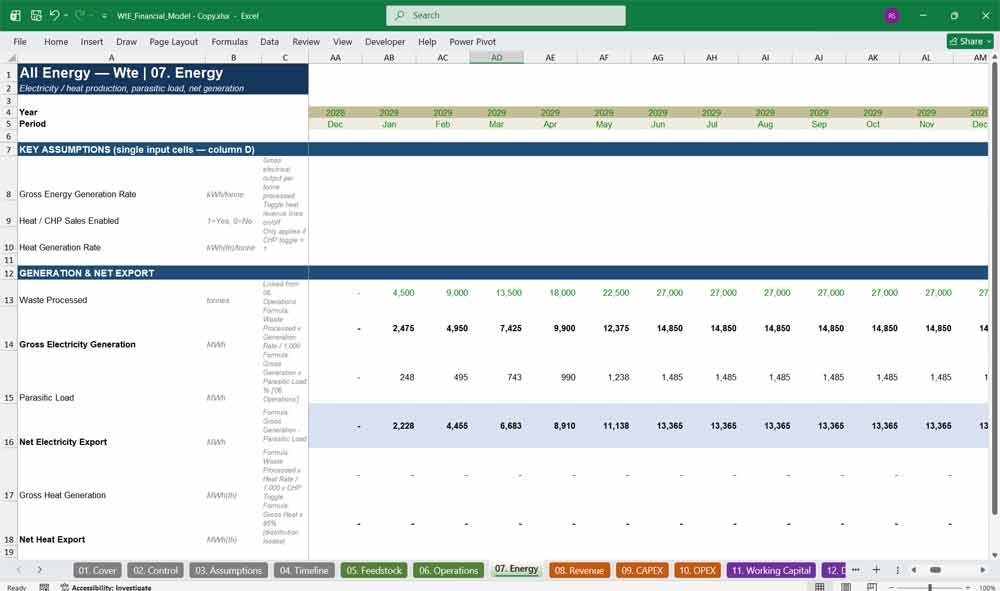
07. Energy
The energy conversion tab translating processed waste tonnes into gross and net electricity (and optional heat) output, forming the direct link between plant performance and PPA revenue in this waste-to-energy project finance model.
- Gross-to-net MWh conversion with parasitic load deduction
- Optional heat/CHP output toggle and revenue linkage
- Feeds directly into the Revenue tab’s PPA calculations
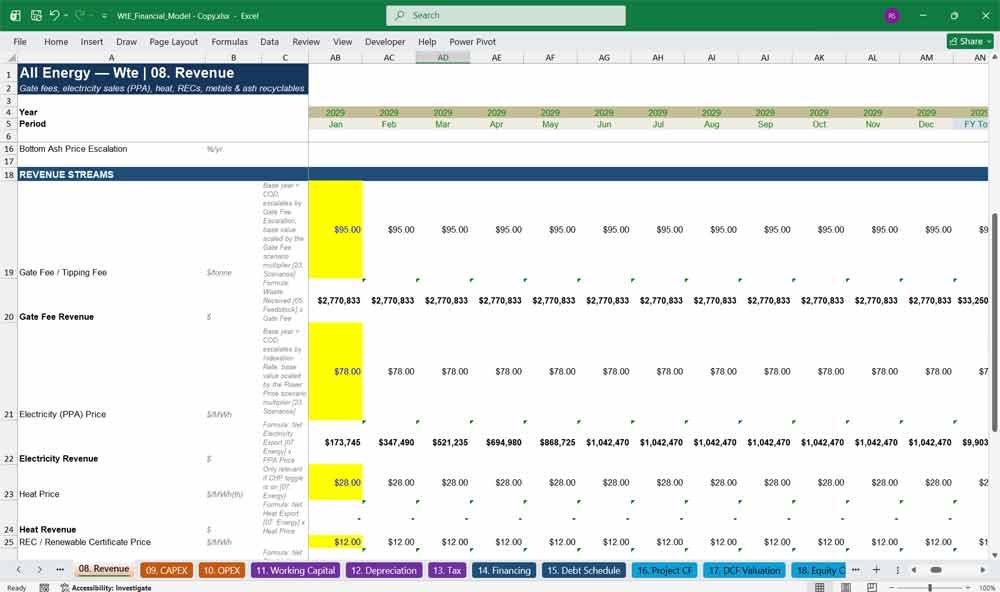
08. Revenue
A dedicated revenue tab modelling gate/tipping fees, PPA electricity pricing and indexation, heat revenue, renewable energy certificates, and metals/ash recyclable income — giving this waste-to-energy financial model a realistic, multi-stream revenue structure lenders expect to see.
- Gate fee and PPA electricity price with indexation
- Renewable incentive and certificate revenue streams
- Metals recovery and ash by-product income modelled separately
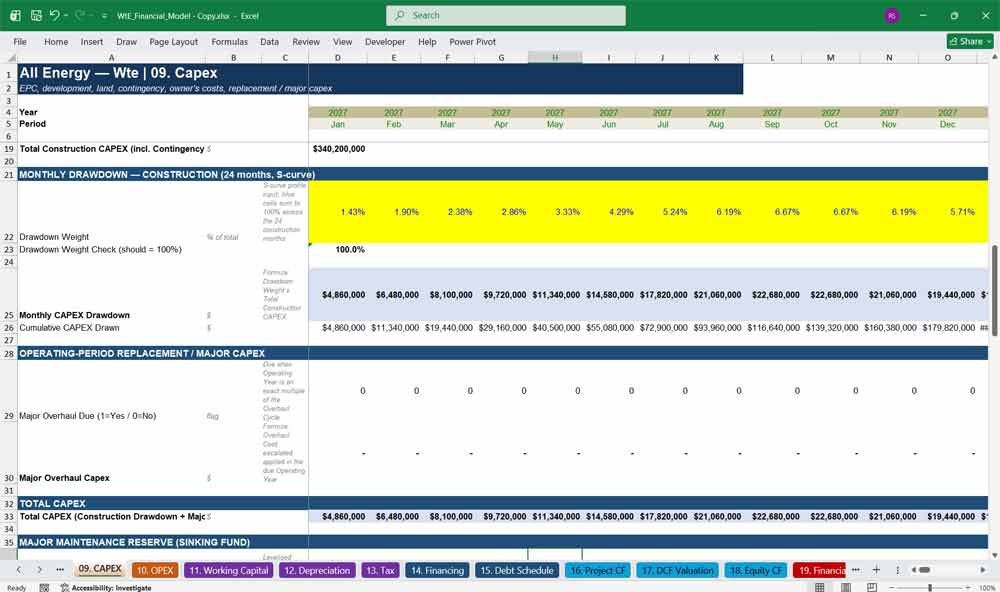
09. CAPEX
A complete capital expenditure tab covering EPC cost, development, land, owner’s costs, contingency, and a built-in Major Maintenance Reserve sinking fund for periodic overhaul capex — ensuring this waste-to-energy model funds long-term asset renewal, not just Day-1 construction.
- Monthly S-curve construction drawdown schedule
- Escalating major overhaul capex every 7 years
- Sinking-fund reserve smooths overhaul costs into distributable cash flow
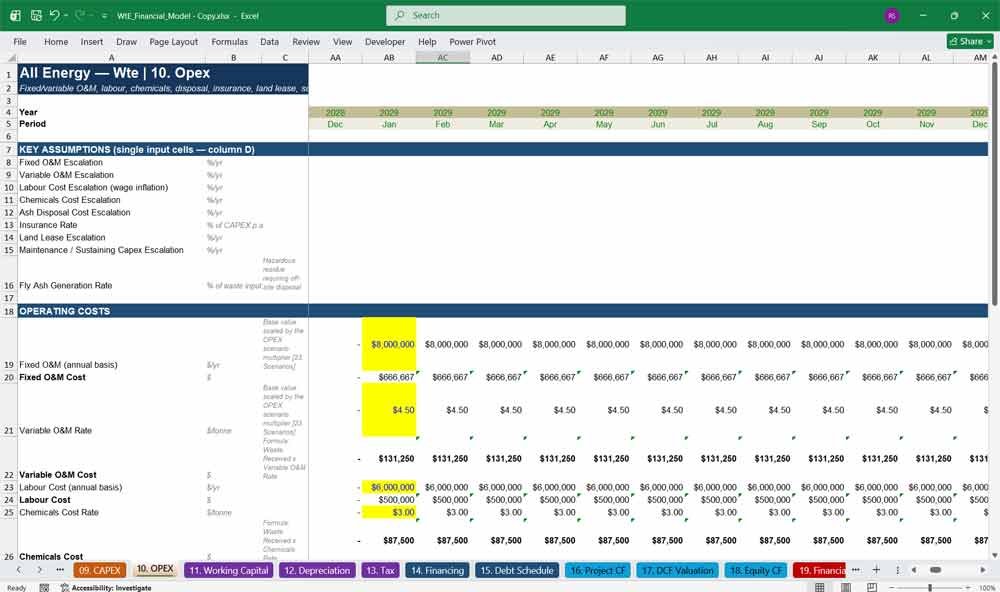
10. OPEX
A granular operating cost tab modelling fixed and variable O&M, labour, chemicals, ash disposal, insurance, land lease, and sustaining capex — giving this waste-to-energy financial model realistic, escalating cost assumptions instead of a single lump-sum opex line.
- Separately escalated fixed, variable, and labour cost lines
- Fly ash generation and disposal cost modelling
- Insurance tied dynamically to total capital cost
Waste To Energy Plant Financing & Tax
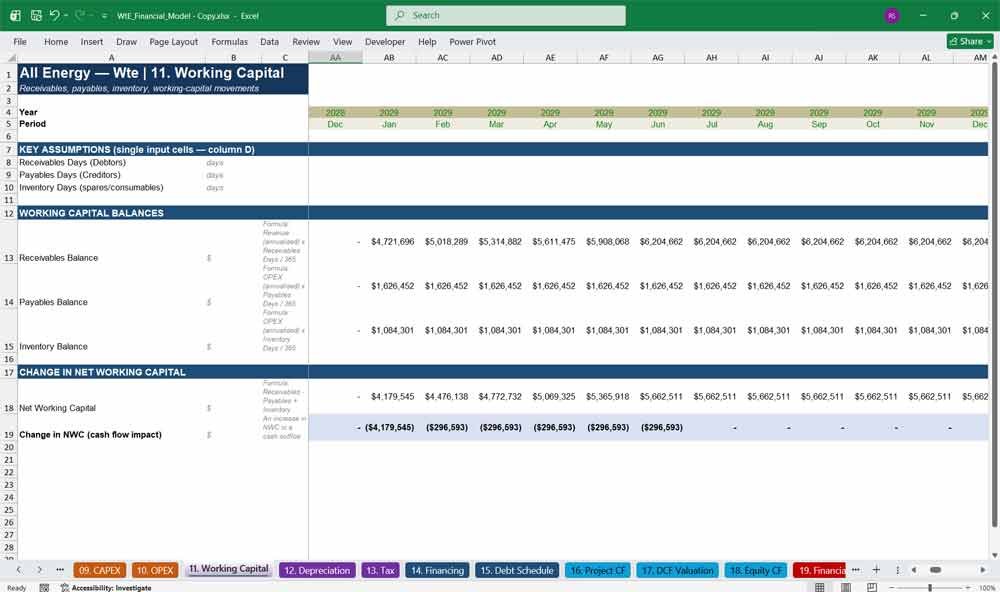
11. Working Capital
A working capital tab modelling receivables, payables, and inventory days to compute the change in net working capital — the often-overlooked driver that keeps this waste-to-energy project finance model’s cash flow statement and balance sheet fully reconciled.
- Configurable receivables, payables, and inventory day assumptions
- Automatic change-in-NWC cash flow linkage
- Balance-sheet-consistent treatment across monthly and annual periods
12. Depreciation
A straightforward depreciation schedule tracking the capitalised asset base — including capitalised construction-period interest — through to accumulated depreciation, tying directly into the tax and balance sheet tabs of this waste-to-energy financial model.
- Full asset base including capitalised interest during construction
- Clean accumulated depreciation rollforward
- Feeds Tax and Financial Statements tabs automatically
13. Tax
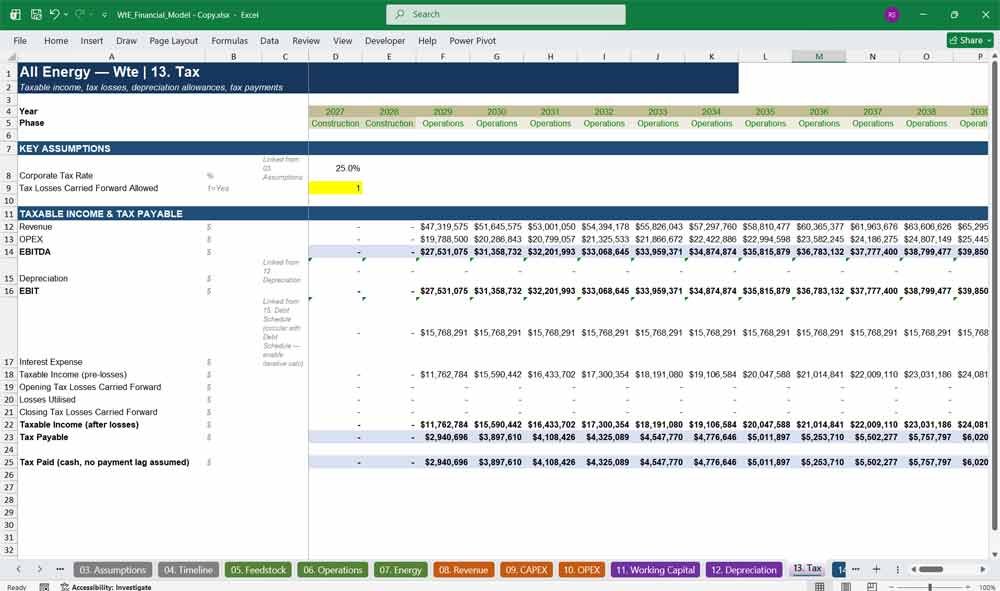
A dedicated tax tab computing taxable income, applying loss carryforwards, and calculating cash tax paid — a critical driver of after-tax project and equity returns in this waste-to-energy financial model’s IRR and NPV outputs.
- EBIT-to-taxable-income bridge with loss carryforward logic
- Cash tax paid feeds CFADS and equity distributions
- Transparent, auditable tax logic rather than a hardcoded rate
14. Financing
The capital structure tab setting leverage, construction and term debt, interest rates, tenor, grace period, DSCR target, and DSRA sizing — the financing assumptions that determine bankability in any waste-to-energy project finance model.
- Configurable debt/equity leverage split
- Separate construction and term-loan interest rate assumptions
- DSCR target and DSRA sizing (months of debt service)
15. Debt Schedule
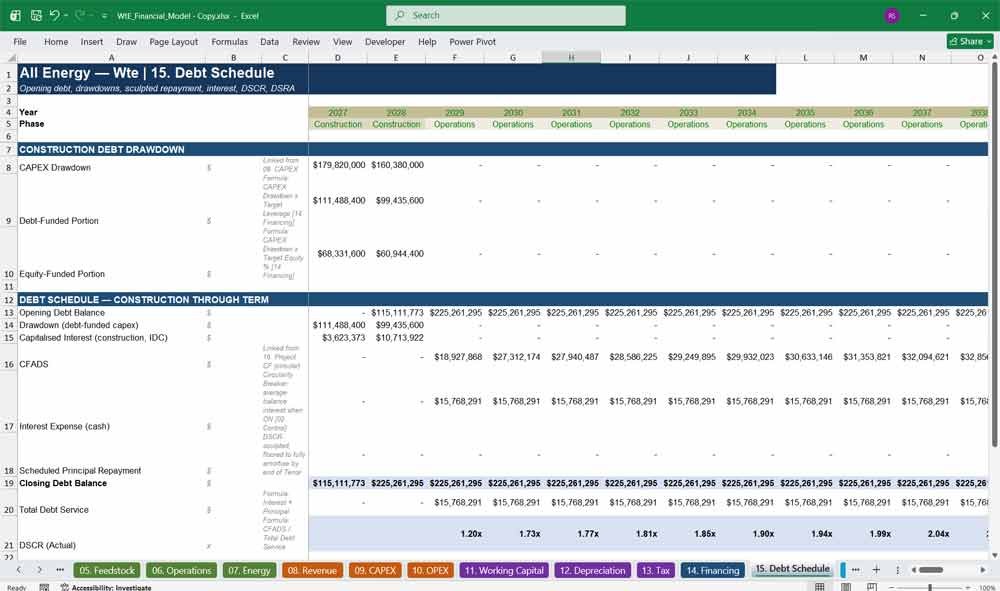
A fully dynamic, DSCR-sculpted debt schedule with an iterative-calculation circularity breaker — automatically sizing principal repayment to hold the covenant while capitalising construction interest, the technical heart of this waste-to-energy financial model’s project finance structure.
- DSCR-sculpted amortization with final-year balloon repayment
- Circularity breaker switch for safe iterative calculation
- Automatic DSRA funding, drawdown, and release logic
16. Project CF
The unlevered project cash flow tab consolidating revenue, opex, tax, and capex into CFADS and free cash flow to firm (FCFF) — the single source of truth feeding valuation, debt sizing, and equity returns throughout this waste-to-energy financial model.
- Clean CFADS build for debt service coverage testing
- Unlevered FCFF feeds the DCF Valuation tab directly
- Fully reconciled to the three financial statements
Key Financial Metrics For A Waste To Energy Plant
17. DCF Valuation
A discounted cash flow valuation tab computing WACC-based enterprise and equity value, project NPV, and unlevered project IRR — giving investors and lenders a clear, formula-driven valuation output from this waste-to-energy financial model.
- WACC-based discounting with a transparent discount factor build
- Enterprise value, net debt, and equity value bridge
- Cross-checked project IRR and NPV in one place
18. Equity CF
The equity cash flow tab modelling construction equity injections, reserve pre-funding, and 100%-payout distributions net of debt service and reserve funding — producing the levered equity cash flows and IRR that matter most to sponsors in this waste-to-energy financial model.
- Automatic reserve (DSRA/MMR) funding before any distribution
- Built-in equity top-up logic prevents negative cash positions
- Clean equity IRR memo cross-checked against the Returns tab
19. Financial Statements
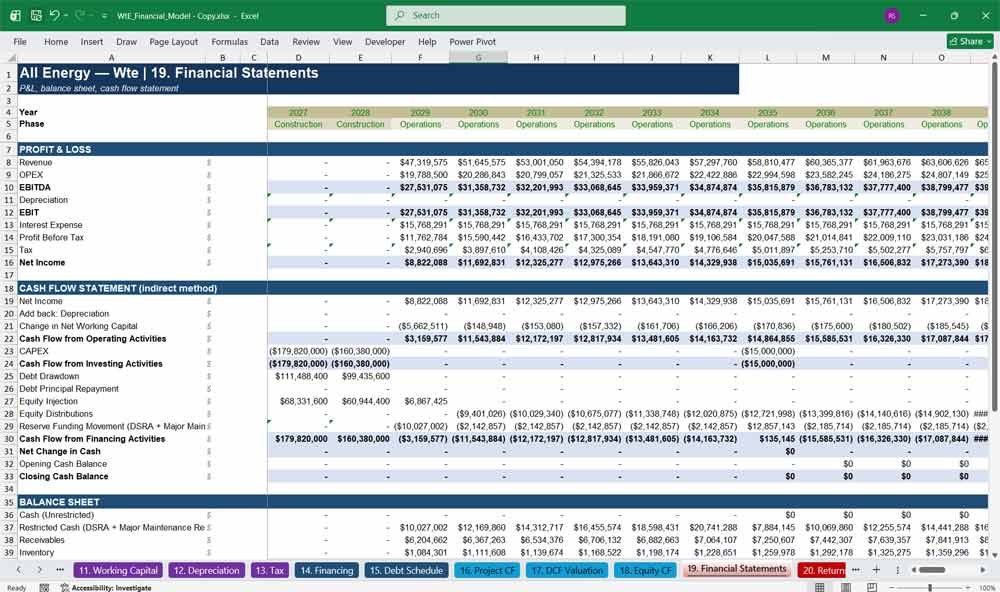
A fully integrated three-statement model — P&L, cash flow statement, and balance sheet — that ties out to zero in every period across construction, operations, and extension, giving this waste-to-energy financial model the credibility of an audited three-statement build.
- Balance sheet reconciles exactly across 29 modelled years
- Indirect-method cash flow statement with reserve accounting
- Restricted cash (DSRA + Major Maintenance Reserve) tracked separately
20. Returns
A dedicated returns tab summarising equity IRR, NPV, MOIC (multiple on invested capital), and payback period — the headline metrics investors ask for first when evaluating any waste-to-energy project finance opportunity.
- Equity IRR and NPV at your chosen hurdle rate
- MOIC and simple payback year calculated automatically
- Pulls directly from the Equity CF tab for consistency
21. DSCR Covenants
A covenant compliance tab testing actual DSCR against the lender’s target in every period, with a clean pass/fail flag — essential for demonstrating debt serviceability in any waste-to-energy project finance model presented to lenders.
- Period-by-period DSCR covenant pass/fail testing
- Floating-point-safe tolerance to avoid false covenant breaches
- Directly linked to the Debt Schedule’s sculpted repayment
22. Sensitivities
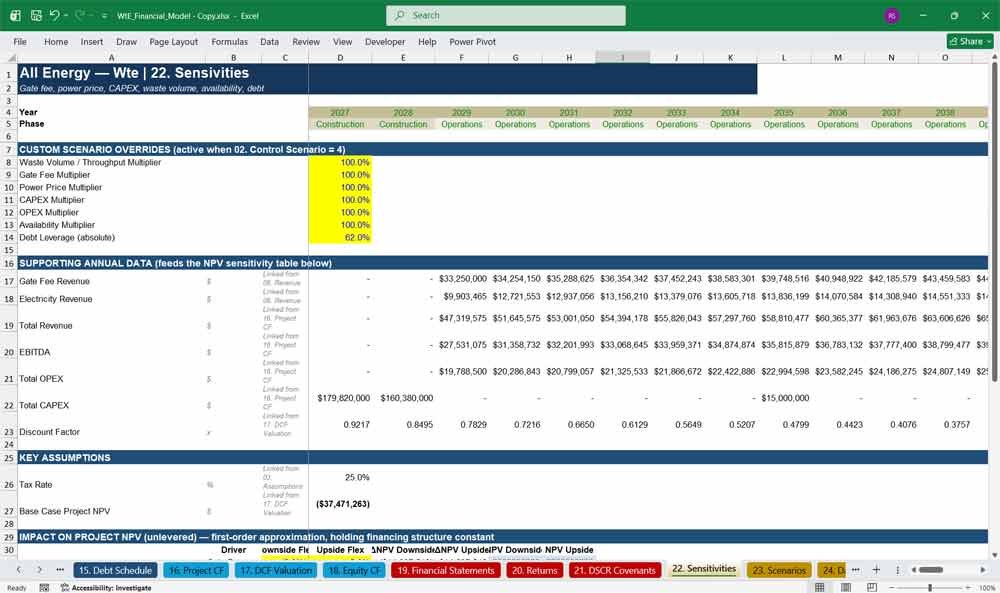
A first-order sensitivity table flexing key drivers — feedstock volume, electricity price, capex, opex, and financing terms — to show their individual NPV impact, helping you stress-test this waste-to-energy financial model before presenting it to investors or lenders.
- Multi-driver NPV sensitivity in one table
- Fast, formula-based flex percentages (no macros required)
- Highlights which assumptions matter most to project value
23. Scenarios
A scenario management tab with Base, Downside, Upside, and Custom cases controlled by a single switch on the Control tab — instantly re-running this waste-to-energy financial model’s entire output set under different market and operating conditions.
- One-cell scenario switch drives the whole model
- Base / Downside / Upside pre-built, plus a Custom case
- No need to duplicate tabs or break formula links
24. Dashboard
An executive dashboard summarising the waste-to-energy project’s key KPIs, charts, and headline returns on a single screen — built for board packs, lender presentations, and investment committee memos without digging through 25 tabs.
- At-a-glance KPI cards for IRR, NPV, MOIC, and DSCR
- Built-in charts visualising cash flow and debt paydown
- Presentation-ready output for investors and lenders
25. Checks
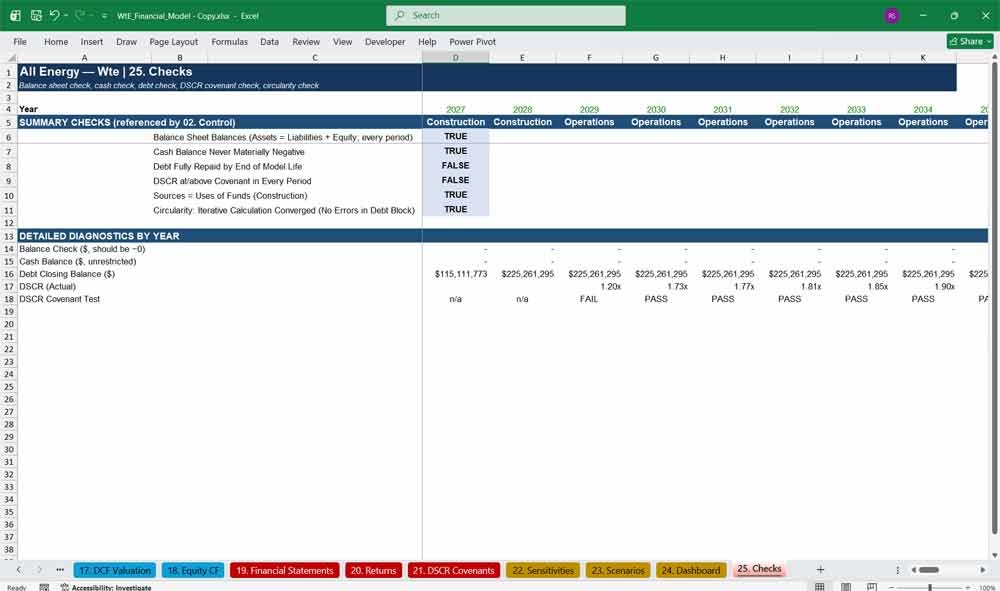
An automated validation tab confirming the balance sheet balances, cash never turns negative, debt fully repays, DSCR holds covenant, sources equal uses, and the iterative calculation converges — giving buyers of this waste-to-energy financial model full confidence in its integrity.
- Six automated pass/fail integrity checks, model-wide
- Year-by-year balance sheet and cash diagnostics
- Verifies convergence of the circular DSCR debt calculation
Wte Model Frequently Asked Questions
Q: What exactly do I get when I buy this waste-to-energy financial model?
A: You receive a single, fully built Excel workbook (.xlsx) with 25 linked tabs covering construction, a 25-year PPA operating period, and an optional 2-year extension. It comes pre-populated with realistic, illustrative USD assumptions across feedstock, plant operations, revenue, costs, and financing, so you can review a working model immediately and then replace the inputs with your own project’s numbers.
Q: Is the model locked, or can I edit every assumption?
A: Every input cell is unlocked, colour-coded, and clearly labelled. Nothing is hidden behind a password or a black-box macro — you can trace every formula back to its source, change any assumption, and see the entire model recalculate in real time.
Q: What version of Excel do I need, and does it work in Google Sheets?
A: The model is built with standard Excel functions and is compatible with modern versions of Microsoft Excel (2016 and later, including Microsoft 365). It uses iterative calculation for the circular debt-sizing logic, so you’ll need to enable that setting (a one-time checkbox in Excel’s calculation options) — full instructions are included on the Control tab. It has not been tested in Google Sheets, which handles circular references differently.
Q: Why does the model use “circular” or “iterative” calculations — do I need to do anything special?
A: Realistic project finance debt is sized using a DSCR-sculpted repayment schedule, which is inherently circular (debt service depends on cash flow, which depends on debt service). The model includes a circularity breaker switch on the Control tab so you can safely turn the circular logic on or off, and Excel’s iterative calculation setting is pre-configured in the file — you may just need to confirm it’s enabled the first time you open it.
Q: Can I resize the plant, change the feedstock mix, or model a different country’s currency?
A: Yes. Plant capacity, throughput, feedstock tonnage, calorific value, and composition are all editable on the Feedstock and Operations tabs. The model is built in USD for a US-style jurisdiction, but because every rate and formula is transparent, you can adapt currency symbols, tax rates, and financing conventions to another market with straightforward edits.
Q: Does this model actually size debt and test DSCR covenants automatically?
A: Yes. The Debt Schedule tab sculpts principal repayment to a target DSCR you set on the Financing tab, funds a debt service reserve account (DSRA), and includes a final-year balloon repayment. The DSCR Covenants tab then tests actual DSCR against your covenant in every period with a clear pass/fail flag.
Q: Is this model suitable for raising project finance debt or for lender due diligence?
A: The model is built to the standards lenders expect from a bankable project finance model — a fully integrated three-statement output, DSCR-based debt sizing, a debt service reserve account, sensitivity analysis, and an automated Checks tab confirming the balance sheet ties out, cash never goes negative, and debt fully amortizes. It’s an excellent starting structure for a term sheet or information memorandum, though your final lender package should always reflect your project’s actual contracts, permits, and quotes.
Q: Does the model include scenario and sensitivity analysis?
A: Yes. The Scenarios tab lets you switch between Base, Downside, Upside, and a Custom case from a single control cell, instantly re-running every output in the model. The Sensitivities tab separately flexes key drivers — feedstock volume, electricity price, capex, opex, and financing terms — to show their individual impact on project NPV.
Q: What happens if I don’t exercise the optional 2-year extension period?
A: A single switch on the Control tab turns the extension on or off. When it’s off, the model cleanly winds down at the end of Year 25 — revenue, costs, and financing all zero out for the extension years, and the model has been tested to confirm the balance sheet still ties and cash never runs negative in either case.
Q: Is there a summary view I can show investors without walking them through 25 tabs?
A: Yes — the Dashboard tab consolidates the model’s headline KPIs (IRR, NPV, MOIC, DSCR) and key charts onto a single screen, and the Returns tab gives a clean one-page summary of equity returns. Both are designed to be presentation-ready for board packs or investment committee memos.
Q: Can this model be adapted for a different renewable energy or infrastructure project?
A: While it’s purpose-built for a waste-to-energy plant under a PPA, the underlying architecture — construction drawdown, DSCR-sculpted project finance debt, three-statement integration, scenario switching, and automated checks — is common to most infrastructure and energy project finance models. With moderate rework of the Feedstock, Operations, and Energy tabs, it can be adapted to other thermal, biomass, or similar power generation assets.
Final Notes on the Financial Model
This 25 Year Waste To Energy Plant Financial Model must focus on balancing capital expenditures with steady revenue growth from Electricity Sales, Recycled Materials Sales, Recovered Heat Sales, etc. By optimizing operational costs, power efficiency, and maximizing high-margin services like Eelectricity sales and Gate Services, the model ensures sustainable profitability and cash flow stability.