
Physiotherapy Clinic Financial Model Template
Build a lender-ready physiotherapy clinic financial model template in Excel in hours rather than weeks. This fully integrated 16-tab workbook combines a bottom-up revenue forecast, staffing, operating costs, capex, working capital, profit and loss, cash flow, balance sheet, debt funding and tax in one transparent, formula-driven physio clinic business plan template. Three years of monthly history and a five-year monthly forecast are included, all in USD, so you can present a credible financial picture to banks, investors, partners and buyers.
Financial Model for A Physiotherapy Clinic
Unlike a static template, this physiotherapy financial forecast starts where real clinics start: clinicians, available hours, appointment capacity, utilisation and average fee. Enter your treatment rooms, opening hours, clinician headcount, service mix, payer mix, cancellation rates and salaries, and the model calculates revenue, EBITDA, cash and funding needs month by month. Change one start date on the Assumptions tab and every date, year header and inflation index updates automatically. Inputs are colour-coded and clearly separated from formulas, so the model stays easy to audit and easy to update.
Whether you are opening a first clinic, adding a second location, applying for a bank loan, preparing an investor pitch or valuing a physiotherapy practice for sale, the workbook gives you what decision-makers ask for: a KPI dashboard, base, upside and downside scenarios, sensitivity tables, and 16 built-in integrity checks including a balance-sheet check that reads zero in every month. Track utilisation, revenue per physio, EBITDA margin, net debt and closing cash with confidence, then copy the results straight into your business plan or lender pack.
Why Buy This Model?
Building a physiotherapy clinic forecast from scratch means designing capacity logic, payroll, property costs, depreciation, debt schedules, tax and three linked financial statements, then proving that they all reconcile. This model does that work for you. Revenue is built the way clinics really earn it, from clinicians, hours, rooms, utilisation, cancellations, payer mix and fees, rather than a single growth percentage. Every figure is a visible formula, every input is colour-coded, and 16 automated checks confirm the balance sheet, cash flow and schedules tie out in every month. You can test hiring plans, a second location, pricing changes and funding structures in minutes, compare base, upside and downside scenarios, and see the impact on EBITDA and cash before you commit. The result is a clear, professional set of projections that saves weeks of spreadsheet work and helps you have better conversations with lenders, investors, partners and your own team. It is a financial modelling tool, not tax, legal or investment advice, so have your accountant review the assumptions before you rely on it.
Tab-by-Tab Overview
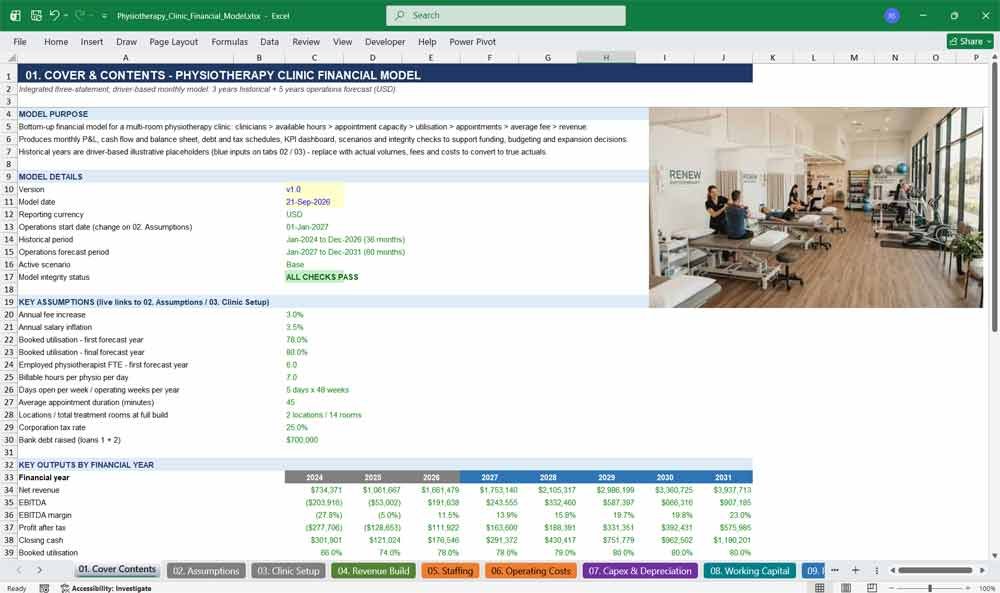
01. Cover Contents
The Cover Contents tab gives your physiotherapy clinic financial model a front page: model purpose, version, key assumptions, headline annual results, colour legend, clickable navigation to all sixteen tabs, and an integrity status showing lenders and investors that everything reconciles.
Highlights
- Model purpose, version and model date in one glance
- Live links to key assumptions such as fee growth, utilisation, tax rate and debt raised
- Annual snapshot of net revenue, EBITDA, margin, profit after tax, closing cash, utilisation and appointments
- Clickable navigation to every tab, with a colour legend for inputs, formulas and links
- Green PASS or red REVIEW status pulled straight from the Checks tab
02. Assumptions
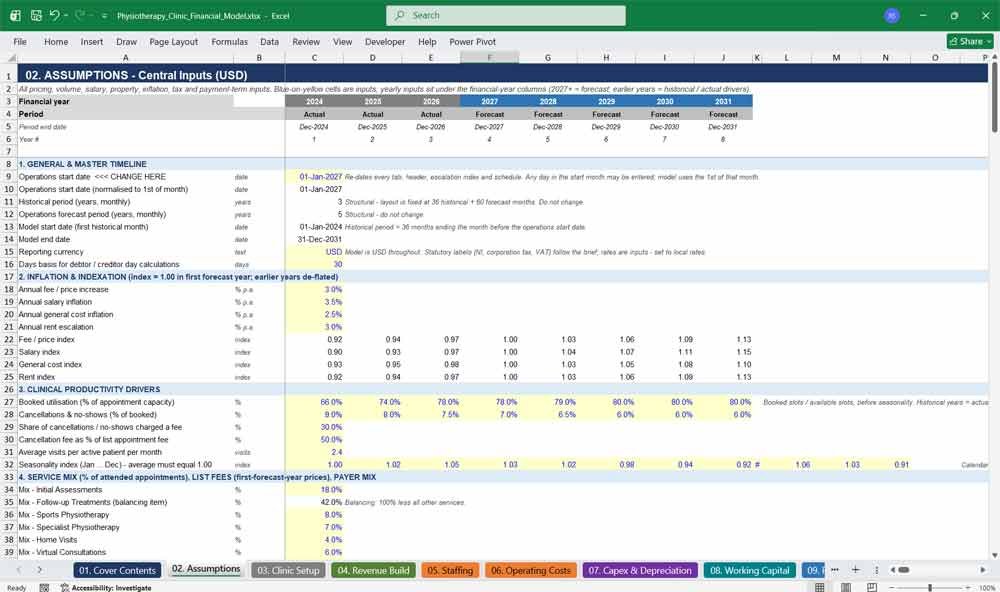
The Assumptions tab is the control centre for your physiotherapy clinic forecast. Change pricing, volumes, salaries, rent, inflation, tax, payment terms and the operations start date in one central place, and every calculation, date and financial statement updates automatically everywhere.
Highlights
- One start-date input re-dates the whole model, including every year header
- Yearly utilisation and cancellation rates, with separate historical and forecast years
- Eight service lines with mix percentages and list fees, plus four payer types with fee realisation and days to collect
- Salaries, employer NI, pension, bonus, property, marketing, technology, admin and insurance inputs
- Capex, useful lives, leases, working-capital days, loans, equity, dividends and tax rates
- Fee, salary, cost and rent inflation indices calculated automatically
Physiotherapy Clinic Revenues & Costs
03. Clinic Setup
The Clinic Setup tab defines your physiotherapy practice: opening date, treatment rooms, operating hours, days open, appointment length, billable hours per clinician and locations. Yearly clinician headcount then drives capacity, so you can test hiring plans and expansion timing quickly.
Highlights
- Two locations, each with its own room count and opening date
- Days open per week, operating weeks per year and daily operating hours
- Billable hours per day for physiotherapists, senior clinicians and locums
- Yearly full-time-equivalent plan for employed physios, senior physios and locums
- Capacity summary that flags when rooms, not clinicians, limit growth
04. Revenue Build
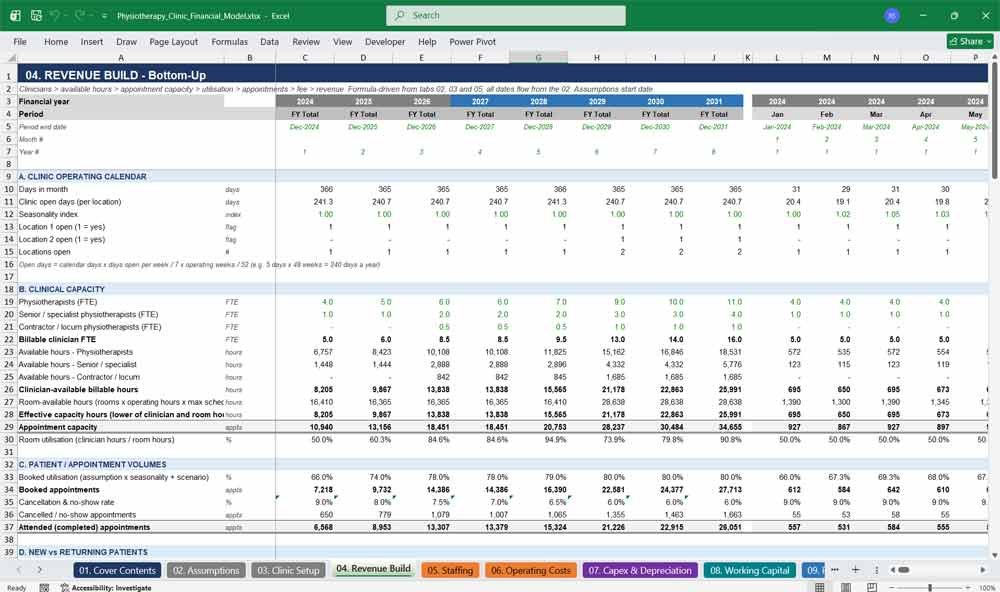
The Revenue Build tab forecasts physiotherapy clinic revenue bottom-up: clinicians, available hours, appointment capacity, utilisation, attended appointments, average fee and revenue by service. Seasonality, cancellations, payer mix, discounts and refunds turn capacity into realistic monthly income that lenders can trust.
Highlights
- Thirteen sections from operating calendar to revenue summary
- Capacity is the lower of clinician hours and room hours
- Booked utilisation with monthly seasonality, cancellations and no-shows
- New versus returning patients and active patient counts
- Eight appointment services plus classes, corporate contracts, retail and cancellation-fee income
- Payer-mix fee realisation, discounts, refunds and bad debts down to net revenue
- Revenue per clinician, revenue per available hour and marketing cost per new patient
05. Staffing
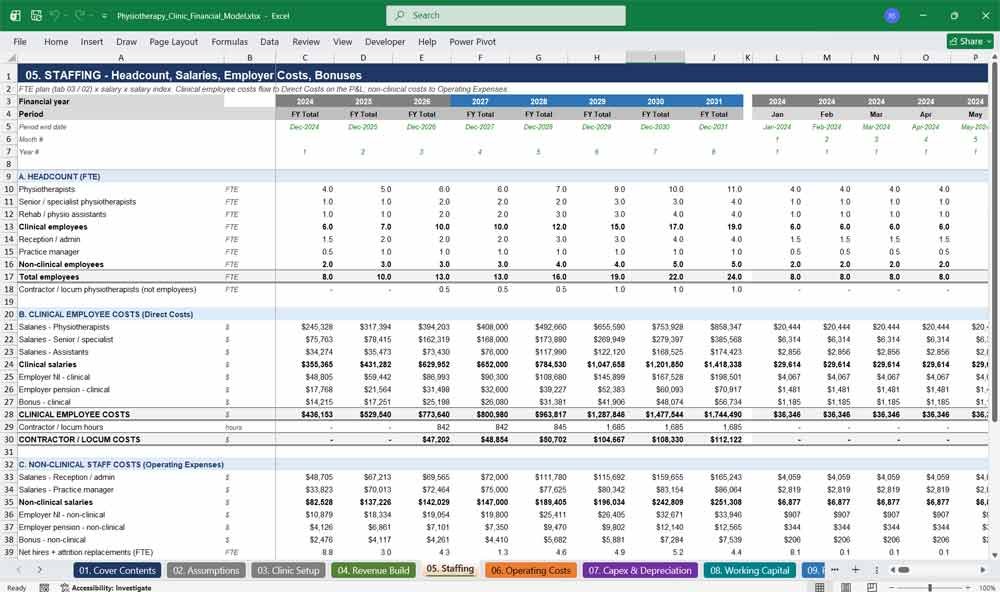
The Staffing tab models clinical and non-clinical payroll month by month: physiotherapists, senior clinicians, assistants, reception and practice management. It calculates salaries, employer NI, pension, bonuses, locum costs, recruitment and training, feeds payroll liabilities directly into the working capital tab.
Highlights
- Headcount by role, linked to the clinician plan
- Salaries indexed for inflation, with a scenario adjustment on forecast months
- Employer NI with a per-employee threshold, pension and bonus accruals
- Locum hours and hourly cost driven by open days
- Recruitment for growth and attrition replacement, plus training
- Clear split between clinical costs (direct) and non-clinical costs (operating expenses)
06. Operating Costs
The Operating Costs tab builds every overhead a physiotherapy clinic carries: rent, rates, utilities, cleaning, marketing, software, professional fees and insurance. Costs scale with locations and inflation, while consumables and card fees follow patient volumes automatically monthly, keeping margins realistic.
Highlights
- Direct non-staff costs: consumables, payment processing and other direct costs
- Nine property lines per location, including rent, rates and service charge
- Marketing, technology, professional and admin, and insurance categories
- Costs scale when the second location opens
- Scenario cost adjustment and inflation indices applied to forecast months
- Creditor and accrual bases prepared for the working-capital tab
07. Capex & Depreciation
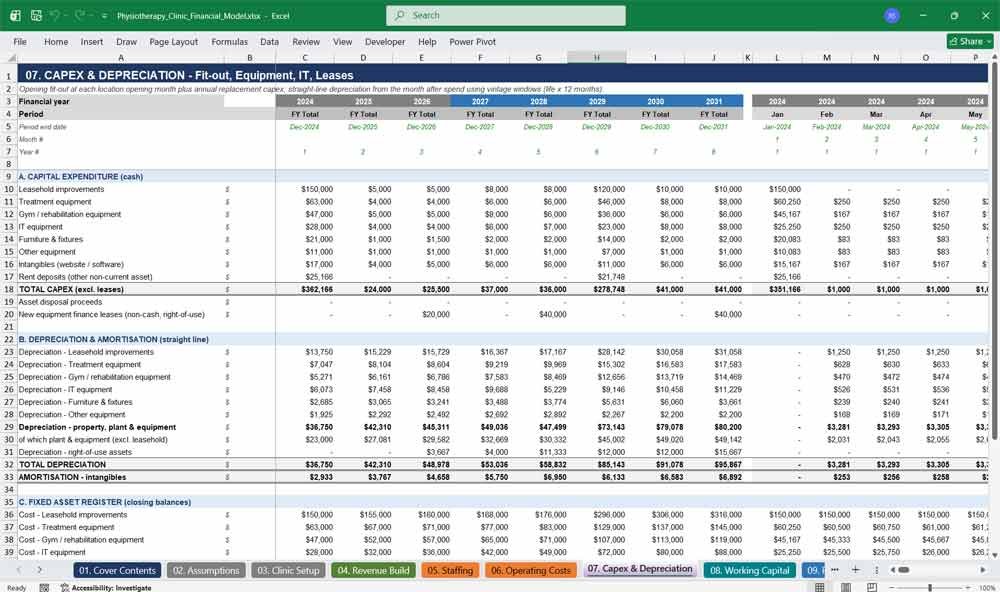
The Capex and Depreciation tab schedules physiotherapy clinic fit-out, treatment tables, rehabilitation equipment, IT, furniture and intangibles, then calculates straight-line depreciation and amortisation. Equipment leases, rent deposits and a full fixed asset register flow directly into the integrated balance sheet.
Highlights
- Opening fit-out for each location plus yearly replacement capex
- Seven asset categories, each with its own useful life
- Monthly straight-line depreciation calculated by purchase month
- Right-of-use assets from equipment finance leases
- Asset cost, accumulated depreciation and net book value register
- Rent deposits shown as other non-current assets
08. Working Capital
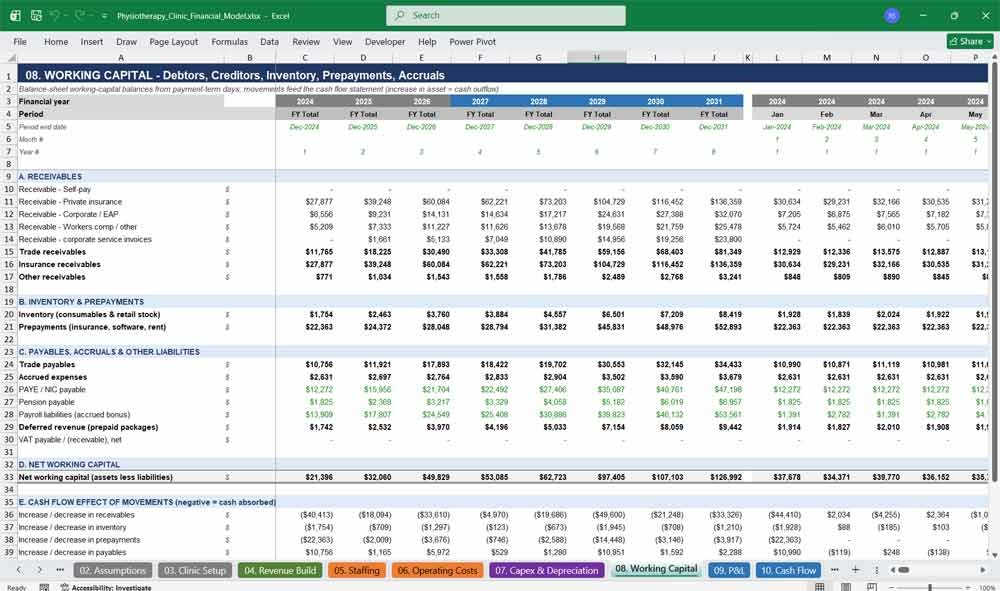
The Working Capital tab converts payment timing into cash. Debtors follow each payer’s days to collect, while inventory, prepayments, creditors, accruals, payroll liabilities and deferred revenue are modelled monthly, showing how growth absorbs or releases cash in your physiotherapy business.
Highlights
- Receivables by payer, with insurance receivables shown separately
- Inventory from consumables and retail stock days
- Prepayments for insurance, software and rent
- Trade payables, accrued expenses and deferred revenue from prepaid packages
- Payroll liabilities, PAYE and NIC, pension and VAT balances
- Net working capital and monthly cash effect
Physiotherapy Clinic Financial Statements
09. P&L
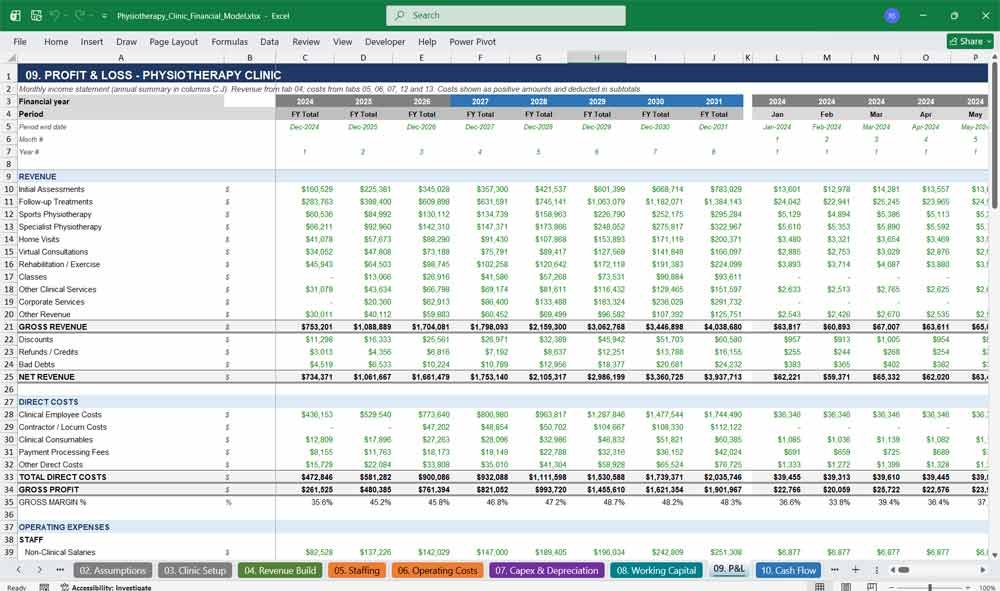
The P&L tab presents a complete monthly and annual income statement for your physiotherapy clinic, from eleven revenue lines through direct costs, gross profit, operating expenses, EBITDA, depreciation, finance costs and tax to profit after tax, with margins shown throughout.
Highlights
- Eleven revenue lines from initial assessments to corporate services
- Discounts, refunds and bad debts leading to net revenue
- Direct costs, gross profit and gross margin percentage
- Staff, property, marketing, technology, admin, insurance and other expenses
- EBITDA, EBIT, profit before tax and profit after tax
- Annual summary in the first columns and 96 months alongside
10. Cash Flow
The Cash Flow tab shows where your clinic’s money comes from and goes, using the indirect method. Starting from EBITDA, it adjusts for working capital, interest and tax, investing and financing flows, to reach closing cash matching the balance sheet.
Highlights
- Operating cash flow with each working-capital movement itemised
- Interest paid and corporation tax paid shown separately
- Investing cash flows by asset class, with disposal proceeds
- Financing flows for bank debt, shareholder loans, equity, dividends and lease principal
- Opening cash, net change and closing cash reconciled to the balance sheet
11. Balance Sheet
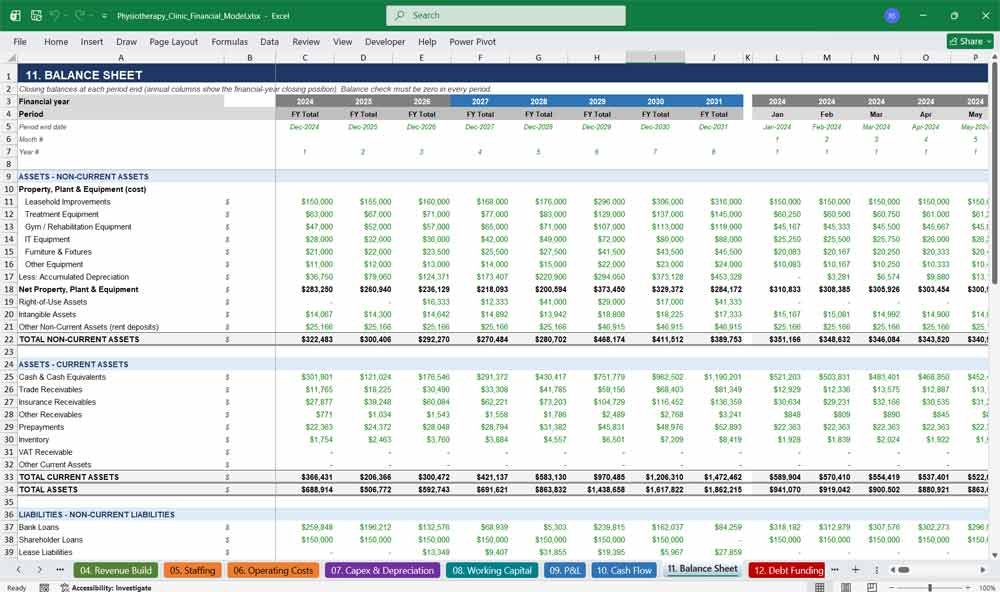
The Balance Sheet tab reports assets, liabilities and equity at every month-end and financial year-end. Property, equipment, receivables, cash, loans, leases, payables, tax and equity are all formula-linked, and a built-in balance check confirms the entire physiotherapy model always balances.
Highlights
- Fixed assets by class with accumulated depreciation and net book value
- Right-of-use assets and intangibles
- Trade, insurance and other receivables, prepayments, inventory and cash
- Bank loans, shareholder loans, lease liabilities and deferred tax
- Retained earnings, current-year profit and dividends in equity
- Balance check that reads zero in every period
12. Debt Funding
The Debt Funding tab models the capital behind your physiotherapy clinic: two bank term loans, a shareholder loan, equity injections, dividends and equipment leases. Interest, fees, grace periods and repayments calculate monthly, feeding the P&L, cash flow and balance sheet.
Highlights
- Two term loans with amount, term, grace period, rate and arrangement fee
- Shareholder loan with monthly interest and bullet repayment
- Equity injections split between share capital and share premium
- Dividends based on a payout percentage of prior-year profit
- Equipment lease schedules with interest and principal
- Total debt and net debt or net cash tracked monthly
13. Tax
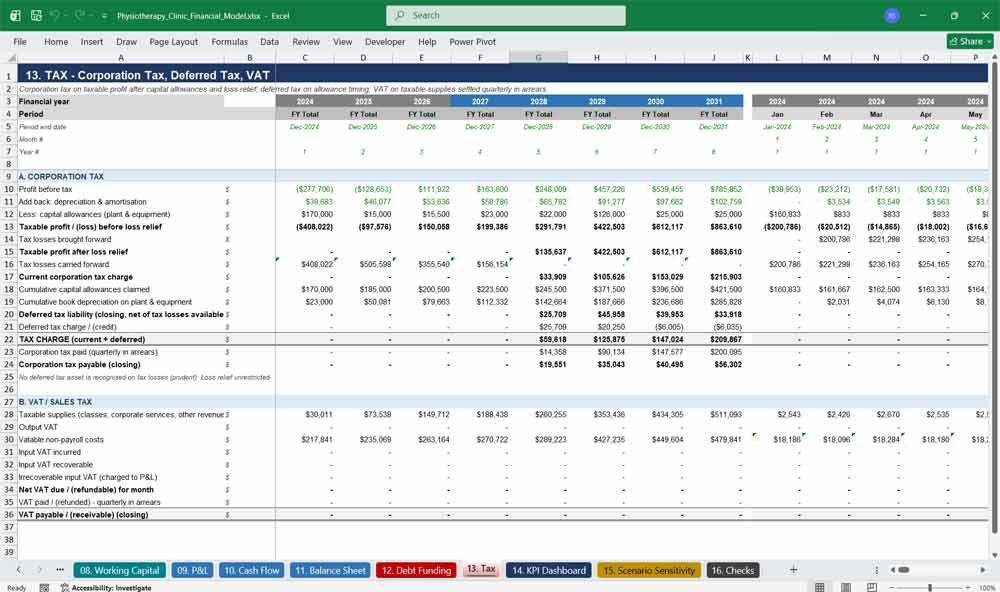
The Tax tab calculates corporation tax on taxable profit after capital allowances and loss relief, plus deferred tax and an optional VAT module. Payment timing feeds the cash flow, so your physiotherapy forecast shows tax as it is actually paid.
Highlights
- Capital allowances on plant and equipment
- Tax losses carried forward and used against later profits
- Deferred tax liability presented net of available losses
- Corporation tax payable and quarterly payments
- Optional VAT on taxable supplies, switched off by default and adjustable
- Every rate is an input on the Assumptions tab
14. KPI Dashboard
The KPI Dashboard tab turns your physiotherapy forecast into clear performance indicators: revenue, patients, utilisation, revenue per physio, EBITDA margin, cash and net debt, with charts. It helps owners, lenders and investors quickly judge physiotherapy clinic performance at a glance.
Highlights
- Revenue growth, attended appointments, new and active patients
- Booked and attended utilisation
- Revenue per physio and revenue per available hour
- Clinical staff and occupancy costs as a percentage of revenue
- Cash, debt, net debt and employee numbers
- Four built-in charts covering revenue, EBITDA, cash, utilisation and volumes
Physiotherapy Clinic Sensitivities & Checks
15. Scenario Sensitivity
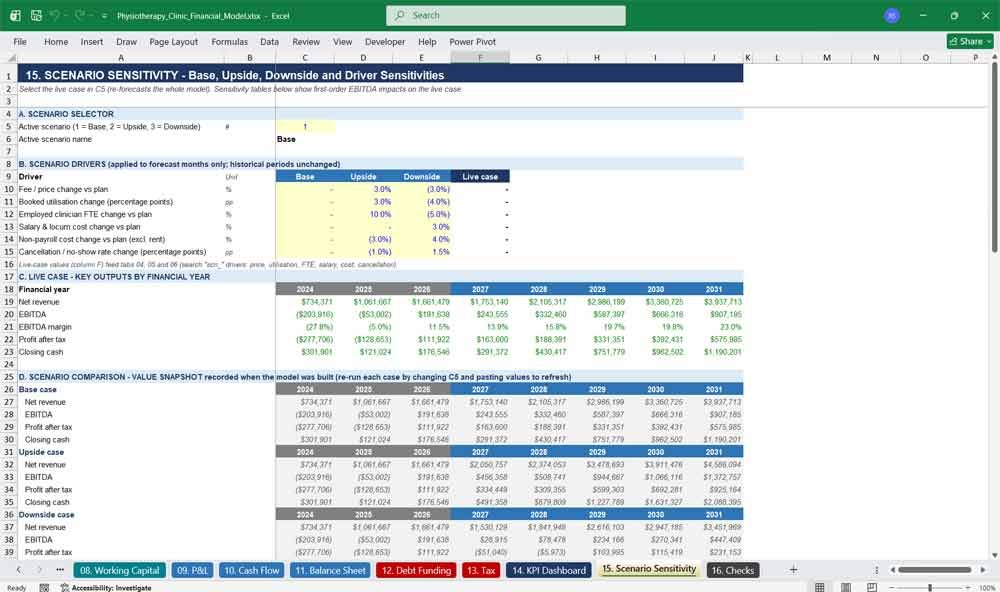
The Scenario Sensitivity tab stress-tests your physiotherapy clinic business plan. Switch between base, upside and downside cases, then measure how price, utilisation, staffing, cost and cancellation changes move EBITDA, so you can plan for risk properly before approaching a lender.
Highlights
- One-cell scenario selector that re-forecasts the entire model
- Six editable drivers: price, utilisation, clinician FTE, salaries, costs and cancellations
- Live-case results by year
- Base, upside and downside comparison snapshot
- Sensitivity tables showing EBITDA impact of each shock, up and down
16. Checks
The Checks tab protects model integrity with sixteen automated tests covering balance sheet, cash, EBITDA, revenue, equity, debt, fixed assets, working capital, capacity, timeline and formula errors. Each period returns PASS or REVIEW, giving reviewers confidence in your physiotherapy model.
Highlights
- Balance-sheet and cash reconciliation checks every month
- Independent EBITDA recomputation against the P&L
- Debt, fixed asset and working-capital tie-outs
- Capacity, room and funding warnings, including negative cash
- Formula-error scan across every statement tab
- Overall status displayed on the Cover tab
Physiotherapy Frequently Asked Questions (Faq)
Q: What exactly do I get when I buy this model?
A: You get a single Excel workbook with 16 colour-coded tabs: Cover Contents, Assumptions, Clinic Setup, Revenue Build, Staffing, Operating Costs, Capex & Depreciation, Working Capital, P&L, Cash Flow, Balance Sheet, Debt Funding, Tax, KPI Dashboard, Scenario Sensitivity and Checks. It is pre-loaded with an illustrative example clinic so you can see how everything works before entering your own numbers.
Q: What software do I need?
A: Microsoft Excel is recommended. The workbook uses standard Excel functions only (such as SUMIFS, INDEX, MATCH, EOMONTH and IFERROR) and contains no macros, add-ins or external links, so there is nothing to enable or install. It has been recalculated and tested in LibreOffice; other spreadsheet applications may open it, but Excel gives the most reliable results.
Q: How long is the forecast, and what time periods does it cover?
A: The model runs monthly for 96 months: 3 years of historical periods followed by 5 years of operations forecast. Annual totals appear alongside the months, and years are labelled 2027, 2028, 2029 and so on rather than Year 1, Year 2.
Q: Can I change the start date?
A: Yes. Enter a new operations start date in the highlighted cell at the top of the Assumptions tab. Every date, year header, inflation index, loan drawdown and opening date across all 16 tabs updates automatically. The model has been tested with a mid-year start date, and all integrity checks still pass.
Q: Are the three historical years real accounts?
A: No. The historical years are driver-based, illustrative figures generated from the same formulas as the forecast. To reflect your own history, replace the yearly inputs for headcount, utilisation, fees and costs with your actuals. The model does not import general ledger or bank data automatically.
Q: How is revenue calculated?
A: Revenue is built bottom-up: clinicians and their billable hours give available capacity, capped by the rooms you have; utilisation and seasonality give booked appointments; cancellations give attended appointments; attended appointments are split across services and multiplied by fees and payer-mix realisation. Discounts, refunds and bad debts then take you from gross to net revenue.
Q: Can I use it for a start-up clinic as well as an established one?
A: Yes. The model assumes the main clinic opens in the first model month, so you can use the first 36 months as your start-up ramp-up (for example, lower utilisation and fewer clinicians) or as actual trading history for an existing clinic. Either way, funding needs appear clearly in the cash flow and the Checks tab flags any month where cash would go negative.
Q: Does it work for clinics that bill insurance?
A: Yes. You set a payer mix (self-pay, private insurance, corporate or employee-assistance programmes, and other payers), the share of the list fee each payer actually pays, and how many days each takes to pay. Insurance receivables are reported separately on the balance sheet. It does not model individual insurance claims or billing codes.
Q: Is it suitable for clinics outside the US?
A: The model reports in US dollars, but the numbers are currency-neutral. Statutory labels follow common UK terms, such as employer NI, PAYE, corporation tax and VAT. Every rate is an input, so you can set them to match your local payroll taxes and corporate tax rate. VAT or sales tax is switched off by default and can be activated. It is not tailored to any one tax regime, so confirm treatment with your accountant.
Q: Can I change the currency symbol?
A: Yes. The figures themselves are unitless, so you can enter values in any currency. The dollar display format and the currency label can be changed using Excel’s standard number formatting and the currency input on the Assumptions tab.
Q: How many clinicians, rooms and locations can I model?
A: There is no fixed clinician limit: headcount by role is set as a yearly full-time-equivalent plan. The model includes two locations, each with its own number of rooms and opening date. If rooms limit capacity before clinicians do, the model uses the lower figure and the Checks tab flags it.
Q: I only have one clinic. Can I switch off the second location?
A: Yes. Set the second location’s opening beyond 60 months on the Clinic Setup tab, and set the second bank loan amount to zero on the Assumptions tab. The second-location fit-out, rent, marketing uplift and loan then no longer affect the forecast.
Q: Can I run base, upside and downside scenarios?
A: Yes. A one-cell selector on the Scenario Sensitivity tab switches between base, upside and downside, applying editable changes to price, utilisation, clinician headcount, salaries, non-payroll costs and cancellation rates from the forecast start. The whole model re-forecasts, and separate sensitivity tables show the EBITDA effect of price, utilisation, staffing, salary, cost and cancellation shocks.
Q: How do I know the numbers are right?
A: The Checks tab runs 16 automated tests every month, including that the balance sheet balances, closing cash equals cumulative cash flow, EBITDA agrees with an independent recalculation, and debt, fixed assets and working capital tie to their schedules. These tests confirm internal consistency; they are not an external audit, so your assumptions should still be reviewed.
Q: Will this help me get a bank loan or investment?
A: The model produces the projected P&L, cash flow, balance sheet, debt schedules and key ratios that lenders and investors normally expect, in a clear, auditable format. It cannot guarantee approval: outcomes depend on your assumptions, track record and the lender’s own criteria. Use realistic inputs and take professional advice.
Q: Do I need advanced Excel or finance skills?
A: No. Inputs are blue text on a yellow background, formulas are black, and links from other tabs are green, so it is clear where to type. Basic familiarity with Excel and an understanding of your clinic’s numbers are enough. An accountant can help review tax, financing and valuation assumptions.
Q: Are the formulas locked or hidden?
A: No. There are no passwords or hidden sheets, and every calculation is a visible formula you can trace and adapt. Because the model is fully open, avoid typing over black formula cells; change inputs instead.
Conclusion & Key Metrics
Physiotherapy Clinic Financial Model financial KPIs that should be tracked:
- Gross Margin – (Revenue – COGS) / Revenue
- Net Profit Margin – Net Profit / Revenue
- Liquidity Ratio – Current Assets / Current Liabilities (should be >1)
- Break-even Point – When total revenue covers total costs.
- Average Revenue per Patient – Helps optimize pricing and marketing efforts.
Download Link On Next Page