
Packaging Manufacturer Financial Model Template
This Packaging Manufacturer Financial Model is a fully integrated Excel financial model built for flexible, rigid, paper, corrugated, carton, label, metal and glass packaging businesses. It combines three years of monthly historical actuals with a five-year monthly forecast and annual roll-up columns, so you can see month-by-month performance and full-year results side by side. Revenue, production capacity, cost of goods sold, operating expenses, capex, working capital, debt and tax all flow into a linked income statement, balance sheet and cash flow
Financial Model for a Packaging Manufacturer
Designed for packaging manufacturers, converters, investors, lenders and corporate finance teams, this packaging financial model shows how sales volume, selling prices and raw material costs drive margins. It models resin, polyethylene, paper, aluminium, steel and glass costs through a bill of materials linked to commodity price indices. Production line capacity, OEE, scrap rates and labour productivity show when capacity runs out and outsourcing is needed. Material cost pass-through, energy and freight surcharges reflect how packaging companies protect margins.
The model is ready to use for budgeting, bank lending, private equity due diligence, capacity planning and business plans. Change one start date and every tab re-dates automatically. Switch between seven scenarios, from Base Case to Severe Downside, to test cash runway, revolver headroom and debt covenants. A KPI dashboard, sensitivity matrices and 26 automated model checks make this packaging company financial model transparent, auditable and lender-ready. Colour-coded inputs, formulas and links make it easy to update with your own figures.
What’s Inside: Tab-by-Tab Guide
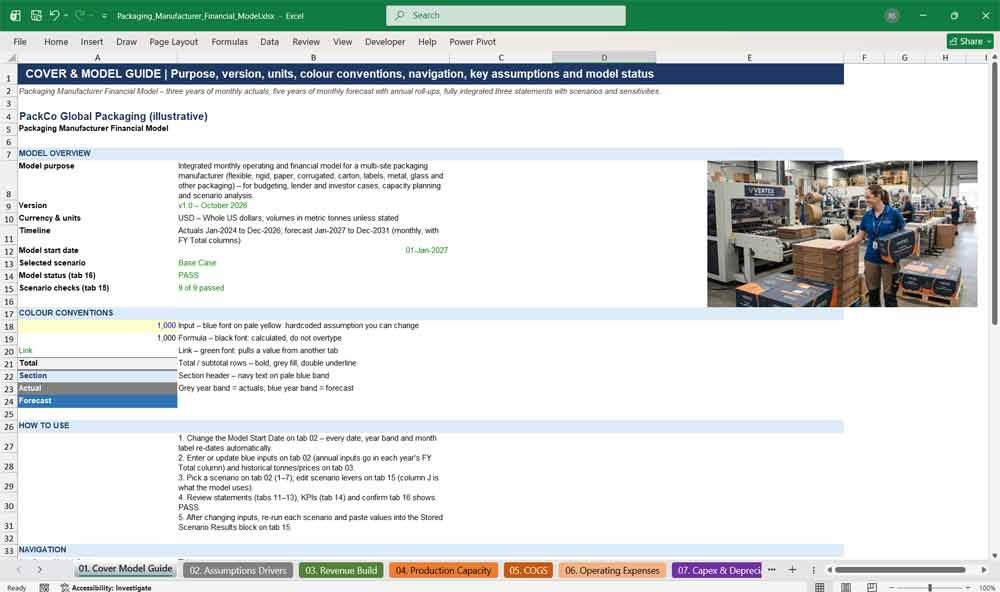
01. Cover Model Guide
The cover tab introduces the packaging manufacturer financial model with its purpose, version, currency, units and timeline. It explains the colour conventions, shows the live scenario and model status, and links to every tab so users can navigate quickly.
Highlights:
- Model purpose, version, units and timeline summary
- Colour legend for inputs, formulas, links and totals
- Clickable navigation to all 16 tabs
- Live model status and scenario check results
- Key assumptions for the first forecast year
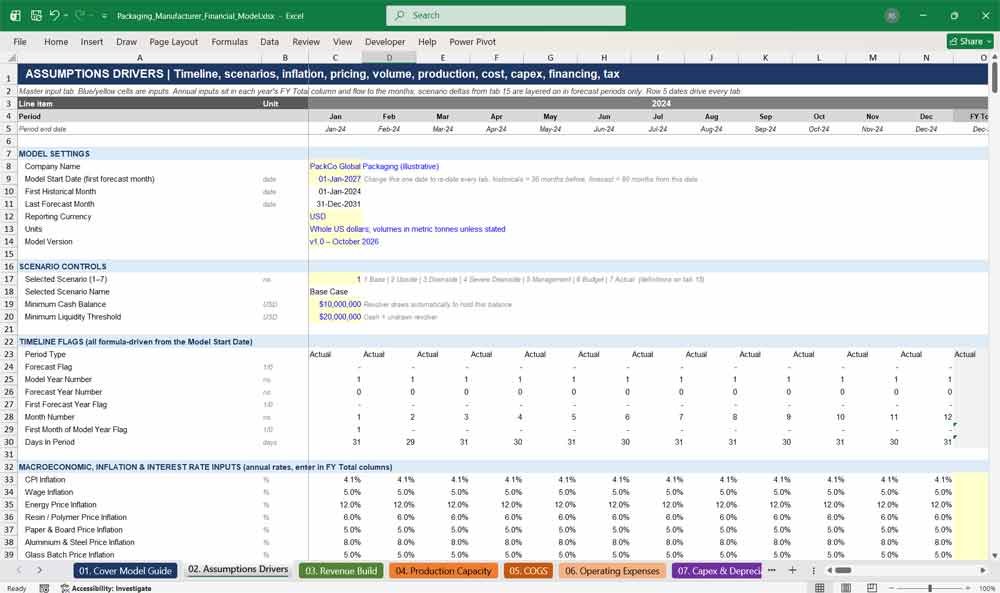
02. Assumptions Drivers
The assumptions tab holds every input that drives the packaging model: inflation, pricing, volume growth, product mix, bill of materials, labour rates, energy prices, tax and interest rates. One start date re-dates the entire workbook, and scenario controls sit here.
Highlights:
- Single model start date re-dates every tab automatically
- Scenario selector for seven pre-built cases
- Commodity price indices for polymer, paper, metals, glass and chemicals
- Product, customer and production line master tables
- Opening balance sheet that balances automatically
Packaging Manufacturer Revenues & Expenses
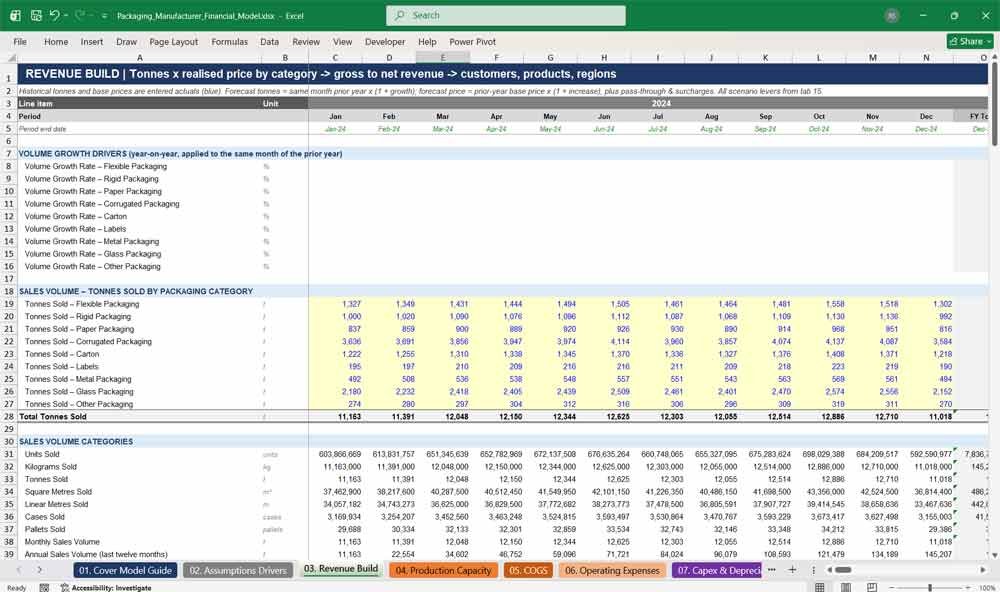
03. Revenue Build
The revenue build forecasts tonnes sold across nine packaging categories, then applies realised selling prices, surcharges and material cost pass-through. Gross revenue flows to net revenue after discounts, returns and allowances, with analysis by customer, product, material, region, industry, site and channel.
Highlights:
- Nine categories, from flexible packaging to glass and labels
- Volume forecasts preserve monthly seasonality
- Units, kilograms, square metres, cases and pallets sold
- Top ten customer revenue and concentration analysis
- Built-in check that revenue analysis reconciles to net revenue
04. Production Capacity
The production capacity tab models nine production lines across three sites, converting rated machine speeds, shifts and downtime into practical capacity. It calculates required production, outsourced volume, utilisation, OEE, scrap, labour hours and material consumption for each line and site.
Highlights:
- Theoretical and practical capacity by production line
- Automatic outsourcing when demand exceeds capacity
- OEE from availability, performance and quality yield
- Capacity expansion from growth projects, with ramp-up
- Finished goods and work-in-progress production planning
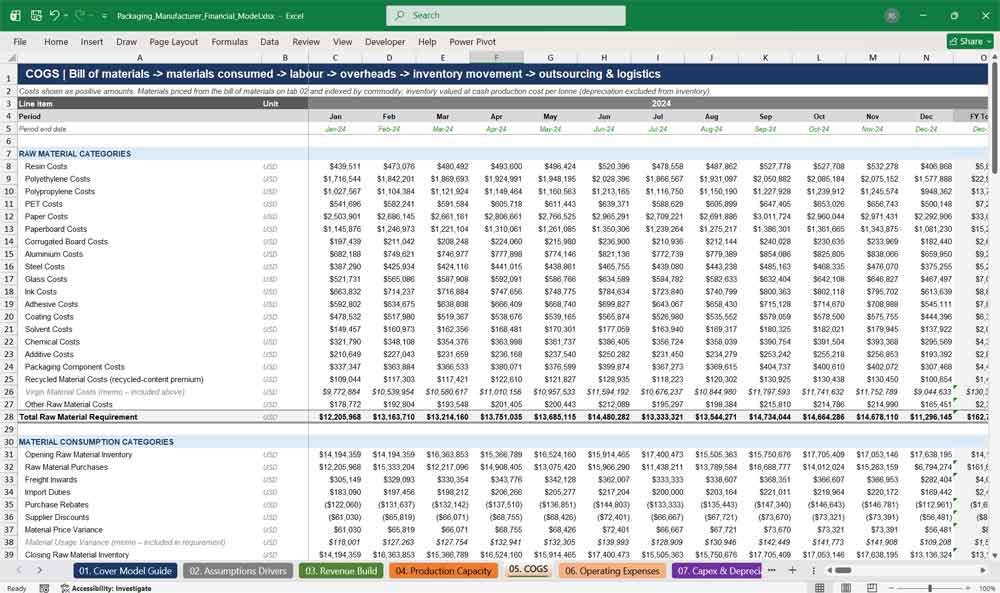
05. COGS
The COGS tab builds cost of goods sold from seventeen raw materials priced through a bill of materials and commodity indices. It adds direct labour, variable and fixed manufacturing overheads, inventory movements, outsourcing and logistics, then reports unit costs and cost-to-revenue ratios.
Highlights:
- Resin, polyethylene, paper, aluminium, glass and more
- Raw material inventory roll-forward with purchases and rebates
- Direct labour with overtime, shift premiums and pensions
- Energy costs driven by kWh per tonne by line
- Cost per unit, per kilogram and per tonne analysis
06. Operating Expenses
The operating expenses tab forecasts over seventy cost lines across sales and marketing, general and administrative, R&D, distribution, maintenance, property and other costs. Each line follows its own driver, either fixed and inflation-indexed or a percentage of revenue, with non-recurring items tracked separately.
Highlights:
- Line-by-line opex across seven categories
- Wage, CPI and rent indexation, plus headcount growth
- Separate non-recurring and impairment costs
- Fixed, variable and personnel cost analysis
- Opex as a percentage of revenue and per unit
07. Capex & Depreciation
The capex tab models maintenance capex and growth projects such as new production lines, moulding cells, tooling and printing presses. Spending flows through construction in progress to fourteen asset classes, with depreciation, intangible amortisation and right-of-use assets calculated by useful life.
Highlights:
- Eight growth projects with spend timing and commissioning dates
- Construction in progress transferring to asset classes
- Straight-line depreciation by asset class and useful life
- Capitalised development and software amortisation
- Depreciation split between COGS and operating costs
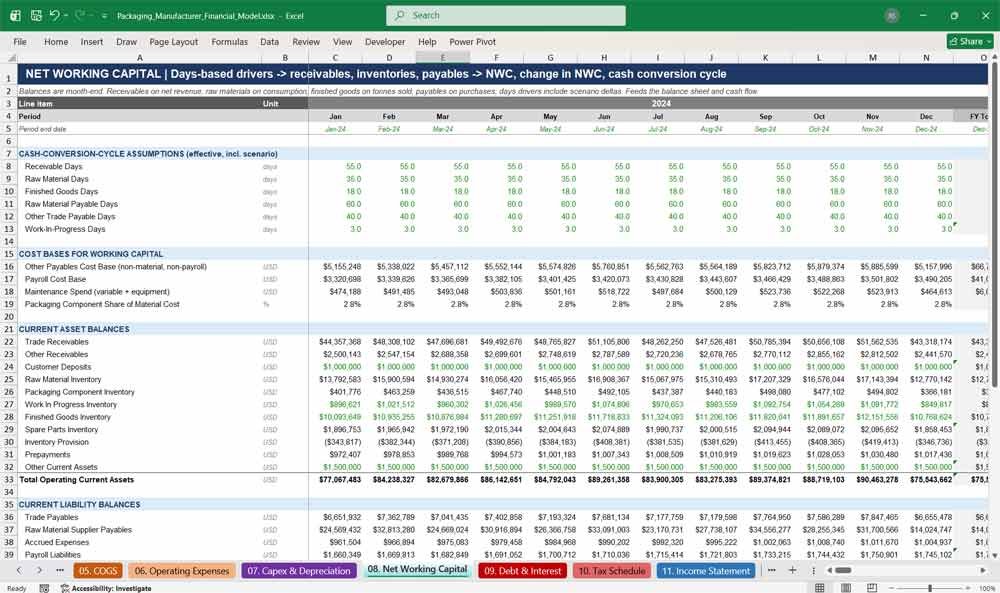
08. Net Working Capital
The net working capital tab calculates receivables, raw materials, work in progress, finished goods, payables and accruals using days-based drivers. It produces net working capital, the monthly change in working capital, inventory days, receivable days, payable days and the cash conversion cycle.
Highlights:
- Receivable, inventory and payable days drivers
- Separate raw material and packaging component inventory
- Inventory provisions for finished goods and raw materials
- Cash conversion cycle tracked monthly and annually
- Working capital as a percentage of revenue
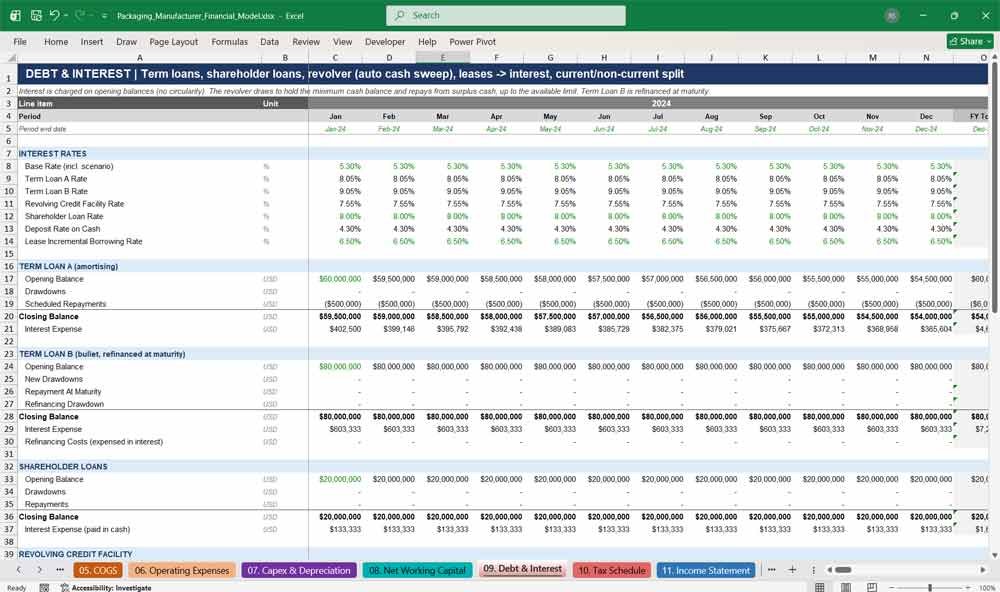
09. Debt & Interest
The debt tab models an amortising term loan, a bullet term loan with refinancing, shareholder loans, a revolving credit facility and leases. Interest is calculated on opening balances, and the revolver draws and repays automatically to protect the minimum cash balance.
Highlights:
- Term Loan A, Term Loan B and shareholder loans
- Revolving credit facility with automatic cash sweep
- Lease liabilities, lease interest and principal repayments
- Current and long-term debt classification
- No circular references in interest calculations
10. Tax Schedule
The tax schedule converts profit before tax into taxable income using capital allowances and non-deductible expenses. It tracks tax losses carried forward, current and deferred tax, the effective tax rate and quarterly cash tax payments, feeding the income statement and balance sheet.
Highlights:
- Taxable income with capital allowance adjustments
- Tax loss carry-forwards and utilisation
- Deferred tax liability and deferred tax asset
- Quarterly cash taxes paid in arrears
- Effective tax rate by month and year
Packaging Manufacturer Financial Statements
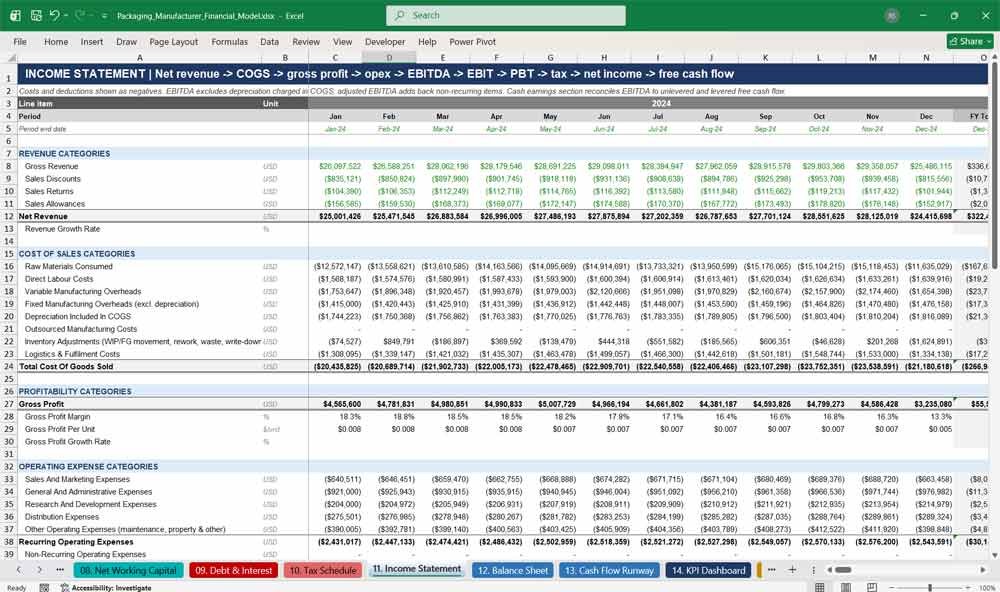
11. Income Statement
The income statement presents gross revenue through to net income, showing gross profit, EBITDA, adjusted EBITDA, EBIT and profit before tax. It includes growth rates, margins and per-unit earnings, plus a cash earnings bridge to unlevered and levered free cash flow.
Highlights:
- Monthly and annual profit and loss statement
- Gross margin, EBITDA margin and operating margin
- Adjusted EBITDA excluding non-recurring items
- Unlevered and levered free cash flow
- COGS and opex tie-outs to supporting tabs
12. Balance Sheet
The balance sheet shows assets, liabilities and equity every month, including inventories, fixed assets by class, leases, deferred tax and retained earnings. It reports working capital, leverage and liquidity ratios, and a balance check confirms it balances in every period.
Highlights:
- Fourteen fixed asset classes plus construction in progress
- Equity with retained earnings, current year earnings and dividends
- Net debt to EBITDA and debt service coverage ratio
- Current ratio and quick ratio
- Balance check in every month and year
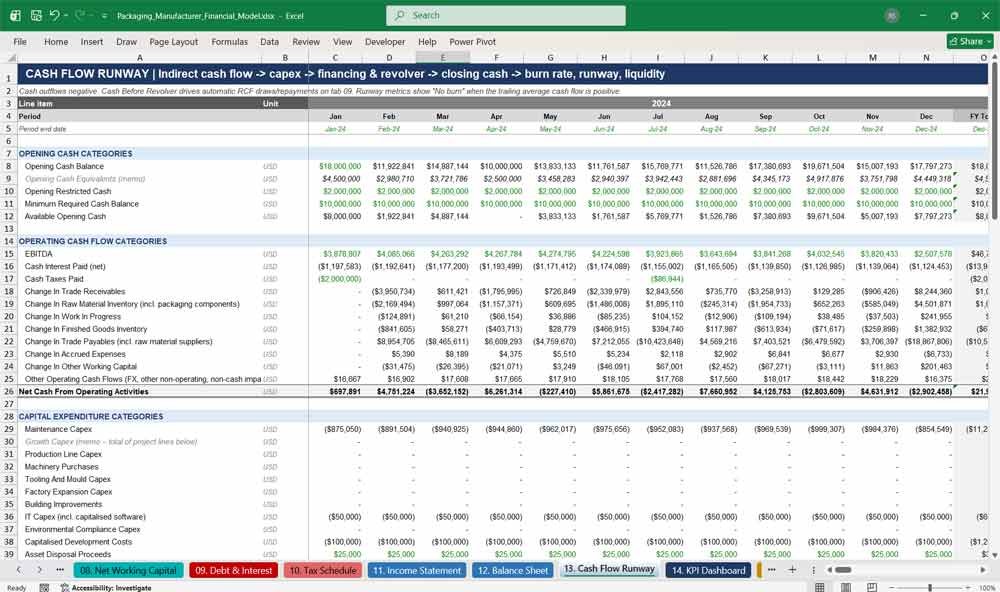
13. Cash Flow Runway
The cash flow runway tab builds operating, investing and financing cash flows using the indirect method. It tracks closing cash, revolver drawings and total liquidity, then calculates monthly burn rate, cash runway, minimum cash breach dates and funding requirements.
Highlights:
- Indirect cash flow from EBITDA
- Burn rate averages over 3, 6 and 12 months
- Cash runway in months and days
- Funding requirement and peak funding analysis
- Interest coverage and operating cash flow coverage
Packaging Manufacturer Key KPIs
14. KPI Dashboard
The KPI dashboard summarises eight years of annual performance on one page: revenue, gross margin, EBITDA margin, unit costs, utilisation, scrap, OEE, working capital days and free cash flow. Four charts show revenue, margins, cash flow and operating efficiency.
Highlights:
- Eight-year annual KPI summary
- Revenue per unit and material cost per unit
- Utilisation, scrap rate and OEE trends
- Free cash flow, net debt and liquidity
- Four charts that update with the model
15. Scenarios And Sensitivities
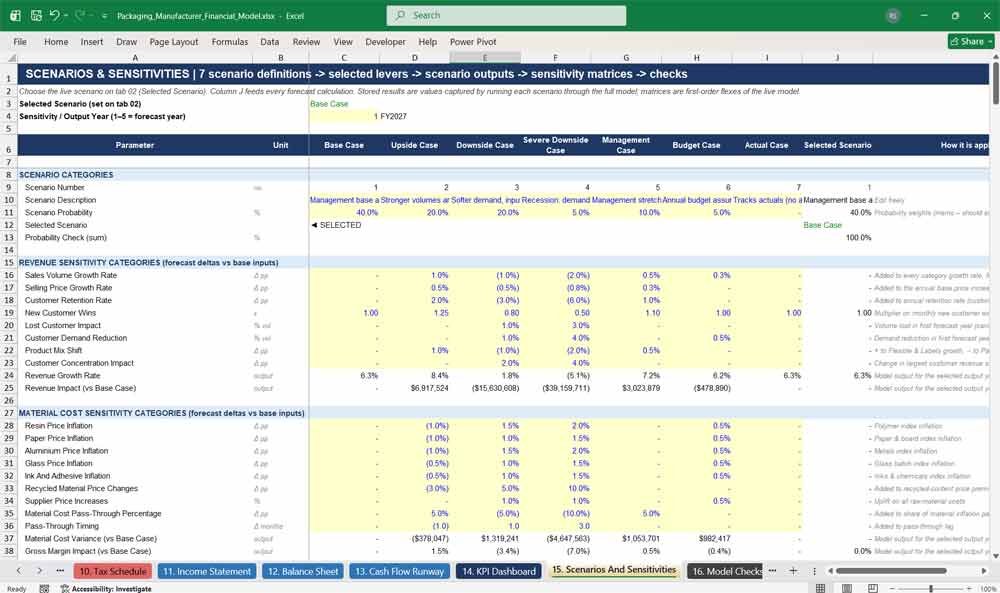
The scenarios tab defines seven cases with around seventy adjustable levers covering revenue, materials, production, opex, capex, working capital, financing and macroeconomics. Stored results compare scenarios side by side, while eight sensitivity matrices flex price, costs, utilisation and interest rates.
Highlights:
- Base, Upside, Downside, Severe Downside, Management, Budget and Actual cases
- Scenario probabilities and descriptions
- Side-by-side comparison of 15 key outputs
- Eight two-way sensitivity matrices
- Nine scenario checks, including covenant and minimum cash tests
16. Model Checks
The model checks tab runs 26 integrity tests every month, covering the balance sheet, cash reconciliation, debt roll-forwards, fixed assets, production, revenue and profit tie-outs. Each period shows PASS or REVIEW, and an overall model status feeds the cover page.
Highlights:
- 26 automated checks every month
- Balance sheet and cash flow reconciliation
- Debt, lease and tax roll-forward checks
- Production reconciles to sales and inventory
- Overall PASS / REVIEW status
Why Buy This Model?
Building a packaging manufacturing financial model from scratch can take weeks, and getting the production, inventory and three-statement links right is where most spreadsheets break. This model gives you a complete, integrated and tested solution from day one. It covers everything a packaging business needs: tonnes-based revenue, line-by-line production capacity, a commodity-driven bill of materials, working capital, debt and tax, and a balance sheet that balances in every month. Seven built-in scenarios, sensitivity matrices and 26 automated checks let you stress-test your plan with confidence. Professional colour coding and formula-driven dates make it easy to update, explain to a bank or investor, and reuse year after year. Whether you are raising finance, planning a new production line or preparing a budget, this model saves you time and gives your numbers credibility.
Packaging Manufacturing Frequently Asked Questions
Which types of packaging businesses is this model suitable for?
It covers flexible, rigid, paper, corrugated, carton, label, metal, glass and other packaging. You can use all nine categories or set the volumes of any you don’t make to zero, so it suits single-format converters and multi-site groups alike.
Can I change the start date of the model?
Yes. Change the Model Start Date on the Assumptions Drivers tab and every date, month label and year heading updates automatically across all 16 tabs. The model then shows 36 months of history before that date and 60 months of forecast from it.
What time periods does the model cover?
It includes three years of monthly historical data and a five-year monthly forecast. Each year also has an FY Total column, so you get monthly detail and an annual summary in the same view.
Do I need advanced Excel skills to use it?
No. Inputs are blue on a yellow background, formulas are black and links to other tabs are green, so it is clear what to change and what to leave alone. The Cover Model Guide explains how to use the model step by step.
Can I enter my own historical figures?
Yes. Enter your actual monthly tonnes and selling prices on the Revenue Build tab, and update the cost drivers and opening balance sheet on the Assumptions Drivers tab. The rest of the model recalculates automatically.
How does the model handle raw material price changes?
Raw material costs come from a bill of materials covering 17 materials, including resin, polyethylene, polypropylene, PET, paper, aluminium, steel and glass. Each material is linked to a commodity price index, and you can set how much of the cost inflation is passed through to customers and how long the lag is.
What happens if demand exceeds my production capacity?
The Production Capacity tab compares required production with the practical capacity of each line. Any volume above capacity is outsourced automatically, and the extra cost flows through to COGS. You can add growth projects that increase capacity from their commissioning date.
Does the balance sheet balance?
Yes, in every month and year. The model includes 26 automated checks that confirm the balance sheet balances, cash reconciles, debt rolls forward, fixed assets reconcile and production ties back to sales and inventory.
Can I run different scenarios?
Yes. Seven scenarios are included: Base, Upside, Downside, Severe Downside, Management, Budget and Actual. You switch between them with one cell, and each scenario has around 70 adjustable levers covering volumes, prices, costs, capex, working capital, financing and macroeconomic factors.
Is the model suitable for bank lending or investor presentations?
Yes. It follows professional modelling standards used by lenders and private equity, with clear colour coding, a KPI dashboard, leverage and covenant ratios, debt service coverage, cash runway analysis and full audit checks.
Does it include debt, leases and a revolving credit facility?
Yes. The Debt & Interest tab includes an amortising term loan, a bullet term loan with refinancing, shareholder loans, leases and a revolving credit facility that draws and repays automatically to keep cash above your minimum balance.
Can I change the currency?
The model is built in USD, but every value is in whole currency units, so you can enter figures in GBP, EUR or any other currency and update the currency label on the Assumptions Drivers tab.
Does the model use macros?
No. The model is built entirely with standard Excel formulas, with no macros or VBA, so it is transparent and works in standard versions of Microsoft Excel.
Conclusion On The Financial Model
Well-structured 5 year financial model for a packaging manufacturer ensures effective financial planning and strategic decision-making. By incorporating revenue forecasting, cost control, cash flow management, and balance sheet stability, businesses can optimize their operations and maintain profitability.
Download Link On Next Page