
Mobile App Financial Model Template & SaaS Metrics
This Mobile App Financial Model Template is a complete five-year Excel forecast built for founders, app developers and investors who need a credible plan fast. It models subscription, ad-supported and transaction-based revenue month by month, from first install to paying subscriber, with annual roll-ups for 2027 to 2031. Every figure is formula-driven. Change one start date and the whole model re-dates automatically, from launch and hiring dates to funding rounds and cost inflation.
Financial Model for a Mobile App
The app financial model follows the real growth funnel of a mobile app business. Paid, organic and referral installs flow through registration, activation, free trial and paid conversion. They then feed monthly and annual subscriber cohorts, churn, reactivation and MRR. Revenue comes from subscriptions, advertising eCPM and in-app purchases. Costs cover Apple App Store and Google Play commissions, payment processing, cloud hosting, AI and API usage, customer support, payroll and overheads. The result is a monthly income statement, a direct-method cash flow and a clear cash runway.
Built for fundraising and board reporting, this mobile app business plan template includes Base, Downside and Upside scenarios. It also runs nine stress tests, a sensitivity analysis, budget-versus-actual tracking and 15 automatic model checks. The executive dashboard shows headline KPIs, including ARR, EBITDA, LTV to CAC, CAC payback, break-even month and peak funding requirement, alongside investor-ready charts. Whether you are pitching a seed round, planning a Series A or managing burn, this financial projection template gives you clear numbers you can defend.
What’s Inside: Tab-by-Tab Guide
01. Dashboard Executive Summary
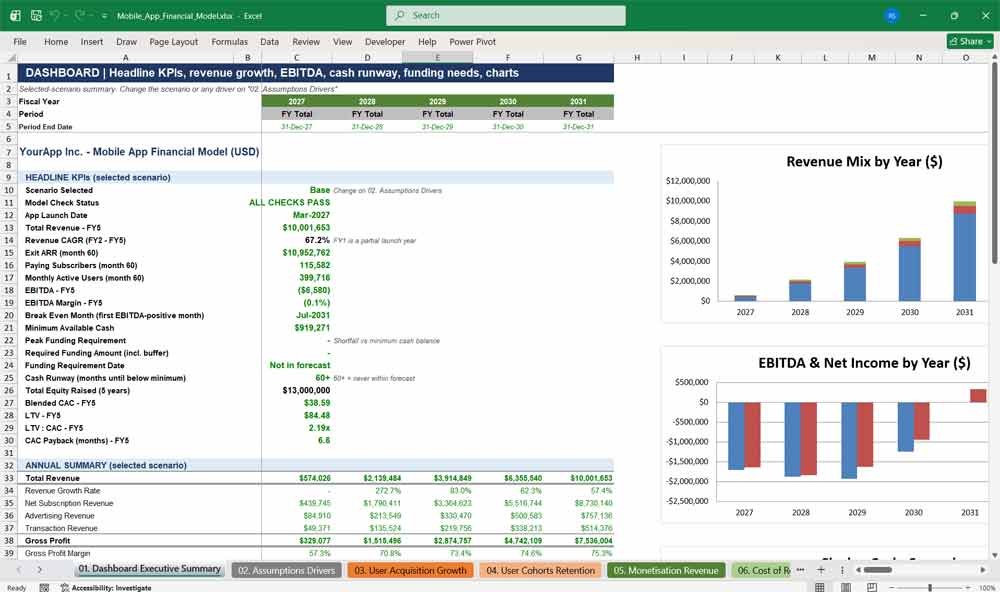
The executive dashboard brings your mobile app’s financial forecast together on one page: headline KPIs, revenue growth, EBITDA, cash runway and funding requirements. Five charts and a scenario snapshot make it an investor-ready summary for pitch decks.
- 20+ headline KPIs, including exit ARR, paying subscribers, MAU, LTV:CAC and CAC payback
- Break-even month, peak funding requirement and funding date
- Five-year annual summary of revenue, gross profit, EBITDA, net income and cash
- Base, Downside and Upside scenario snapshot
- Five charts: revenue mix, EBITDA and net income, cash by scenario, monthly revenue, and subscriber and MAU growth
- Live model-check status
02. Assumptions Drivers
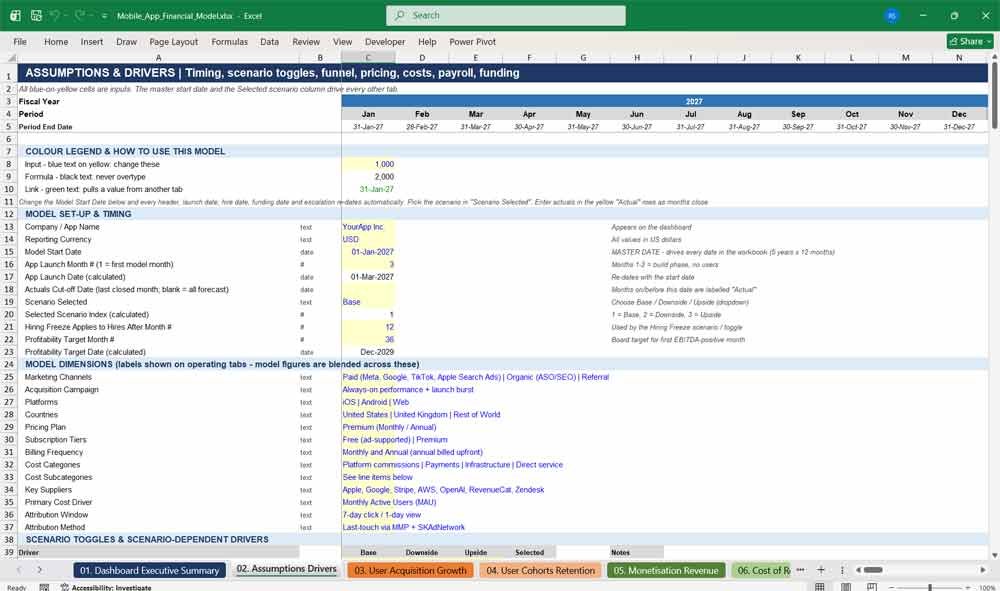
All the inputs for the app financial model sit on one colour-coded assumptions tab: launch date, pricing, conversion rates, churn, growth rates, salaries, inflation, tax and payment fees. Scenario toggles switch the whole forecast between Base, Downside and Upside.
- A single Model Start Date re-dates the entire workbook automatically
- Scenario dropdown with side-by-side Base, Downside and Upside drivers
- 22-role hiring plan with start month, salary, bonus and employee or contractor type
- Equity funding rounds and a venture debt facility
- Stress-test and sensitivity library with editable shock sizes
- Blue-on-yellow input cells with a note on every assumption
Mobile App Revenues & Expenses
03. User Acquisition Growth
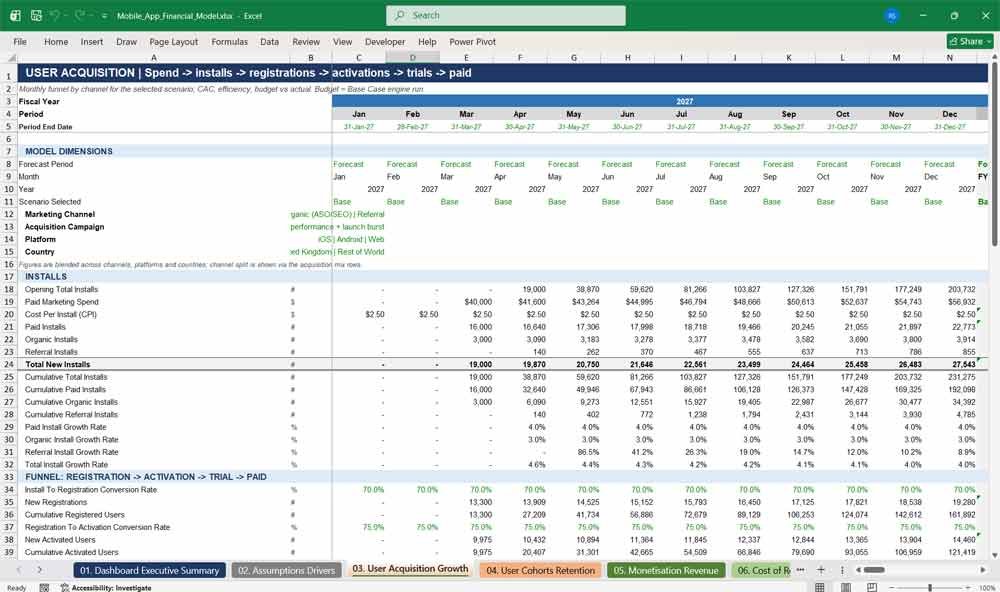
This user acquisition forecast models installs month by month from paid, organic and referral channels, then tracks the funnel from registration to paid subscription. It calculates cost per install, CAC, ROAS, marketing ROI and payback, against budget.
- Paid, organic and referral installs, with growth rates and acquisition mix
- Full funnel: install → registration → activation → trial → paid
- CPI, blended CAC, paid CAC, organic CAC and referral CAC
- Marketing ROI, ROAS and payback period in months
- Cost per trial, cost per activated user and new paying subscribers per $1,000 of spend
- Budget, target and actual variances, with forecast accuracy
04. User Cohorts Retention
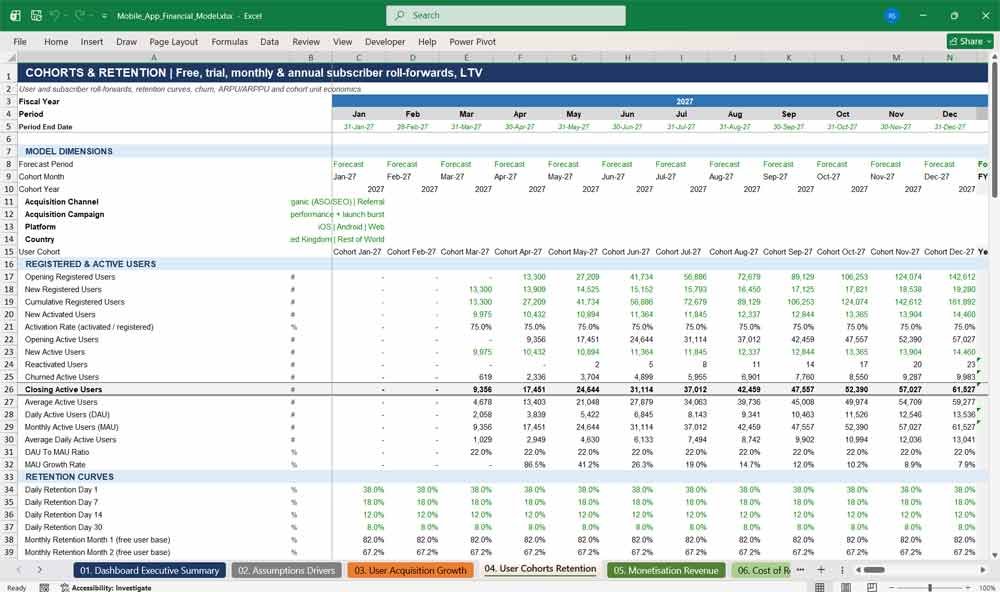
The cohort retention tab tracks free, trial, monthly and annual subscribers through full roll-forwards. It measures DAU, MAU, churn, reactivation, GRR and NRR, and builds subscription unit economics: ARPU, ARPPU, LTV, LTV to CAC and cohort payback.
- Opening-to-closing roll-forwards for free, trial, monthly and annual users
- DAU, MAU, the DAU-to-MAU ratio and MAU growth
- Day 1, 7, 14 and 30 retention, plus month 1 to month 12 cohort retention
- Voluntary and involuntary churn, payment failure and dunning recovery
- Gross Revenue Retention (GRR) and Net Revenue Retention (NRR)
- LTV, CAC, LTV:CAC, cohort payback and profitability month
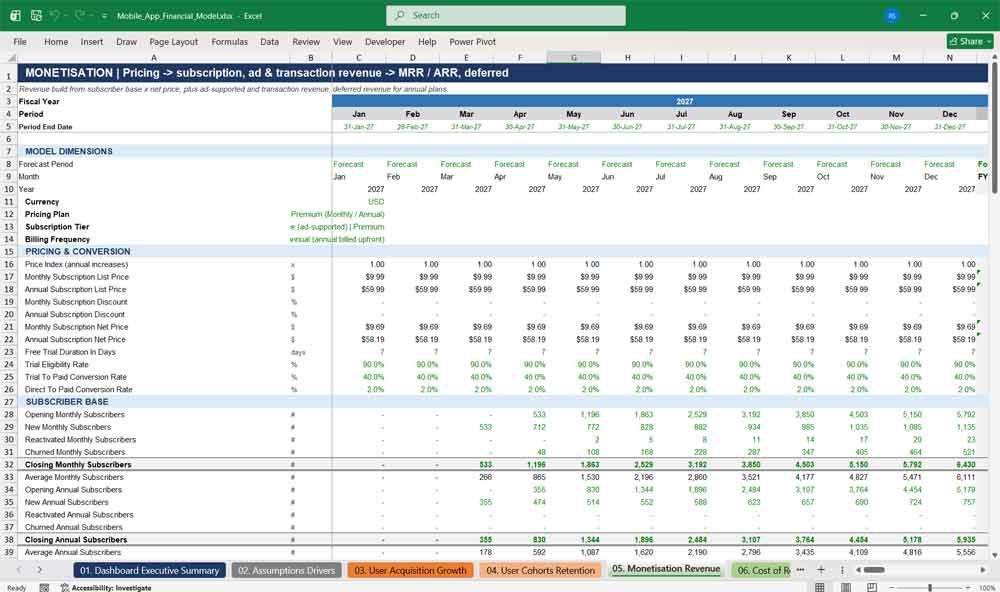
05. Monetisation Revenue
The monetisation tab builds app revenue from subscribers, prices, discounts and price increases, plus advertising eCPM revenue and in-app purchases. It produces a full MRR bridge, ARR, deferred revenue for annual plans, and revenue by plan, platform and country.
- Monthly and annual subscription pricing, with discounts and promotional offers
- Ad-supported revenue (impressions × fill rate × eCPM) and transaction revenue
- MRR bridge: new, expansion, contraction, churned and reactivation MRR
- ARR, ARPU, ARPPU and plan mix
- Annual plans billed upfront and recognised as revenue over 12 months, with a deferred revenue balance
- Revenue by channel, platform and country, and impact analysis for pricing, promotions and FX
06. Cost of Revenue
This cost of revenue tab models every direct cost of running a mobile app: Apple and Google store commissions, payment processing, cloud hosting, CDN, third-party APIs, AI model usage and support. It calculates gross profit, contribution margin and segment margins.
- Apple App Store and Google Play commissions, with an adjustable commission rate
- Web payment processing: a percentage fee plus a fixed fee per transaction
- Cloud, database, storage, bandwidth and CDN costs, driven by active users
- AI model and API costs per active user, and cost per API request
- Gross margin by plan, platform, country and subscription tier
- Cost of revenue budget versus actual, with forecast accuracy
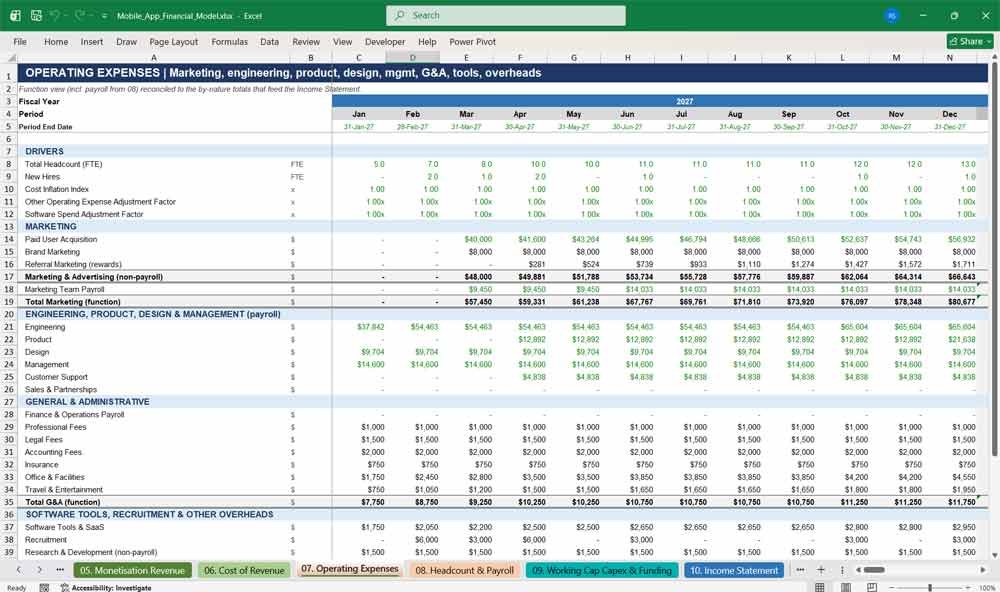
07. Operating Expenses
The operating expenses tab forecasts marketing, engineering, product, design, management, G&A, software tools, recruitment and overheads, all linked to inflation. A function view and a by-nature view reconcile automatically, so your operating budget always ties to the income statement.
- Paid acquisition, brand marketing and referral rewards
- Payroll by function: engineering, product, design, management, support and sales
- G&A: legal, accounting, insurance, office and travel costs
- Software and SaaS costs that scale with headcount
- Recruitment cost per new hire
- Automatic reconciliation between the function view and the by-nature view
Mobile App Financial Statements
08. Headcount & Payroll
This headcount and payroll plan builds staffing costs role by role: salaries, employer taxes, benefits, bonuses and contractor costs. Hiring delays, hiring freezes and salary inflation flex by scenario, showing exactly how team growth affects burn and runway.
- 22-role hiring roster with start dates and FTE for each role
- Fully loaded cost per role: salary, bonus, employer taxes and benefits
- Separate treatment for employees and contractors
- Scenario controls for hiring delay, hiring freeze, payroll adjustment and salary inflation
- Payroll by department, payroll per FTE and headcount growth
09. Working Capital, Capex & Funding
This balance-sheet tab covers app store and ad network receivables, payables, deferred subscription revenue and VAT. It also models capex and depreciation, optional capitalised development, equity fundraising rounds, venture debt and closing cash balances for your app startup.
- Receivables timing: app store payouts and the ad network payment lag
- Accounts payable, VAT and corporation tax payable
- Deferred subscription revenue and net working capital movement
- Capex, depreciation and optional capitalised development with amortisation
- Equity rounds, with a fundraising-delay toggle
- Venture debt drawdown, interest-only period, amortisation and fees
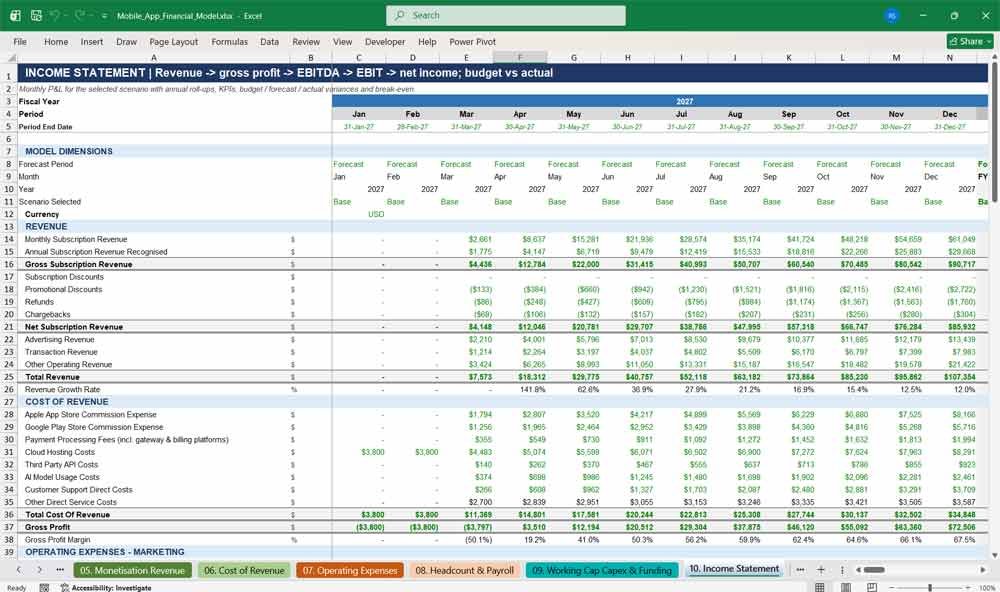
10. Income Statement
The monthly income statement takes your app from gross subscription revenue to net income. It covers discounts, refunds, store commissions, payroll, G&A, EBITDA, depreciation, interest and corporation tax with loss carry-forward, plus budget variances and break-even analysis.
- Full P&L: revenue, cost of revenue, gross profit, EBITDA, EBIT and net income
- Gross margin, EBITDA margin and net profit margin
- Corporation tax with tax losses carried forward
- Revenue per employee, payroll per employee and burn rate
- Budget versus actual versus forecast for revenue, cost of revenue, gross profit, operating expenses, EBITDA and net income
- Break-even revenue, break-even subscriber count and break-even month
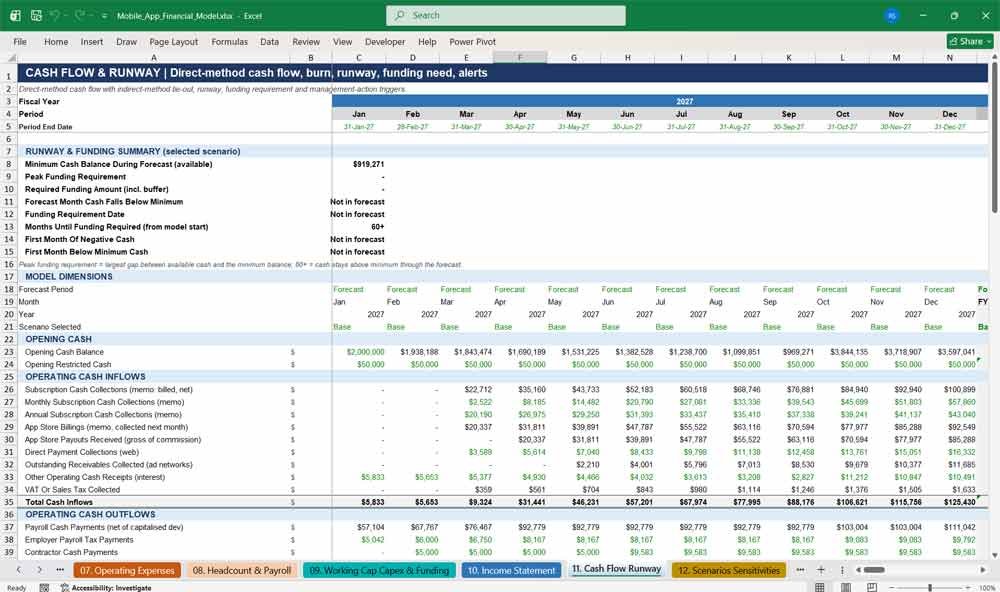
11. Cash Flow Runway
The cash flow and runway tab is a direct-method monthly cash flow forecast covering app store payouts, payroll, suppliers, taxes and funding. It calculates net burn, cash runway, minimum cash, peak funding requirement and when you’ll need to raise.
- Direct-method cash flow, reconciled to the indirect method every month
- Gross and net burn, plus three-month and six-month average burn
- Cash runway in months and headroom above your minimum cash balance
- Peak funding requirement, required raise amount and funding date
- Downside, Base and Upside closing cash and runway
- Automatic alerts for financing, cost cuts, marketing cuts and hiring freezes
Key Financial Metrics for Mobile App Deveopment
12. Scenarios Sensitivities
The scenario analysis tab compares Base, Downside and Upside cases side by side, with probability-weighted outcomes. Nine stress tests and a sensitivity analysis covering conversion, churn, pricing, CPI, payroll and gross margin show where your app’s biggest risks lie.
- Scenario probabilities, weightings, risk ratings and review dates
- Five-year revenue, EBITDA, cash, runway and break-even for each case
- Nine stress scenarios, including marketing cuts, a pricing increase and emergency cost reduction
- Sensitivity of revenue, cash, runway and CAC to each key driver
- Sensitivity of LTV, LTV:CAC, break-even subscribers and minimum cash
- Management action flags for each scenario
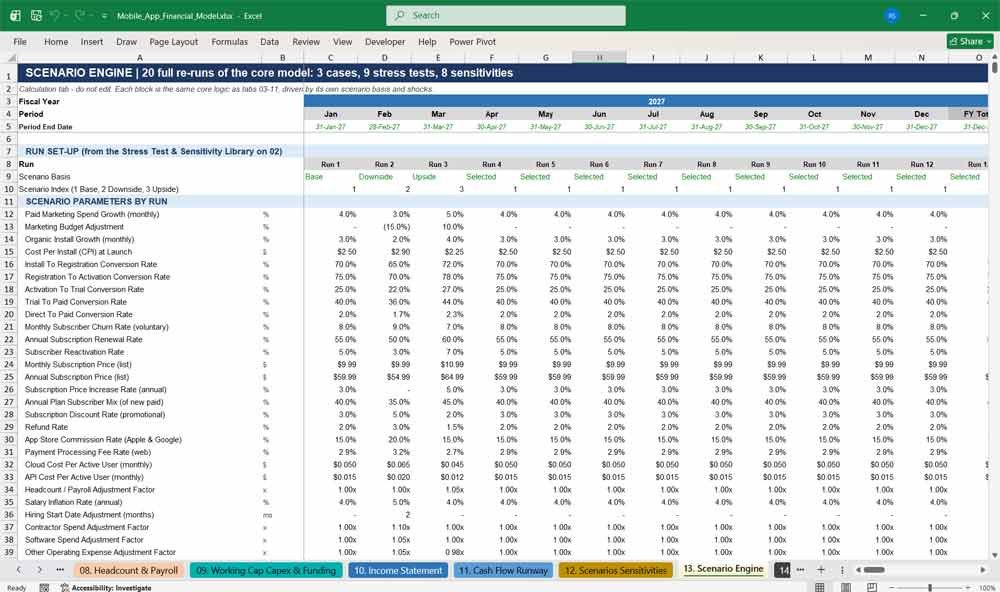
13. Scenario Engine
The scenario engine re-runs the full core model 20 times: three cases, nine stress tests and eight sensitivities. Every result is a complete live re-calculation, not an estimate, so your scenario comparisons stand up when investors challenge your assumptions.
- 20 independent full-model runs, all in live formulas
- Each run can be based on Base, Downside, Upside or the Selected scenario
- Shock multipliers for marketing, CPI, conversion, churn, price, installs, payroll, overheads and COGS
- Powers the budget figures (Base Case) used throughout the model
- No macros and no data tables, so it’s fast and transparent
14. Model Checks
The model checks tab runs 15 automatic tie-outs for every month and year, covering subscribers, the MRR bridge, deferred revenue, payroll, cash and the scenario engine. A single pass status on the dashboard proves the forecast is internally consistent.
- 15 reconciliation checks across all 60 months and the five annual totals
- Direct versus indirect operating cash flow check
- Subscriber, MRR, deferred revenue and cash roll-forward checks
- A check that the main model ties back to the scenario engine
- A check that no user balance goes negative
- Overall “ALL CHECKS PASS” status, with conditional formatting
Why Buy This Mobile App Financial Model?
Building a mobile app financial model from scratch takes weeks, and one broken formula can undermine an investor meeting. This template gives you a fully built, professionally formatted five-year forecast that reflects how mobile apps actually make money: through installs, trials, subscriptions, ads and in-app purchases. It also accounts for real costs, such as app store commissions, cloud hosting and AI usage. Over 300,000 live formulas recalculate instantly, and the model contains no macros or hidden hardcodes. Change a single date or assumption, and everything updates, from the hiring plan and funding rounds to the cash runway. Base, Downside and Upside scenarios, nine stress tests and a sensitivity analysis answer the “what if” questions investors always ask. Fifteen built-in checks prove the numbers tie out. Whether you’re raising a seed round, preparing a Series A, reporting to your board or validating an app idea, this subscription app financial model saves time, reduces risk and helps you present your app business with confidence.
Mobile App Development Frequently Asked Questions (Faq)
What type of mobile app is this financial model suitable for?
It suits any app that earns money from subscriptions, advertising, in-app purchases, or any combination of the three. That includes fitness, wellness, productivity, education, dating, media and AI apps, on iOS, Android and the web. If your app uses only one revenue stream, simply set the others to zero.
I’m not a finance expert. Will I be able to use it?
Yes. All the inputs are on one tab, “02. Assumptions Drivers”, and every input cell is marked in blue text on a yellow background, with a note explaining it. You never need to touch a formula. Change the inputs, and the dashboard, income statement and cash flow update automatically.
How many years does the forecast cover?
The model covers five years of monthly projections (60 months), with an annual total column for each year. It is set up for 2027 to 2031 by default. Change the Model Start Date, and every date, header, hiring date and funding round moves with it.
Can I change the launch date or start the model in a different year?
Yes. Enter a new Model Start Date and set your launch month number. Every tab re-dates automatically: the timeline, the launch date, hire start dates, funding dates, price increases and cost inflation. You don’t need to re-enter anything by hand.
Does it include subscription metrics like MRR, ARR, churn and LTV?
Yes. The model calculates MRR with a full bridge (new, expansion, contraction, churned and reactivated MRR), as well as ARR, ARPU and ARPPU. It also covers monthly and annual plan churn, renewal rates, GRR, NRR, subscriber lifetime, LTV, CAC, LTV to CAC ratio and CAC payback in months.
How are annual subscriptions handled?
Annual plans are billed upfront, and the revenue is recognised evenly over 12 months, so the model builds a deferred revenue balance automatically. Annual subscribers come up for renewal after 12 months, at the renewal rate you set. The cash flow therefore shows the upfront cash benefit of annual plans.
Does it account for Apple App Store and Google Play fees?
Yes. You can set the store commission rate, for example 15% under the small-business programme or 30% at the standard rate. You can also choose the split between iOS, Android and web billing. Web billings carry their own payment processing fees instead. The model also reflects the delay before app store payouts reach your bank account.
Can I model advertising revenue for a free tier?
Yes. Ad revenue is calculated from free-tier daily active users, ad impressions per user, fill rate and eCPM. There is also a payment lag for ad networks. In-app purchase (transaction) revenue is modelled separately, using purchase rate, transactions per buyer and average transaction value.
How does the scenario analysis work?
Choose Base, Downside or Upside from a dropdown, and the whole model switches to that scenario. Separately, the Scenario Engine runs all three cases, nine stress tests and eight sensitivities in parallel. That means you can compare outcomes side by side without changing your selected scenario.
Will it tell me how much funding I need to raise?
Yes. The cash flow tab calculates your minimum cash balance, peak funding requirement, recommended raise (including a buffer) and the month when funding is required. You can enter your own equity rounds and venture debt, and test the impact of a delayed raise.
Can I add or change roles in the hiring plan?
Yes. The hiring roster on the assumptions tab lists 22 roles, each with a department, employee or contractor type, start month, FTE count, salary and bonus percentage. Edit any of these, and payroll, employer taxes, benefits, recruitment, equipment capex and runway all update automatically.
Can I track actual results against the forecast?
Yes. The model includes yellow “Actual” input rows for revenue, cost of revenue, operating expenses, marketing, installs, new subscribers, retention and cash. Variances against the Base Case budget and forecast accuracy percentages are calculated automatically, so you can use the model for monthly board reporting.
How do I know the numbers are correct?
The Model Checks tab runs 15 reconciliations for every month and year. These include subscriber roll-forwards, the MRR bridge, deferred revenue, payroll, cash and a check of direct versus indirect cash flow. The overall status shows on the dashboard, and should read “ALL CHECKS PASS”.
Which version of Excel do I need?
The model is built for Microsoft Excel 2019, Excel 2021 and Microsoft 365, on Windows or Mac. It uses standard formulas only, with no macros, VBA or add-ins. That means there are no security warnings, and every calculation is transparent and easy to audit.
What currency is the model in?
The model is presented in US dollars. You can change the currency label on the assumptions tab and enter your prices and costs in any currency. Because all the calculations are unit-neutral, the model works equally well in pounds, euros or any other currency.
Is the model suitable for investors and banks?
Yes. It follows professional financial modelling conventions: colour-coded inputs, formulas and links; a single timeline that drives every date; consistent formatting; and visible tie-out checks. The dashboard, scenario analysis and funding requirement outputs are designed to support seed, Series A and lender discussions.
Final Thoughts for the Financial Model
A solid Mobile App Financial Model combines multiple revenue streams, optimized pricing strategies, and strong cash flow management. The six-tier subscription model ensures a broad user base while ad revenues and in-app purchases provide alternative income sources.
Download Link On Next Page