
Indoor Golf Financial Model Template
Planning an indoor golf simulator business? This Indoor Golf Center Financial Model Template is a fully dynamic, investor-ready Excel template built specifically for golf simulator lounges, entertainment venues, and membership-based sports facilities. Covering a full 10-year horizon — monthly detail for Years 1–5, annual summaries for Years 6–10 — it turns your bay count, membership pricing, and market assumptions into a complete three-statement financial model: Income Statement, Balance Sheet, and Cash Flow Statement, all built on live formulas instead of static numbers. Whether you’re opening your first location or modeling a multi-bay flagship, this template gives you a professional financial projection template you can trust in front of a bank, an investor, or a landlord.
Financial Model for an Indoor Golf Center
Unlike generic startup financial projection templates, this model is purpose-built around how indoor golf businesses actually make money: membership subscriptions, pay-as-you-go (PAYG) simulator bay time, food & beverage sales, lessons, leagues, corporate events, and retail. A genuine six-tier membership system manages capacity, not just price — controlling peak-hour access, booking windows, guest passes, and bay-hour allocation so your revenue build reflects real-world utilization constraints, not a simple spreadsheet guess. Every date in the workbook — from your grand opening through your Year 10 close — is driven by a single input cell, so changing your opening date instantly re-dates every tab, every escalation, and every forecast automatically.
This golf simulator business plan financial model includes a full startup capex and funding requirement build, a 10-year debt schedule, depreciation schedule, working capital schedule, integrated returns and valuation analysis (IRR, MOIC, NPV, exit value), Base/Upside/Downside scenario modeling, and a dedicated Checks tab that ties out the balance sheet to the penny across every single period. If you need a bankable, lender-ready, SBA-loan-ready financial model for an indoor golf simulator, driving range, or golf entertainment concept, this 21-tab template is built to hand directly to a bank, investor, or franchise partner.
Why Buy This Model
Most financial projection templates on the market are generic spreadsheets with a few line items swapped out for your industry — this one isn’t. It was purpose-built around the actual economics of an indoor golf simulator business: a genuine capacity-managed membership system, bay-hour utilization mechanics, and F&B/ancillary revenue streams that mirror how these venues really operate. Every number is a live formula, not a hardcoded guess — change your bay count, your opening date, your membership pricing, or your financing structure on the Assumptions tab, and all 21 tabs, 10 years, and 71 time periods recalculate instantly with zero broken links. The three financial statements are fully integrated and independently verified to balance to $0 in every period, with a built-in Checks tab that gives you (and any lender or investor reviewing the file) instant confidence the model is mechanically sound. You’re not just buying a spreadsheet — you’re buying a professional-grade underwriting tool that would otherwise cost thousands of dollars from a financial modeling consultant.
What’s Inside: The 21-Tab Model
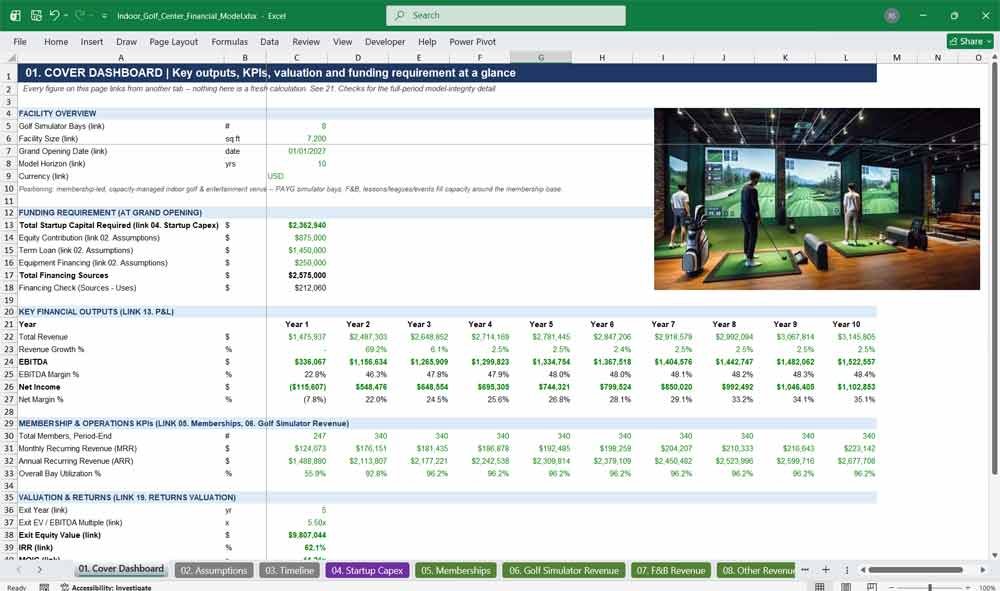
01. Cover Dashboard
The Cover Dashboard puts your entire indoor golf simulator business plan on one page: 10-year revenue, EBITDA, and net income trends, membership KPIs, the total funding requirement, and exit valuation metrics — every figure pulled live from the model so investors and lenders see results at a glance.
- Facility overview: bay count, square footage, opening date, model horizon
- Funding requirement vs. committed equity, term loan, and equipment financing
- 10-year revenue, EBITDA, EBITDA margin, net income, and net margin trends
- Membership, MRR, ARR, and bay utilization KPIs by year
- Exit valuation, IRR, MOIC, and NPV linked from the Returns tab
- Live model-integrity flag linked from the Checks tab
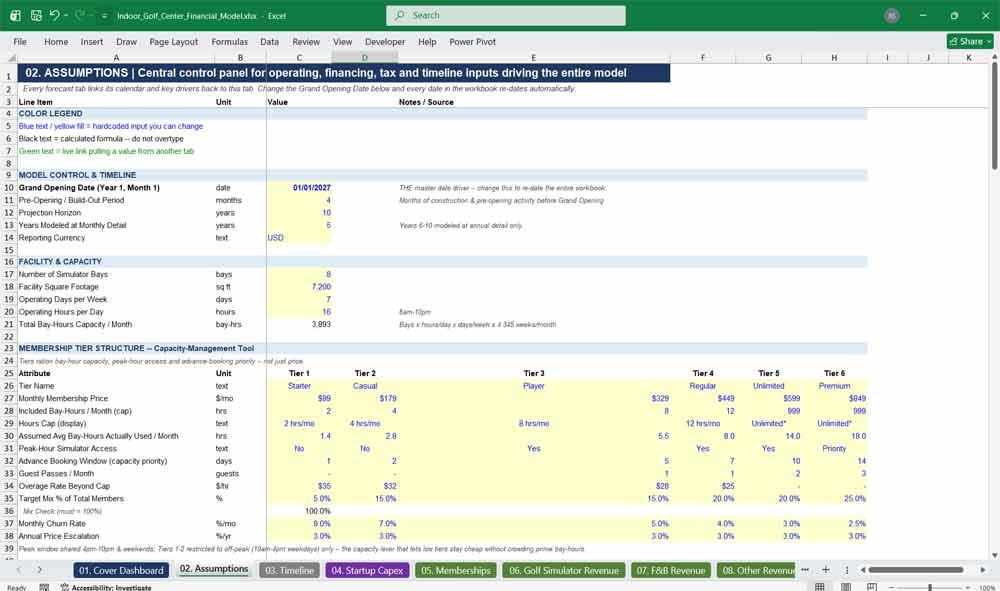
02. Assumptions
The central control panel of the entire model: every operating, pricing, staffing, financing, and market assumption lives here in one place. Change a single input — bay count, membership pricing, rent, interest rate — and it flows automatically through all 21 tabs and 10 years of projections.
- One master Grand Opening Date input drives every date in the workbook
- Full six-tier membership structure: pricing, hour caps, churn, and escalation
- Facility, staffing, financing, tax, and valuation assumptions in one panel
- Color-coded inputs (blue), formulas (black), and cross-tab links (green)
- Scenario flex percentages for Upside/Downside sensitivity analysis
Indoor Golf Center Revenues
03. Timeline
The master calendar of the model, generating every monthly date, quarter, operating year, and cumulative month of operation from the single opening-date input. Every other tab links its dates back to this tab, keeping all 71 periods of the 10-year forecast perfectly synchronized.
- Dynamic monthly dates for Years 1–5, annual periods for Years 6–10
- Fiscal quarter and year-of-operation tracking
- Cumulative operating month counter for ramp and escalation formulas
- Days-in-period detail feeding working capital and staffing calculations
04. Startup Capex
A complete startup budget for your indoor golf simulator build-out: leasehold improvements, golf simulator bays, kitchen and bar equipment, FF&E, IT systems, security deposits, and pre-opening operating costs — everything a lender or investor needs to see your total capital requirement.
- Itemized leasehold, simulator, FF&E, kitchen/bar, IT, and golf equipment costs
- Contingency reserve and security deposit line items
- Pre-opening staffing and operating cost lump sum
- Ongoing maintenance capex modeled as a percentage of revenue
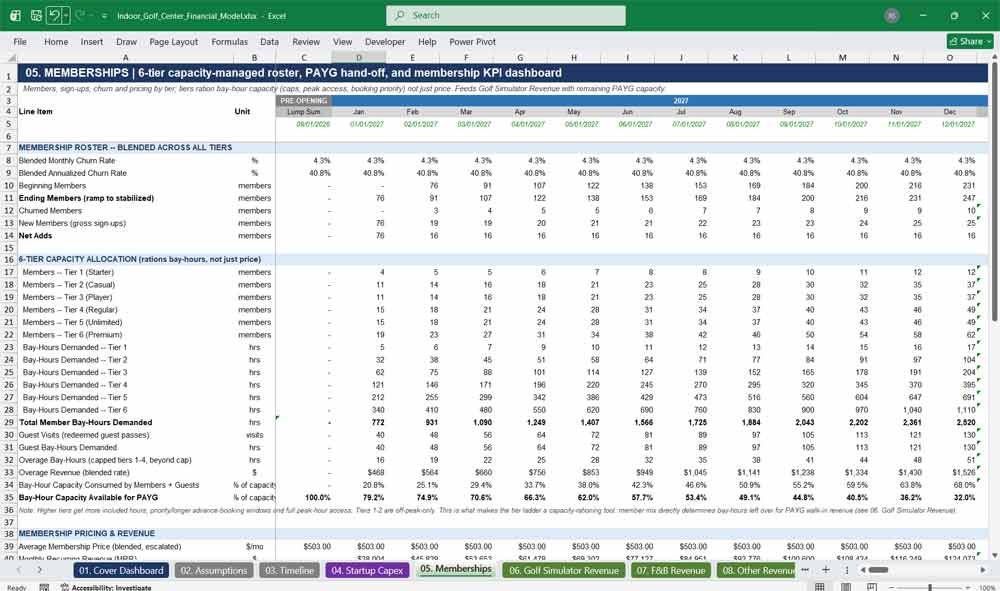
05. Memberships
The engine of the model: a genuine six-tier membership system that manages bay-hour capacity, not just price, with hour caps, peak-access rules, booking windows, and guest passes. Includes a full membership KPI suite — churn, MRR, ARR, CAC, LTV, and utilization — buyers expect in a subscription business model.
- Six membership tiers from Starter to Premium, each with distinct capacity rules
- Full funnel: new members, churn, net adds, and ramp-to-stabilization
- Complete KPI block: MRR, ARR, LTV, CAC, LTV/CAC, payback, and utilization
- Bay-hour capacity allocation feeding directly into simulator revenue
06. Golf Simulator Revenue
Models pay-as-you-go (PAYG) simulator bay revenue built directly on top of the capacity your membership tiers leave available — peak vs. off-peak pricing, utilization ramp, and hours sold — so your bay revenue reflects real capacity constraints instead of an unconstrained guess.
- Bay utilization ramp from opening through stabilization
- Peak and off-peak PAYG pricing and hours-sold detail
- Capacity-constrained revenue linked directly from the Memberships tab
- Overall facility bay utilization KPI
07. F&B Revenue
Projects food and beverage revenue from member, guest, and PAYG customer visit volume, attach rate, and average spend per visit — plus the F&B cost of goods sold — giving your golf simulator business plan a realistic ancillary revenue stream beyond simulator time.
- Visit volume built from members, guests, and PAYG customers
- F&B attach rate and average spend-per-visit assumptions
- Full transaction-based revenue and COGS build
- Scales automatically with membership and utilization growth
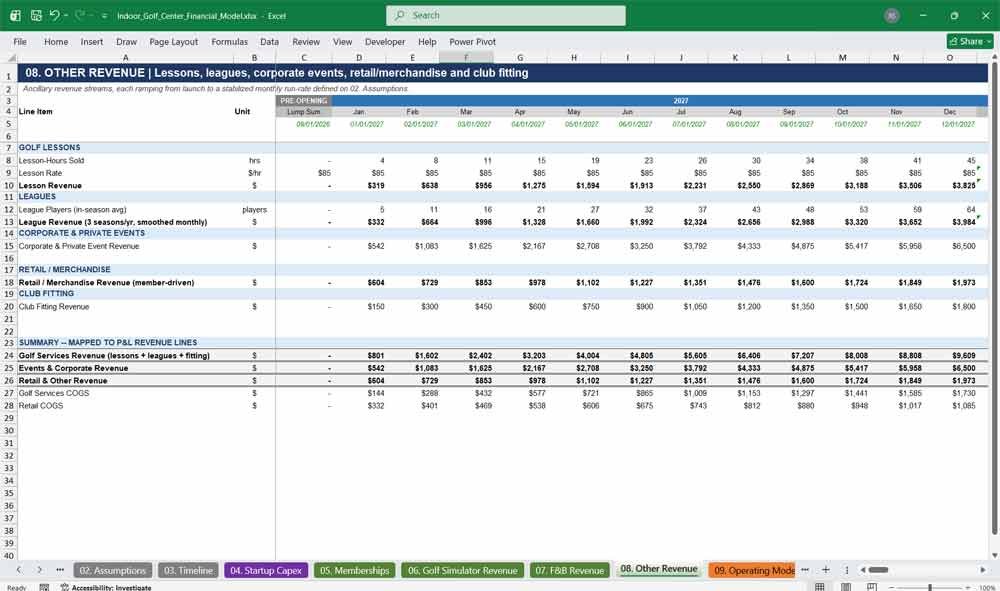
08. Other Revenue
Covers every ancillary golf services revenue stream: private lessons, leagues, corporate and private events, club fitting, and retail merchandise — the diversified income streams that separate a full-service indoor golf entertainment venue from a bare-bones simulator rental space.
- Golf lesson revenue from instructor hours and rates
- League fees, corporate event bookings, and club fitting revenue
- Retail and merchandise revenue per member
- Ramp-to-stabilization curve for each ancillary revenue line
09. Operating Model
Consolidates the operating drivers that connect revenue to cost: total bay-hours used, facility-wide utilization, customer visit counts, and staffing ratios — the bridge between your revenue build and your headcount and cost-of-service calculations.
- Total bay-hours demanded and facility utilization percentage
- Revenue-per-available-bay-hour (RevPABH) operating metric
- Customer visit volume across all revenue streams
- Front-of-house and attendant staffing requirement drivers
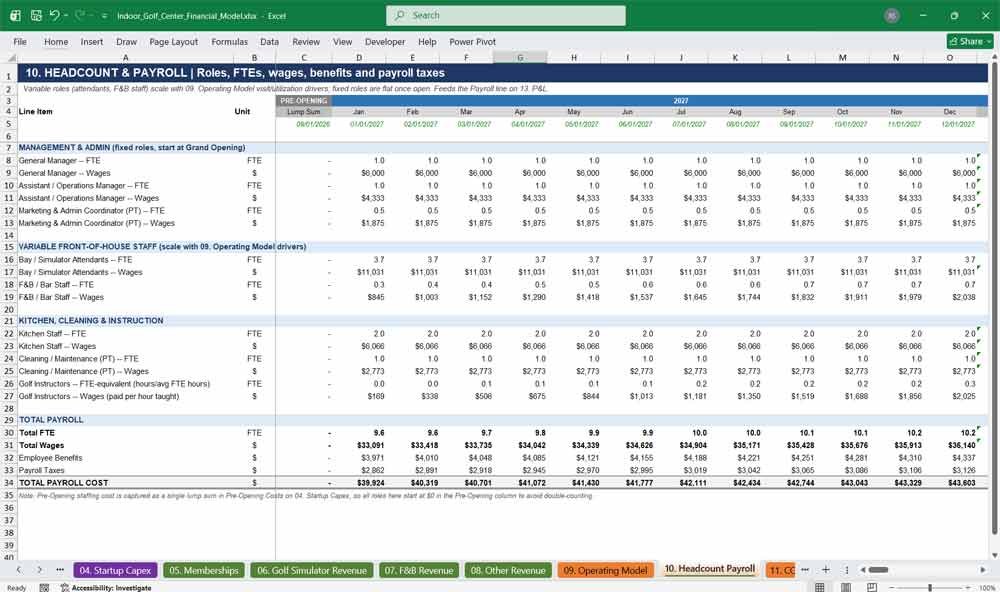
10. Headcount Payroll
A role-based staffing and payroll build covering management, bay attendants, F&B staff, kitchen, cleaning, and golf instructors — with fixed and variable FTE counts, wage inflation, benefits load, and payroll taxes fully modeled by role and year.
- Fixed roles (GM, Assistant Manager, Marketing) and variable, demand-driven staffing
- Instructor pay tied directly to lesson volume from Other Revenue
- Benefits load and payroll tax rate applied automatically
- Annual wage inflation escalation built in
11. COGS
Aggregates the true cost of goods sold across every revenue line — simulator time, food & beverage, retail, and golf services — giving you an accurate gross margin picture for your indoor golf simulator business plan, not just a single blended cost assumption.
- Per-bay-hour simulator cost of service
- F&B and retail COGS linked from their revenue tabs
- Golf services and events cost percentages
- Feeds directly into the integrated Gross Profit calculation
12. Operating Expenses
Every recurring overhead cost a golf simulator venue actually carries: rent and CAM with annual escalation, utilities, insurance, marketing, software subscriptions, repairs and maintenance, cleaning, security, and professional fees — modeled realistically instead of as one vague “opex” lump sum.
- Escalating rent and CAM based on square footage
- Marketing and repairs modeled as a percentage of revenue
- Fixed monthly costs: utilities, insurance, software, security, professional fees
- Pre-opening cost factor separate from full operating-period costs
Indoor Golf Center Financial Sttements
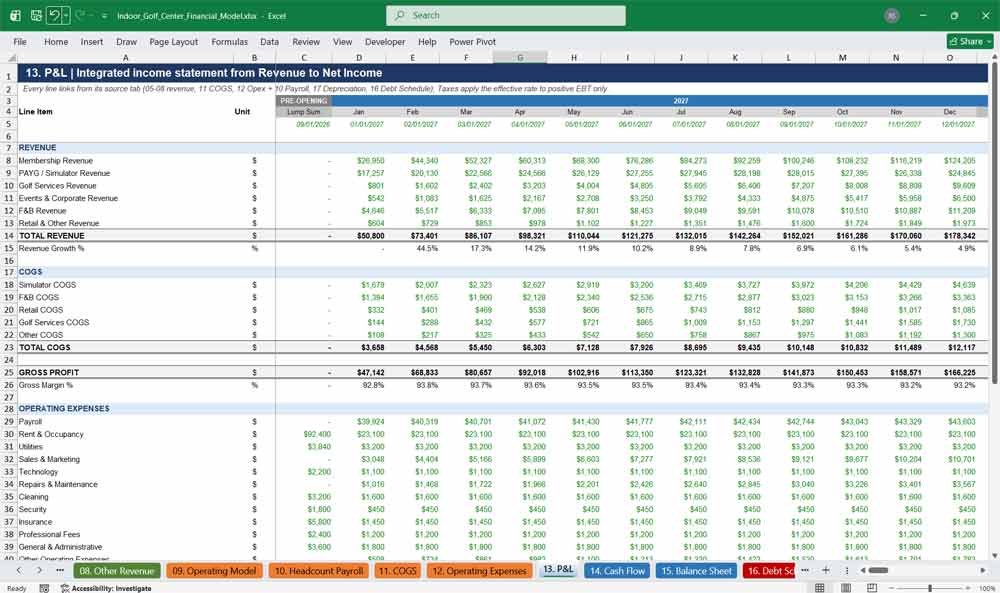
13. P&L
The fully integrated income statement tying every revenue and cost tab together: total revenue by stream, gross profit, operating expenses by category, EBITDA, depreciation, EBIT, interest, taxes, and net income — the core output every lender and investor will read first.
- Revenue broken out by membership, PAYG, golf services, events, F&B, and retail
- Full COGS, gross profit, and gross margin detail
- 12-category operating expense breakdown down to EBITDA and margin
- Complete EBITDA-to-net-income bridge with interest and taxes
14. Cash Flow
A complete statement of cash flows across operating, investing, and financing activities — including working capital changes, capex by category, debt draws and repayments, and equity contributions — showing exactly how and when your indoor golf business generates and consumes cash.
- Operating cash flow with full working capital movement detail
- Investing cash flow broken out by capex category
- Financing cash flow: equity, term loan, equipment financing, repayments
- Month-by-month and year-by-year beginning and ending cash balances
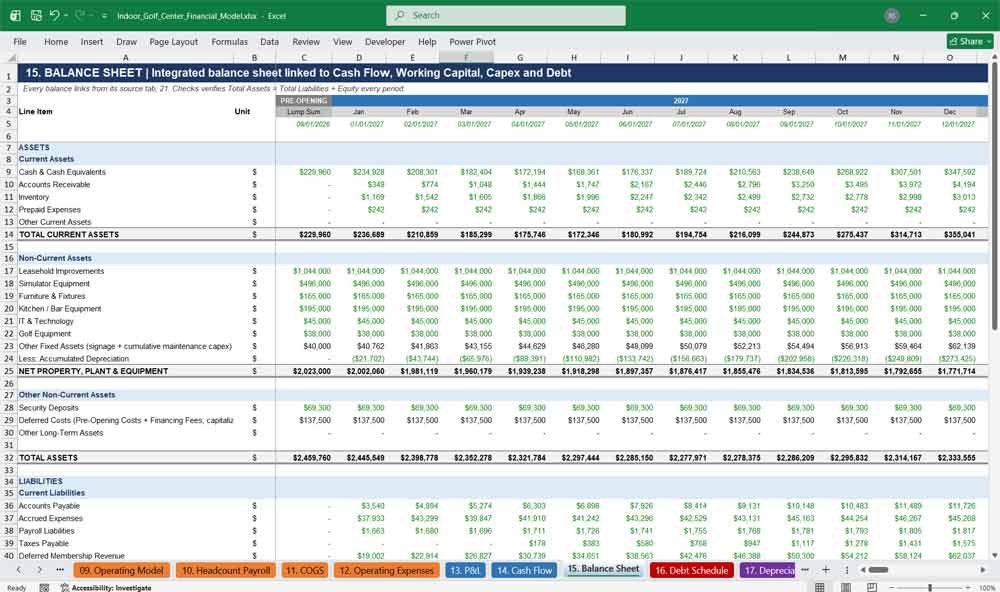
15. Balance Sheet
A fully integrated, always-balanced balance sheet — current and fixed assets, current and long-term liabilities, and equity — built to tie out to $0 in every single period across the full 10-year, 71-period model, verified and lender-ready.
- Complete current and non-current asset detail with accumulated depreciation
- Current and long-term liabilities including debt and deferred revenue
- Paid-in capital, retained earnings, and current-year net income roll-forward
- Independently verified balance check across every period
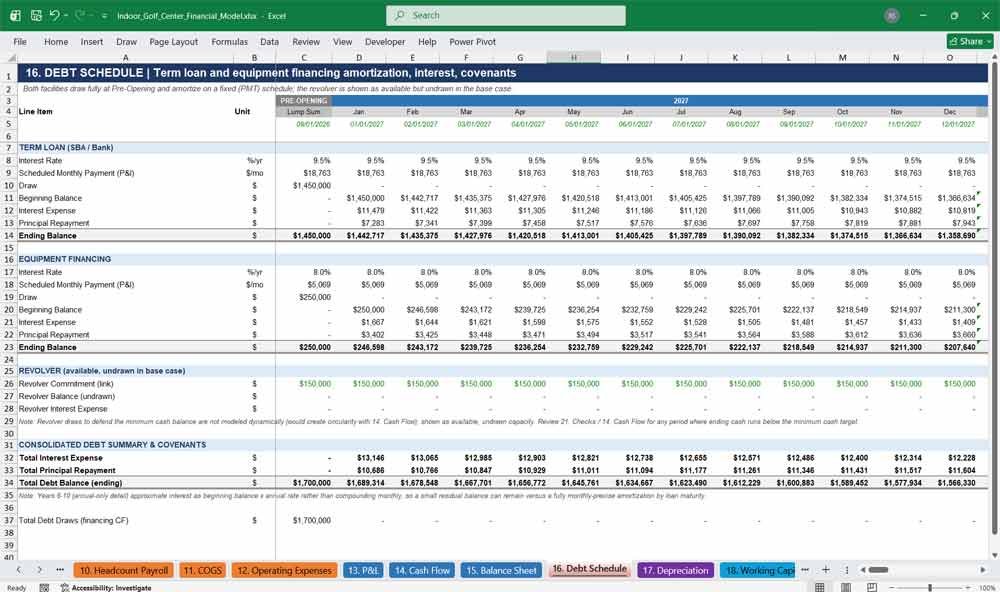
16. Debt Schedule
Full amortization schedules for your term loan and equipment financing, plus an undrawn revolver facility for liquidity flexibility — interest and principal broken out by period so lenders can see exactly how their capital is serviced over the 10-year term.
- Term loan and equipment financing amortization with rate and payment detail
- Beginning balance, interest, principal, and ending balance by period
- Revolver facility modeled for liquidity headroom
- Feeds directly into interest expense on the P&L
17. Depreciation
A straight-line depreciation schedule applied by capex category — leasehold improvements, simulators, FF&E, kitchen equipment, IT, and golf equipment — each on its own useful life, with a running accumulated depreciation balance that flows into the Balance Sheet and P&L.
- Category-specific useful lives for every capex line item
- Monthly and annual depreciation expense calculated automatically
- Cumulative accumulated depreciation balance chained period-to-period
- Feeds D&A directly into the P&L and net PP&E on the Balance Sheet
18. Working Capital
Models accounts receivable, inventory, accounts payable, accrued expenses, deferred membership revenue, and customer deposits — the working capital dynamics that determine how much cash your indoor golf business actually needs to fund day-to-day operations as it grows.
- AR, inventory, and AP driven by days-outstanding assumptions
- Deferred membership revenue and customer deposit liabilities
- Accrued expenses and payroll liabilities by period
- Feeds directly into the Cash Flow Statement
Key Financial Metrics for an Indoor Golf Center
19. Returns Valuation
The investor-facing valuation tab: IRR, MOIC, and NPV on invested equity, plus a dynamic exit valuation built on an EBITDA multiple at a user-selectable exit year — everything a private equity investor or high-net-worth backer needs to underwrite the deal.
- Dynamic, user-adjustable exit year selection
- Exit enterprise value and exit equity value after net debt
- IRR, MOIC, and NPV calculated on actual equity cash flows
- Annual summary of EBITDA, net income, cash, and debt by year
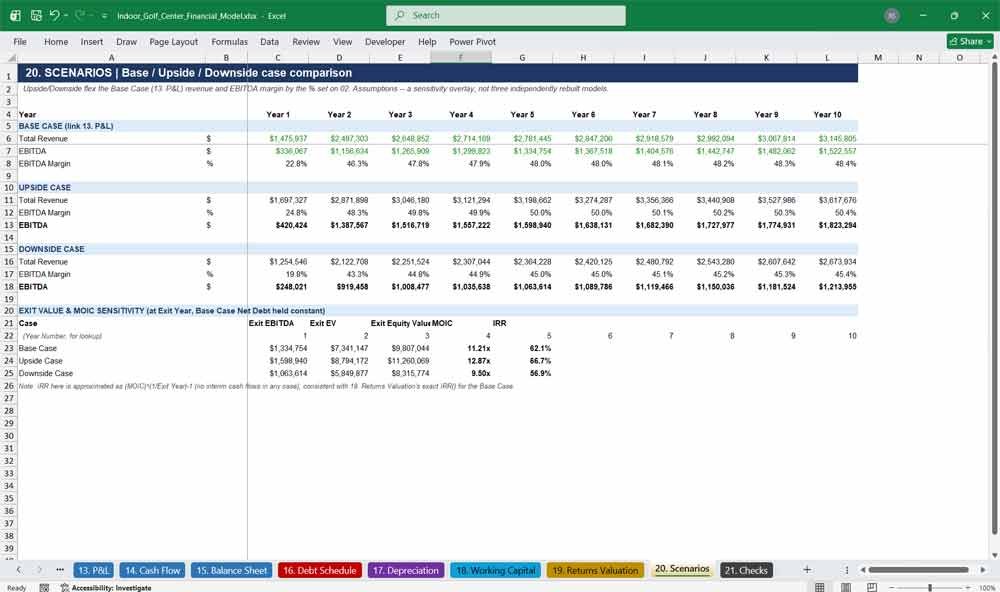
20. Scenarios
A Base, Upside, and Downside sensitivity overlay on top of the core model — flexing revenue and EBITDA margin by adjustable percentages — so you can stress-test your indoor golf business plan and show a lender or investor a realistic range of outcomes.
- Base Case linked directly from the P&L
- Upside and Downside cases flex revenue and margin by adjustable percentages
- Exit value and MOIC sensitivity table across all three cases
- Approximated IRR for quick scenario comparison
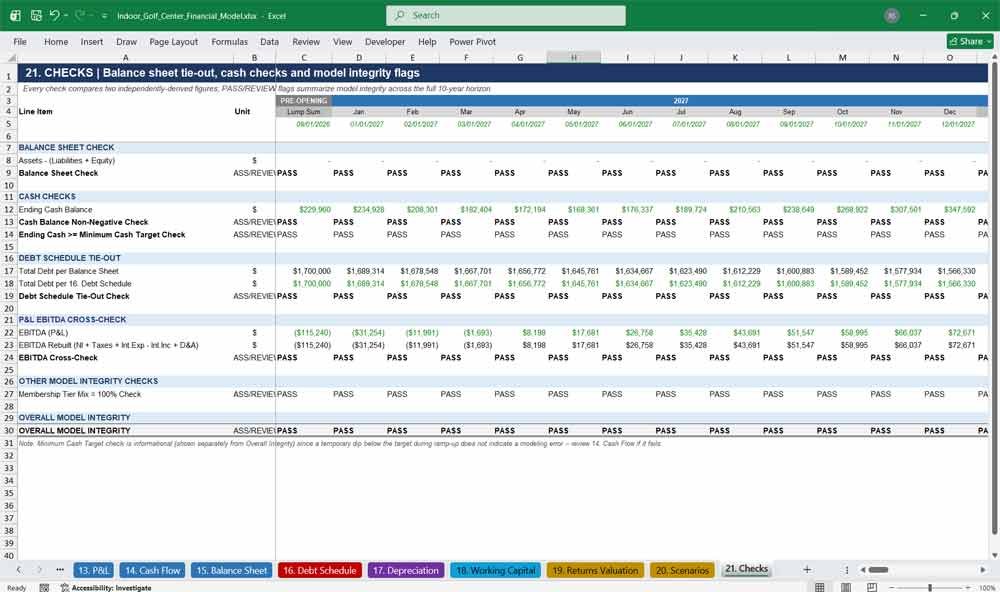
21. Checks
A dedicated model-integrity tab that independently verifies the balance sheet balances, cash never goes negative, the debt schedule ties to the balance sheet, and EBITDA cross-checks correctly — giving you and anyone reviewing the file total confidence the model is built right.
- Balance sheet check verified to $0 across all 71 periods
- Cash balance and minimum cash target checks
- Debt schedule tie-out and EBITDA cross-check
- Single overall PASS/REVIEW model-integrity flag
Indoor Golf Frequently Asked Questions (Faq)
Is this model fully editable, or are the formulas locked?
Everything is fully editable. Every input cell is color-coded blue so you always know exactly what’s safe to change, every calculated cell is a live formula (never a hardcoded number), and nothing is locked or password-protected. You can open the Assumptions tab and change anything — bay count, pricing, financing, opening date — and the entire 21-tab, 10-year model recalculates automatically.
Will this work in Excel, or does it need a specific version?
It’s built as a standard .xlsx file using only widely-supported Excel formulas, so it opens and calculates correctly in any current version of Microsoft Excel (Windows or Mac) as well as most other major spreadsheet applications. No macros, add-ins, or special plugins are required.
Can I actually use this for an SBA loan or investor pitch?
Yes — that’s exactly what it’s built for. It follows standard bankable financial-model conventions: color-coded inputs and formulas, a fully integrated three-statement model that balances to $0 every period, a debt schedule, and a dedicated Checks tab lenders and investors specifically look for. Many buyers use it as the financial exhibit in an SBA loan package or investor deck.
How do I change the number of bays, the opening date, or my market assumptions?
All of that lives on the 02. Assumptions tab. Change the Grand Opening Date in one cell and every date across all 10 years and 21 tabs updates automatically. Change the bay count, membership pricing, rent, or any other assumption and the entire model — revenue, staffing, cash flow, valuation — recalculates instantly with no manual rework.
Is the six-tier membership structure something I have to keep, or can I customize it?
You can fully customize it. The six tiers (Starter through Premium) come pre-built with realistic pricing, hour caps, and capacity rules based on how indoor golf memberships actually work, but every price, hour cap, churn rate, and mix percentage is an editable input — you can rename tiers, change pricing, or restructure the mix to match your own concept.
Does this model include a sensitivity or scenario analysis?
Yes. The 20. Scenarios tab builds Base, Upside, and Downside cases by flexing revenue and margin assumptions, complete with an exit-value and MOIC sensitivity table — useful for showing lenders and investors a realistic range of outcomes rather than a single optimistic projection.
How is this different from a generic startup financial projection template?
Most generic templates are just relabeled spreadsheets with no real industry logic underneath. This model’s revenue engine is purpose-built around indoor golf simulator economics — a genuine capacity-managed membership system, bay-hour utilization constraints, and F&B/ancillary revenue streams — not a simple “revenue grows X% per year” assumption. It’s also a fully integrated three-statement model that provably balances, which most template-store spreadsheets are not.
What if my facility size, bay count, or budget is different from the example in the model?
That’s expected — the example figures (8 bays, a mid-size market cost structure, a specific opening date) are just a realistic starting scenario. Every input is designed to be changed. Update the bay count, square footage, capex figures, or financing structure on the Assumptions tab and the entire model rebuilds itself around your real numbers.
Will I need to know Excel formulas or financial modeling to use this?
No advanced Excel knowledge is required to use the model day-to-day — you only need to type new numbers into the clearly marked blue input cells on the Assumptions tab. Basic familiarity with reading financial statements (revenue, EBITDA, cash flow) will help you get the most out of it, but you never need to write or edit a formula yourself.
How do I know the numbers actually add up correctly?
The 21. Checks tab exists specifically for this. It independently re-derives the balance sheet balance, cross-checks EBITDA two different ways, ties the debt schedule to the balance sheet, and verifies cash never goes negative — across every one of the 71 periods in the model — and rolls it all up into a single PASS/REVIEW flag so you always know the model is mechanically sound.
Final Notes on the Financial Model
This Indoor Golf Centre Finance Model has:
- Profitability Focus: The firm should aim for high-margin revenue streams (retainers and subscriptions).
- Cash Flow Management: Keep an eye on accounts receivable to avoid cash shortages.
- Scalability Strategy: Automate low-tier services to keep operational costs low.
- Long-Term Sustainability: Invest in branding, client loyalty, and technology to enhance efficiency.