
Grocery Store Financial Model Template Excel
This grocery store financial model is a complete Excel template for supermarket chains, regional grocers and multi-site food retailers. It links three full financial statements: the profit and loss, the cash flow statement and the balance sheet. The model starts from 24 months of historical actuals, then forecasts 96 months (8 years) from 2027 to 2034. The template is built for founders, CFOs, private equity investors, lenders and consultants who need a lender-ready grocery business plan, budget or acquisition model.
Financial Model Template for a Grocery Store
Revenue is built from the ground up. Store openings and closures feed a maturity profile. From there the model calculates customer transactions, average basket size, like-for-like growth, and sales per square foot and per square metre. Cost of goods sold is broken out across 12 product categories, including produce, meat, fish, bakery, dairy, frozen and private label. It also covers freight-in, supplier rebates and allowances, inventory shrinkage and spoilage. The operating cost build covers store labour, rent and occupancy, utilities, marketing, distribution and logistics, payment processing fees and G&A. Separate schedules handle capex, depreciation, working capital, debt, leases and tax.
Every forecast number is a live formula traced back to one central assumptions tab. Change the model start date and every date, label and escalation updates across all 17 tabs. A drop-down on the cover dashboard switches between Base, Upside and Downside scenarios. The valuation section includes a DCF, exit-multiple valuation and equity IRR/MOIC, plus sensitivity tables. A dedicated checks tab confirms that the balance sheet balances and that cash ties out in every period.
What’s Inside: Tab-by-Tab Guide
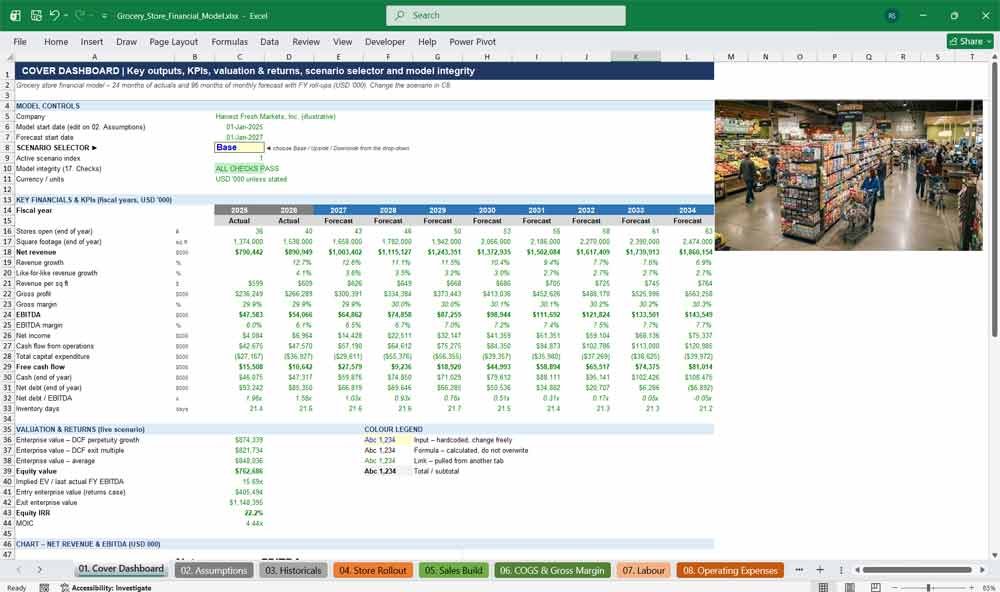
01. Cover Dashboard
The Cover Dashboard summarises the grocery business on one executive page. It shows annual KPIs, revenue and EBITDA trends, enterprise value, equity IRR and MOIC. A scenario drop-down switches between the Base, Upside and Downside cases, and a model integrity flag confirms that all checks pass.
- Base / Upside / Downside scenario selector
- 10-year KPI summary: stores, revenue, margins, EBITDA, free cash flow, net debt
- Revenue vs EBITDA chart
- Valuation and returns summary (EV, equity value, IRR, MOIC)
- Colour legend and hyperlinked table of contents
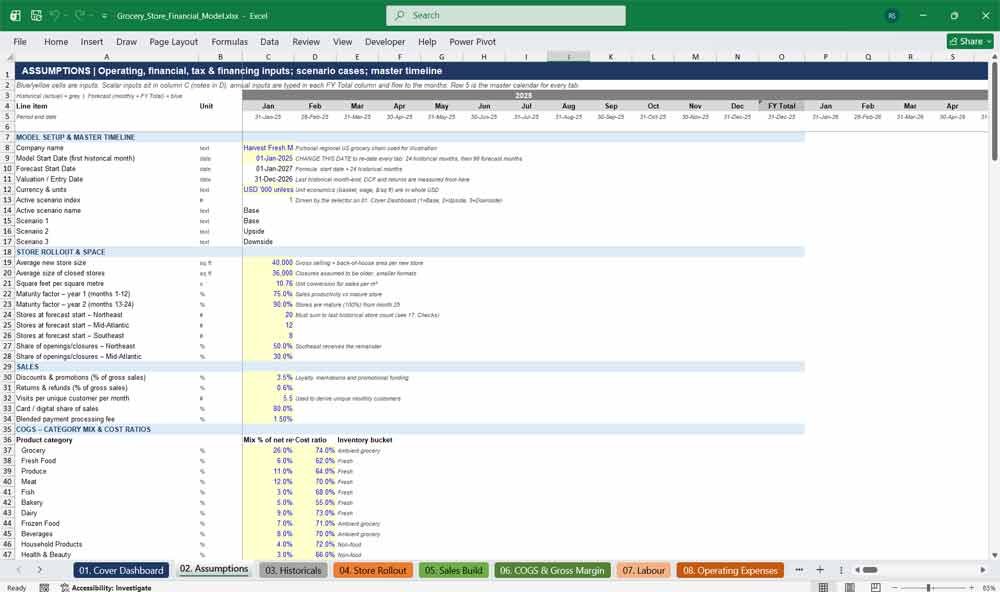
02. Assumptions
The Assumptions tab holds every input for the supermarket model in one place: operating drivers, category margins, labour rates, rent, capex, working-capital days, tax and financing terms. Changing the single Model Start Date input automatically re-dates the entire workbook.
- One Model Start Date drives all 17 tabs
- Scenario cases for traffic, basket size, store openings, supplier costs and wage inflation
- Category mix and cost ratios for 12 product categories
- Annual inputs typed once, then flowed to every month
- Colour-coded inputs (blue on yellow) and explanatory notes
Grocery Store Expenses Financing
03. Historicals
The Historicals tab stores 24 months of monthly actuals. It covers the income statement, cash flow items, the balance sheet and operating KPIs such as store count, square footage, transactions and FTEs. Replace the sample figures with your management accounts and the forecast rolls forward automatically.
- 2 years of monthly historical financial statements
- Operating KPIs: stores, square footage, transactions, headcount
- Built-in balance checks on the historical figures
- Debt and lease balances that seed the forecast
- Illustrative figures included, so you can see how the model works before you add your own
04. Store Rollout
The Store Rollout tab models grocery store expansion. It covers annual openings and closures phased by month, new-store maturity ramp-up, mature-equivalent store counts, square footage growth, floor area in square metres and store counts by region. These drive revenue, labour, rent and capex.
- Monthly phasing of annual openings and closures
- Year-1 and year-2 maturity curves for new stores
- Square footage and m² tracking
- Store count by region
- Mature-equivalent store count feeds the sales build
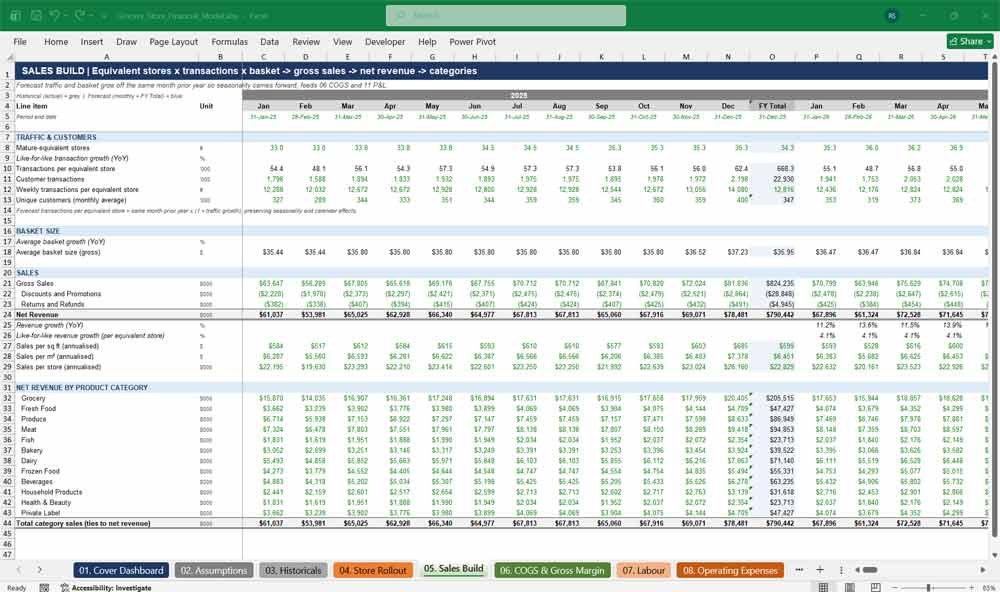
05. Sales Build
The Sales Build forecasts supermarket revenue from customer transactions multiplied by average basket size. It captures traffic growth, basket inflation, seasonality and new-store maturity. It then calculates gross sales, discounts, returns, net revenue, like-for-like growth, sales per square foot and revenue by product category.
- Transactions × basket size revenue build
- Seasonality carried forward from historical months
- Like-for-like (LFL) revenue growth
- Sales per sq ft, sales per m² and sales per store
- Net revenue split across 12 grocery categories
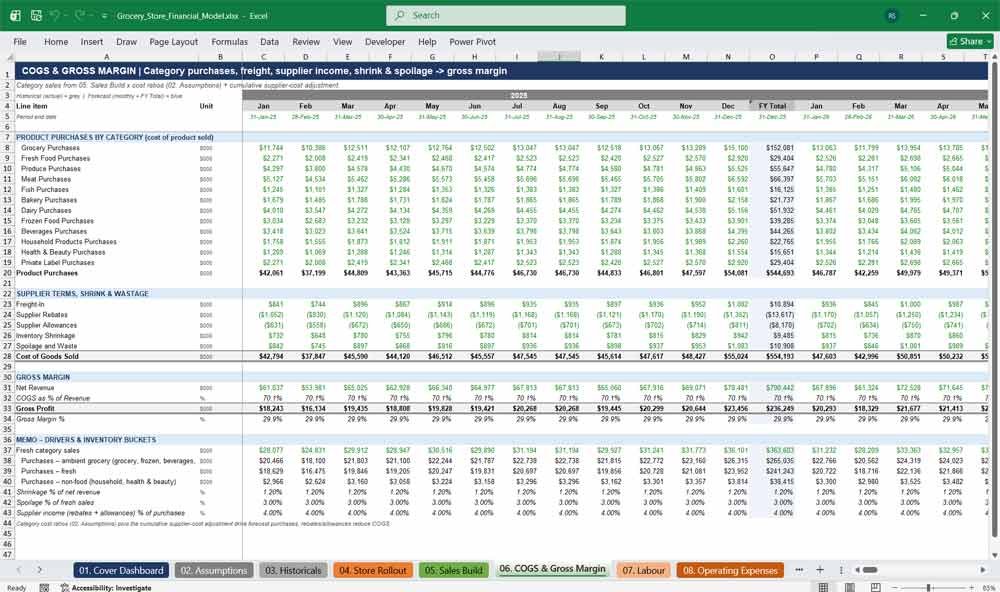
06. COGS & Gross Margin
This tab builds cost of goods sold by product category: grocery, fresh food, produce, meat, fish, bakery, dairy, frozen, beverages, household, health & beauty and private label. It adds freight-in, supplier rebates, allowances, shrinkage and spoilage to calculate gross profit and gross margin.
- Purchases by 12 product categories
- Supplier rebates and allowances that reduce COGS
- Inventory shrinkage and fresh-food spoilage
- Supplier cost pressure applied by scenario
- Gross profit, gross margin % and inventory buckets
07. Labour
The Labour tab models grocery payroll by headcount and hours. It calculates store FTEs, distribution centre staff and HQ employees, with hourly wages, salaries, wage inflation, payroll taxes, benefits and share-based compensation. Store hours flex with customer traffic, so labour costs track sales volume realistically.
- Store, distribution centre and corporate headcount
- Hourly wages and salaries escalated by wage inflation
- Payroll taxes and benefits
- Share-based compensation (non-cash)
- Labour cost as % of revenue
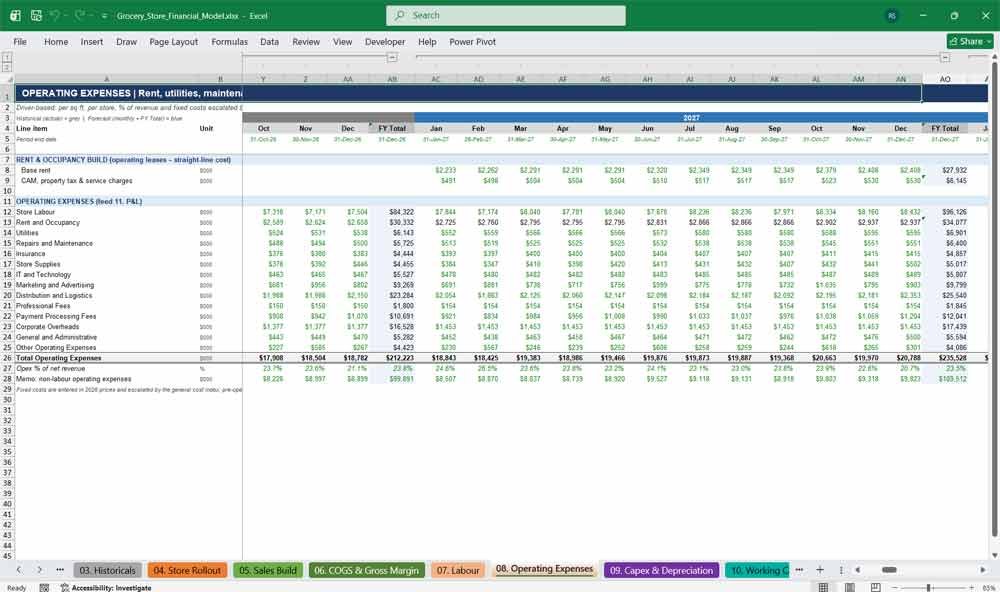
08. Operating Expenses
The Operating Expenses tab forecasts every store and corporate overhead line for a supermarket chain: rent and occupancy, utilities, repairs, insurance, store supplies, IT, marketing, distribution, professional fees, payment processing, corporate overheads and G&A. Each line uses a realistic driver: per store, per square foot, or % of revenue.
- 14 operating expense lines matching the P&L
- Rent per sq ft with CAM and annual escalation
- Grand-opening marketing and pre-opening costs for new stores
- Card fees calculated from payment mix
- Opex as % of revenue
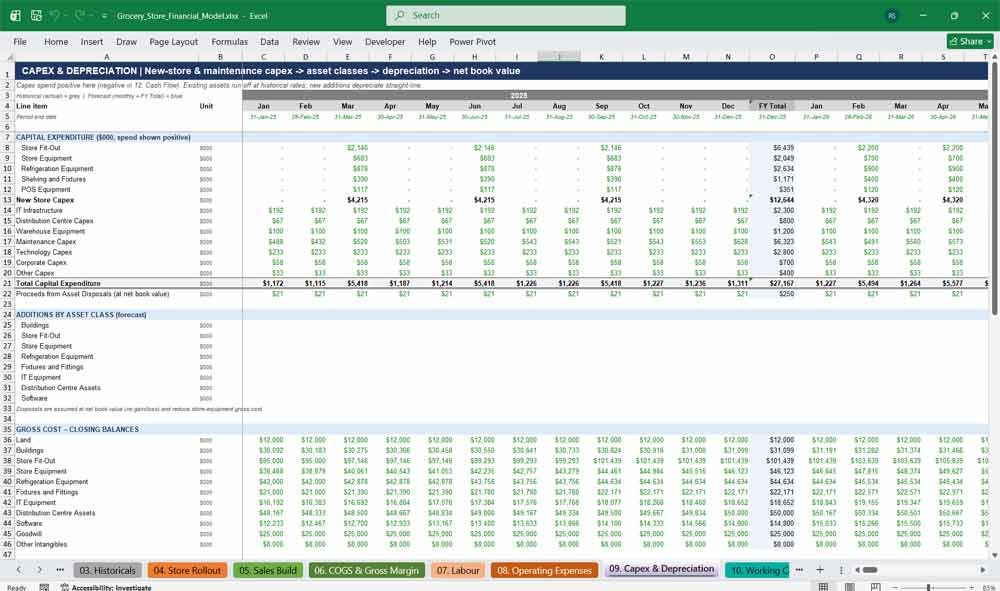
09. Capex & Depreciation
This tab models capital expenditure and depreciation for grocery stores. It covers new-store fit-out, store equipment, refrigeration, shelving, POS systems, distribution centre investment, maintenance capex and technology spend. Straight-line depreciation by asset class calculates net book value and D&A for the P&L.
- New-store capex per opening, escalated for inflation
- Maintenance, IT, DC, warehouse and corporate capex
- Gross cost roll-forward for 9 asset classes
- Straight-line depreciation with useful lives by asset class
- Existing assets run off smoothly over time
10. Working Capital
The Working Capital tab forecasts card receivables, supplier receivables, grocery, fresh and non-food inventory, prepaid expenses, trade payables and accruals, all driven by days. It shows the negative working capital typical of supermarkets and calculates the cash flow impact of each change.
- Days-driven receivables, inventory and payables
- Separate grocery, fresh and non-food inventory
- Changes in working capital feed the cash flow statement
- Inventory, receivable and payable days
- Cash conversion cycle
Grocery Store Financial Statements
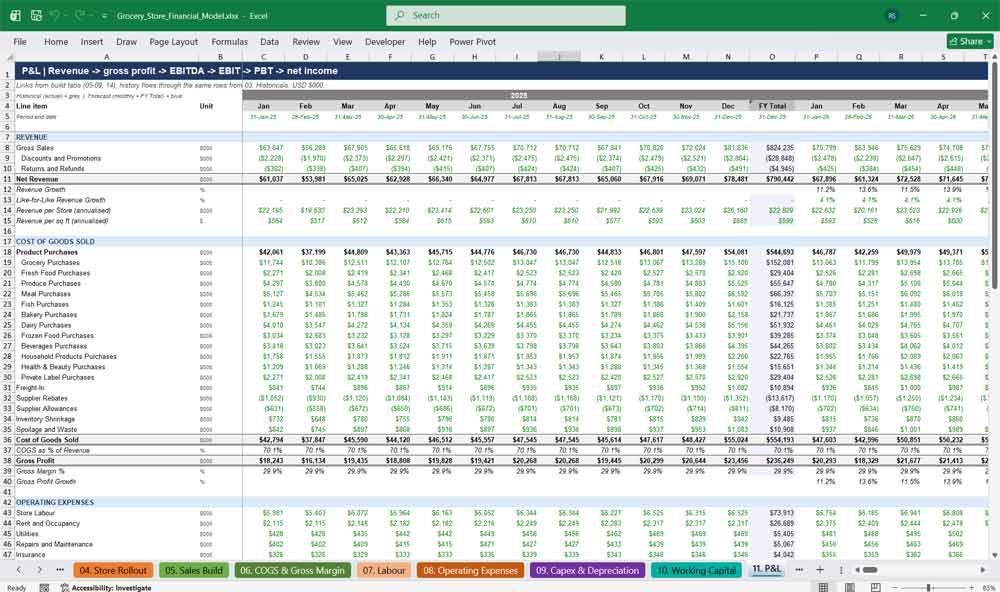
11. P&L
The P&L tab presents a full grocery income statement from gross sales to net income, monthly and annually. It covers discounts, category purchases, gross profit, 14 operating expense lines, EBITDA, depreciation, EBIT, finance costs, current and deferred tax, plus margins, growth rates and per-store metrics.
- Gross sales to net income across 10 years
- Revenue, gross profit, EBITDA and net income growth
- EBITDA per store and per sq ft
- Interest detail: revolver, term loan and leases
- LTM revenue, EBITDA and finance costs
12. Cash Flow
The Cash Flow tab produces an indirect cash flow statement for the grocery chain, covering operating, investing and financing activities. It reconciles beginning and ending cash every month and calculates free cash flow, unlevered free cash flow and levered free cash flow for valuation and debt analysis.
- Indirect cash flow statement (CFO, CFI, CFF)
- Detailed capex and financing lines
- Monthly cash reconciliation
- Free cash flow, unlevered FCF and levered FCF
- Operating cash flow and FCF margins
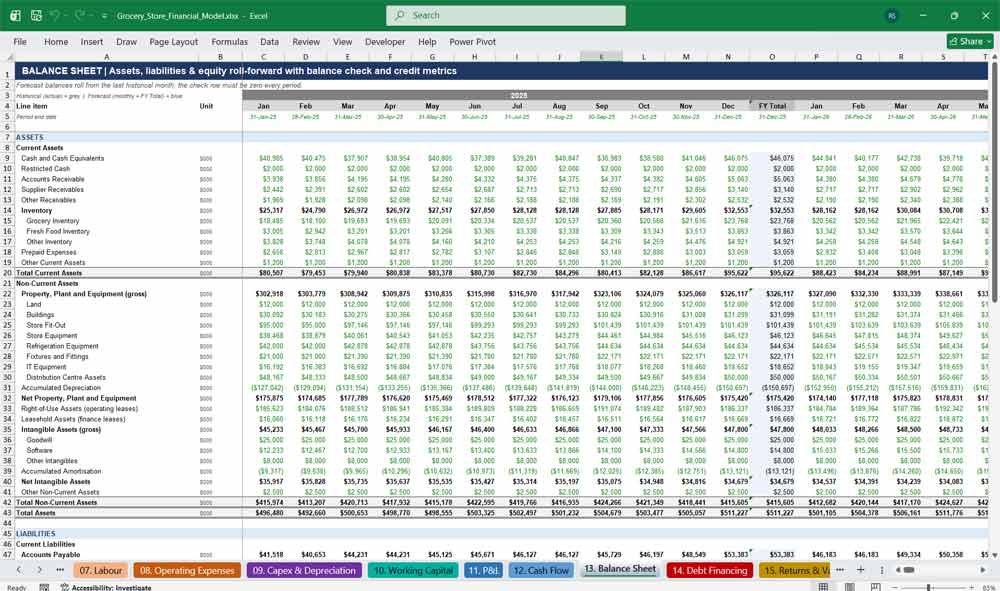
13. Balance Sheet
The Balance Sheet tab delivers a fully integrated projected balance sheet. It shows cash, receivables, inventory, property, plant and equipment, right-of-use assets, intangibles, payables, lease liabilities, debt and equity. A check row confirms that assets equal liabilities plus equity in every month.
- Full balance sheet with detailed sub-lines
- Retained earnings, current-year net income and dividends roll-forward
- Balance check in every period
- Net debt, net debt / EBITDA and debt / EBITDA
- Working capital and inventory, receivable and payable days
14. Debt Financing
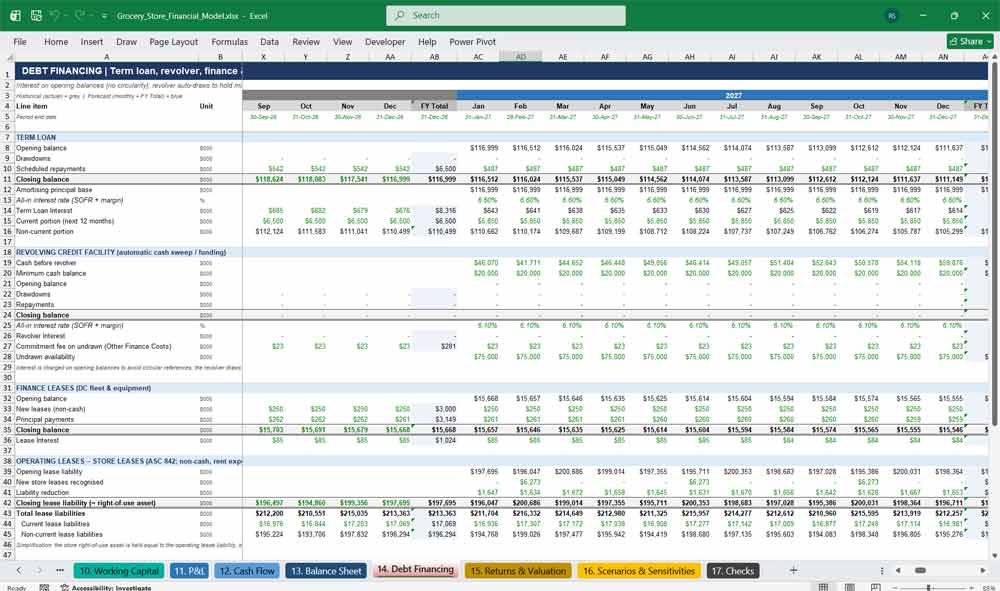
The Debt Financing tab schedules the term loan, revolving credit facility, finance leases and operating leases. It includes drawdowns, amortisation, interest at SOFR plus margin and commitment fees. The revolver funds cash shortfalls automatically, and leverage and interest cover covenants are tested every month.
- Term loan with scheduled amortisation
- Revolver that draws and repays automatically to hold minimum cash
- Finance lease and ASC 842 operating lease schedules
- Interest on opening balances (no circular references)
- Monthly covenant tests with headroom
Grocery Key Financial Ratios & Metrics
15. Returns & Valuation
The Returns & Valuation tab values the grocery business with a discounted cash flow analysis using both the perpetuity growth and exit multiple methods. It calculates enterprise value, equity value and implied multiples, plus a buy-and-exit returns analysis with equity IRR and MOIC.
- Unlevered free cash flow and discounting
- DCF: perpetuity growth and exit multiple methods
- Enterprise value to equity value bridge
- Entry and exit valuation analysis
- Equity IRR and MOIC
16. Scenarios & Sensitivities
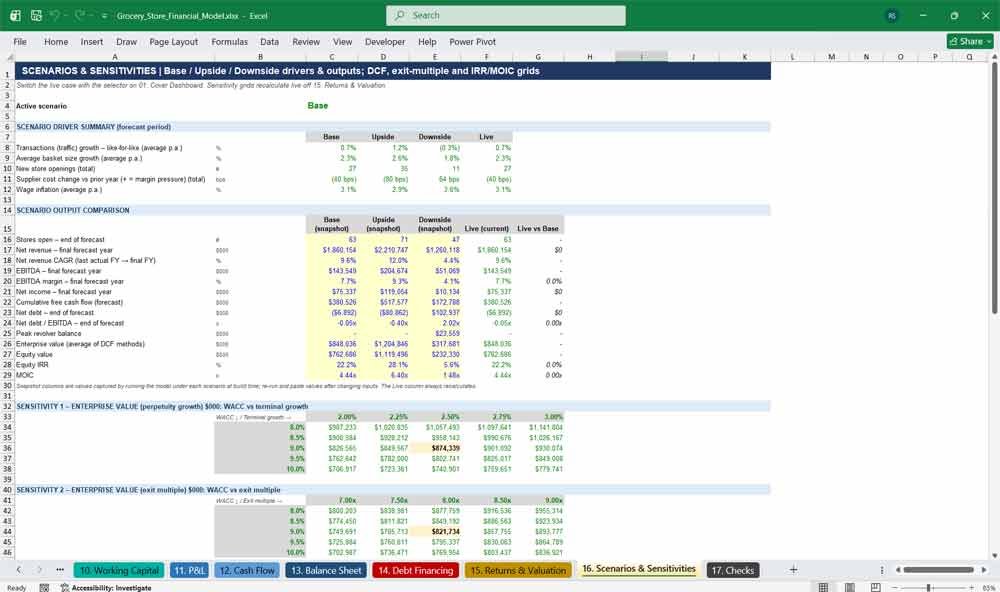
This tab compares the Base, Upside and Downside cases side by side, with the key outputs for each scenario. It also includes four sensitivity tables: EV against WACC and terminal growth, EV against exit multiple, and IRR and MOIC against entry and exit multiples.
- Scenario driver summary
- Side-by-side scenario output comparison
- EV sensitivity to WACC and terminal growth
- EV sensitivity to WACC and exit multiple
- IRR and MOIC grids for entry vs exit multiples
17. Checks
The Checks tab tests the integrity of the model in every period. It confirms that the balance sheet balances, that cash ties out, that category sales reconcile, that EBITDA rebuilds correctly, and that the revolver, minimum cash and covenants are within limits. It also counts formula errors on every tab.
- Balance sheet and cash flow tie-out checks
- Debt, revolver and covenant compliance flags
- Formula error count for every tab
- PASS / REVIEW result for each period
- One overall model integrity flag, linked to the dashboard
Why Buy This Model
Building a three-statement grocery store financial model from scratch can take weeks, and one broken link can undermine a lender pitch or investment decision. This template gives you a professional, fully integrated supermarket model that you can adapt to your own business. It is formula-driven, colour-coded, has no circular references and runs automated checks. Revenue is built from transactions, basket size, category mix and store maturity, so the forecast reflects how grocery retail actually works. Lenders and investors expect this level of detail: monthly granularity, a balance sheet that always balances, scenario analysis, covenant testing and a DCF with IRR returns. All of it is included in one workbook. Whether you are raising debt, planning store expansion, preparing a budget or evaluating an acquisition, this model gets you from assumptions to investor-ready outputs quickly.
Frequently Asked Questions
What kind of business is this model designed for?
It is built for supermarket chains, regional grocers, independent grocery groups and multi-store food retailers. It also suits specialty and fresh-food retailers, because the product categories, store count and cost drivers can all be adjusted to fit your format.
Can I use it for a single grocery store?
Yes. Set the historical store count to one and new openings to zero. The model then works as a single-store budget and forecast, and you can add stores later if you expand.
Do I need advanced Excel skills to use it?
No. Inputs are clearly marked in blue on a yellow background and grouped in one Assumptions tab, with notes explaining each driver. You only change the inputs; the model does the calculations.
How do I change the start date of the forecast?
Enter a new date in the Model Start Date cell on the Assumptions tab. Every date, month label, year header and escalation across all 17 tabs updates automatically.
Is the forecast monthly or annual?
Both. The model forecasts 96 months, and each year has an annual total column. You can collapse the monthly columns to see an annual view.
Can I enter my own historical financials?
Yes. Replace the sample figures on the Historicals tab with your management accounts. The forecast balance sheet, debt and working capital roll forward from your last actual month.
Does the balance sheet actually balance?
Yes. The three statements are fully linked, and the Checks tab confirms that the balance sheet balances and cash ties out in every month under all three scenarios.
How do the scenarios work?
Choose Base, Upside or Downside from the drop-down on the Cover Dashboard. Each scenario has its own traffic growth, basket growth, store openings, supplier cost and wage inflation assumptions, and the whole model recalculates instantly.
Does it include a valuation?
Yes. It includes a DCF using both perpetuity growth and exit multiple methods, an enterprise value to equity value bridge, and an entry and exit returns analysis with equity IRR and MOIC.
Can I use this model to raise bank debt?
Yes. It includes a term loan, a revolving credit facility, lease schedules, monthly covenant tests (leverage and interest cover) and debt headroom, which are the outputs lenders typically ask for.
How are leases treated?
Store leases are modelled as operating leases under ASC 842, with rent in operating expenses and a right-of-use asset and lease liability on the balance sheet. Fleet and equipment leases are modelled as finance leases, with interest and principal payments.
Are there any macros or circular references?
No. There are no macros and no circular references. Interest is calculated on opening balances, which keeps the model stable and easy to audit.
What currency is the model in?
The model is in US dollars, with financials shown in thousands. The formulas do not depend on the currency, so you can relabel it for GBP, EUR or any other currency.
Can I add or remove product categories?
The model has 12 standard grocery categories with their own sales mix and cost ratios. You can change the mix and margins freely, or set a category to zero if it does not apply.
Will it work in Google Sheets or on a Mac?
The model is built for Microsoft Excel and works in Excel for Windows and Mac. It uses standard functions, so it should also open in Google Sheets, although Excel gives the best experience.
Is the sample data real?
No. The historical figures and assumptions are illustrative placeholders for a fictional grocery chain. They show how the model works and should be replaced with your own data.
Conclusion
This Grocery Store Financial Model ensures accurate financial planning and decision-making. The income statement measures profitability, the cash flow statement ensures liquidity and the balance sheet provides financial stability insights. Regularly analyzing these statements helps store owners optimize costs, manage cash flow, and plan for growth.