
Fitness Gym Financial Model Template
Planning to open a bodybuilding gym, fitness center or health club? Our Fitness Gym Financial Model Template in Excel gives you a complete, investor-ready financial plan for a gym startup or an expansion. It covers 10 years: Years 1–5 are monthly and Years 6–10 are annual. Every line is driven by live formulas, so you can model membership growth, pricing, personal training, group classes, retail, nutrition, staffing, rent and opening costs. The result is a professional set of gym financial projections you can present to banks, landlords and investors.
Financial Model for a Fitness Gym
The heart of the model is a detailed gym membership revenue model. It tracks seven membership categories, new joins, churn, retention, capacity utilization and ARPU. Members flow straight into a revenue build covering memberships, personal training, classes, day passes, PAYG rentals, retail, food and beverage, and corporate wellness. Those revenues feed a fully integrated three-statement model: the Profit & Loss, Cash Flow and Balance Sheet. The model also includes a debt schedule, working capital, capex, depreciation and a balance check in every period.
This gym business plan Excel template is built for decision-making, not just presentation. Change one start date and the whole timeline re-dates automatically. You can switch between Base, Downside and Upside scenarios, and live sensitivity tables show how pricing, churn and costs affect EBITDA and investor returns. With IRR, MOIC, NPV, break-even analysis and a built-in checks tab, you can test your fitness business idea, size your funding and pitch with confidence.
What’s Inside: Tab-by-Tab Guide
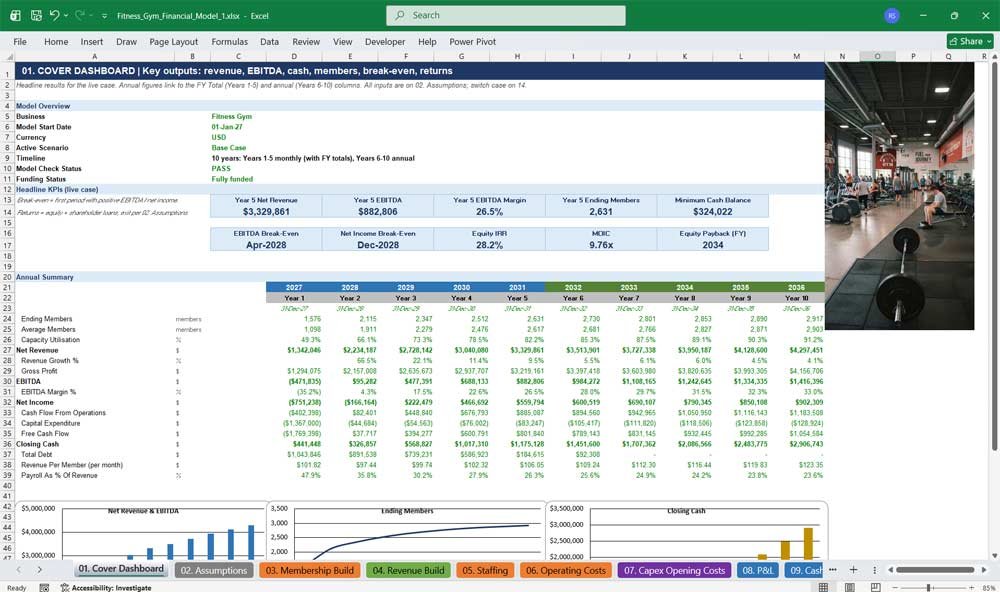
01. Cover Dashboard
The Cover Dashboard gives owners, lenders and investors an instant snapshot of your gym’s financial performance. Revenue, EBITDA, cash, members, break-even timing and investor returns all update automatically from your assumptions, keeping every presentation current, accurate and investor-ready.
- Headline KPI tiles: Year 5 revenue, EBITDA, margin, members, minimum cash, IRR and MOIC
- EBITDA and net income break-even month calculated automatically
- 10-year annual summary of members, revenue, profit, cash flow and debt
- Charts for revenue and EBITDA, membership growth and closing cash
- Live model check status and funding status indicators
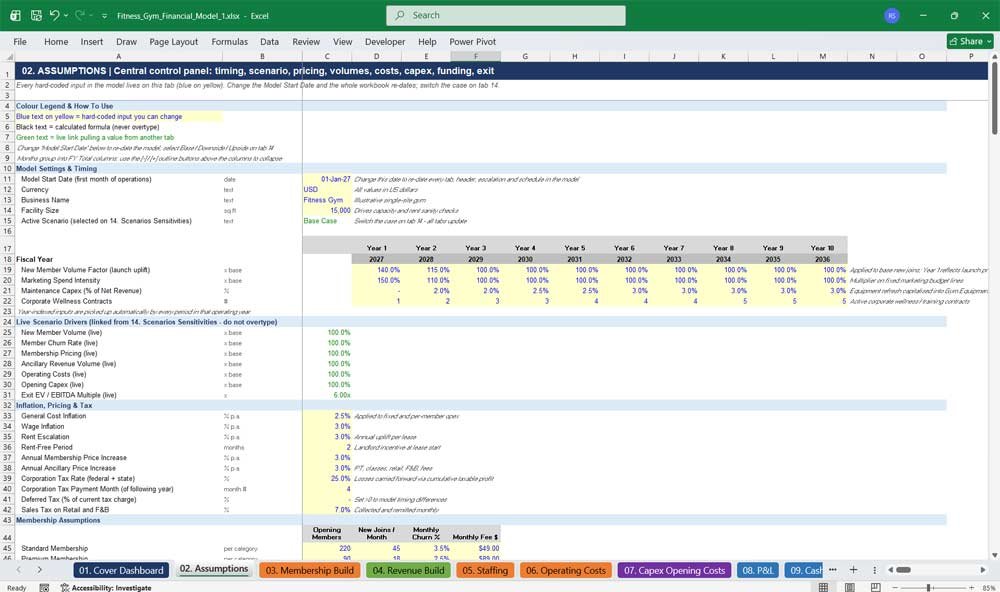
02. Assumptions
The Assumptions tab is the central control panel for your gym financial model. Pricing, membership volumes, churn, staffing, operating costs, capex, working capital, funding, tax and exit inputs all sit in one colour-coded place. Change any value and everything updates.
- One Model Start Date re-dates every tab, header and schedule automatically
- Colour-coded inputs (blue on yellow), formulas (black) and links (green)
- Year-by-year drivers for launch uplift, marketing intensity and maintenance capex
- Monthly seasonality for new member joins, keyed to the calendar month
- Complete funding inputs: equity, bank loan, equipment finance and shareholder loans
Fitness Gym Revenues & Costs
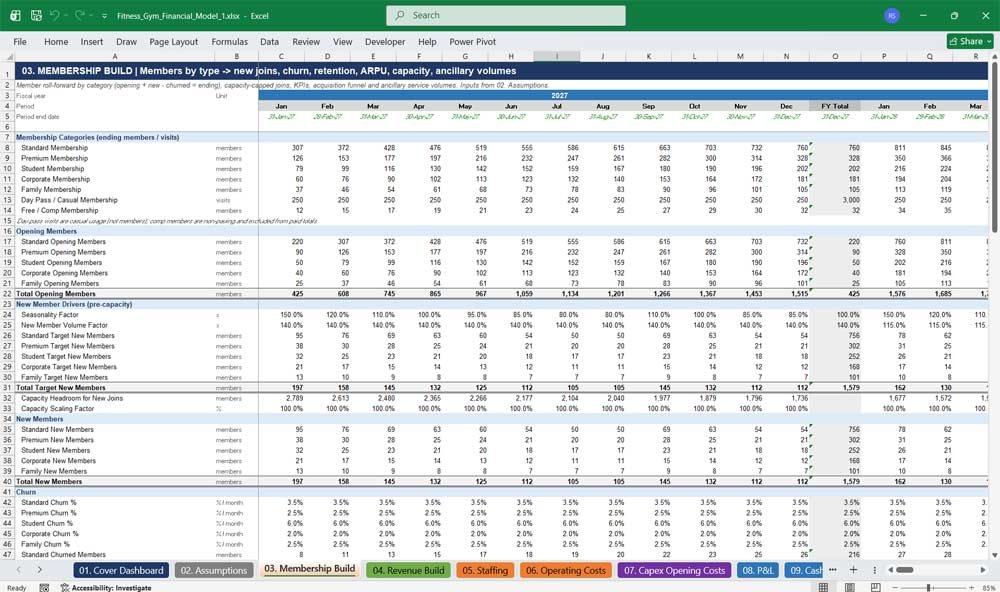
03. Membership Build
The Membership Build forecasts your gym’s member base by category, covering opening members, new joins, churn, ending and average members. It caps growth at facility capacity and tracks retention, ARPU, the lead conversion funnel and ancillary service volumes.
- Standard, Premium, Student, Corporate, Family, Day Pass and Free/Comp categories
- Member roll-forward with automatic capacity cap on new joins
- Churn rate, annual churn, retention rate and new member growth KPIs
- Acquisition funnel: marketing leads, enquiries, sign-ups and cost per acquisition
- Volumes for PAYG rentals, private lessons, group coaching, workshops, retail and nutrition
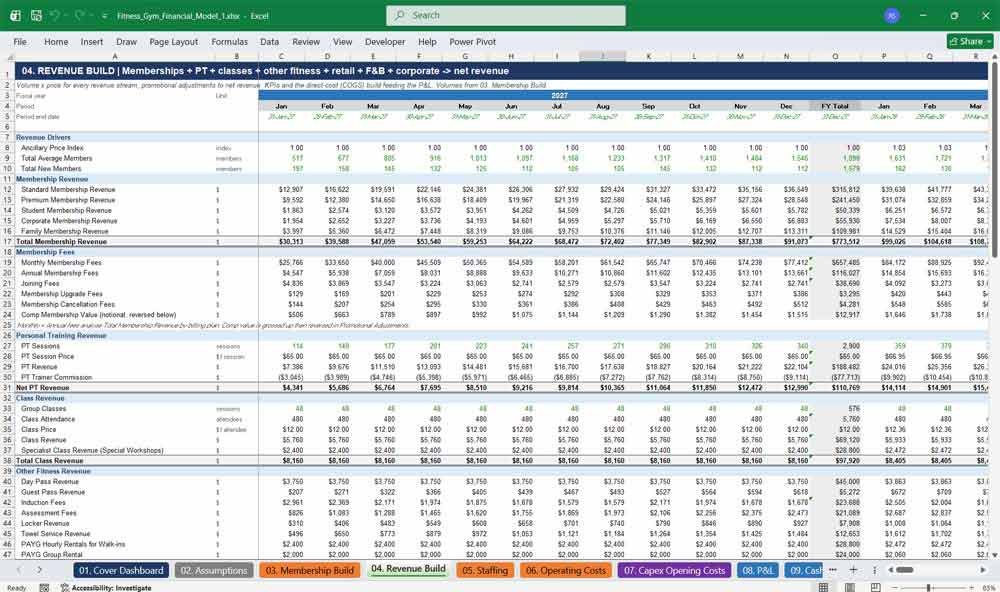
04. Revenue Build
The Revenue Build turns members into detailed gym revenue projections. It covers membership fees, personal training, classes, day passes, PAYG rentals, retail, nutrition, food and beverage, and corporate wellness, with discounts, refunds and chargebacks deducted to give net revenue.
- Membership revenue by category with annual price increases
- Joining, upgrade and cancellation fees plus prepaid annual plans
- Personal training revenue with trainer commission and net PT revenue
- Retail, supplements, smoothies, coffee and food sales with COGS build
- Revenue KPIs: revenue per member, per visit, ancillary spend and revenue mix
05. Staffing
The Staffing tab builds your gym payroll budget from headcount up. It models FTEs by role, salaries with wage inflation, employer taxes, benefits, bonuses and training. It also calculates personal trainer commissions and contractor fees, your largest operating cost.
- Eight roles, from Gym Manager to Cleaning and Maintenance staff
- Separate Year 1 and Year 2+ headcount to reflect ramp-up
- Employer taxes, benefits, bonuses and training per FTE
- PT commissions, contractor fees and trainer bonuses linked to PT revenue
- KPIs: payroll as a % of revenue, FTE per 100 members and revenue per FTE
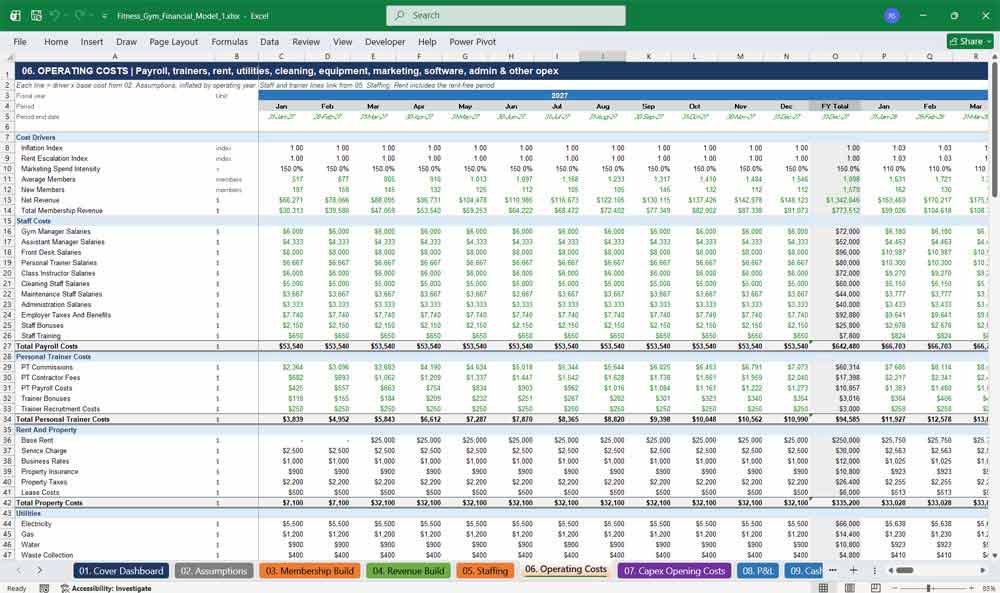
06. Operating Costs
The Operating Costs tab forecasts every gym expense, including rent, utilities, cleaning, equipment servicing, marketing, software, insurance, administration and consumables. Each line uses fixed, per-member or percentage-of-revenue drivers, and every line inflates automatically each year for realistic gym budgeting.
- Over 80 cost lines across 13 categories, matching standard gym operations
- Rent-free period and annual rent escalation built in
- Marketing budget scaled for launch intensity and referral fees
- Merchant fees and equipment replacement linked to revenue
- KPIs: cost per member, rent and marketing as a % of revenue
07. Capex Opening Costs
The Capex Opening Costs tab captures your gym startup costs: equipment, leasehold improvements, fit-out, furniture, technology, software, licences, pre-opening costs and deposits. Depreciation and amortisation by asset class flow directly into the P&L and Balance Sheet for accurate profit reporting.
- Opening capex by asset class with individual useful lives
- Pre-opening costs broken down, capitalised and amortised
- Lease security and utility deposits tracked as balance sheet assets
- Ongoing maintenance capex as a % of revenue for equipment refresh
- Gross cost, accumulated depreciation and net book value for every asset class
Fitness Gym Financial Statements
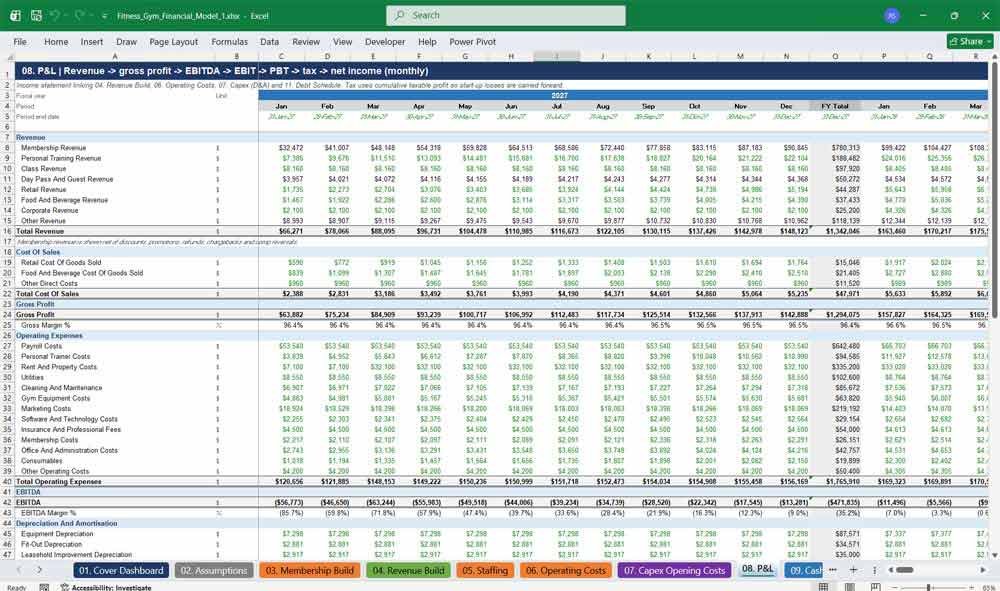
08. P&L
The P&L tab is a full monthly income statement for your fitness business. It runs from revenue through gross profit, EBITDA, depreciation, operating profit, finance costs and tax to net income. Margin KPIs show exactly when your gym becomes profitable.
- Revenue analysed by membership, PT, classes, retail, F&B, corporate and other
- Gross margin, EBITDA margin, operating margin and net margin
- Corporation tax with losses carried forward automatically
- Interest expense, loan fees and interest income on cash
- Payroll and rent as a % of revenue for benchmarking
09. Cash Flow
The Cash Flow tab shows exactly how cash moves through your gym. Using the indirect method, it adjusts net income for working capital, capex, debt, equity and dividends. It also tracks your minimum cash balance, revealing the funding you really need.
- Cash flow from operations, investing and financing activities
- Free cash flow, cash burn and cash conversion KPIs
- Minimum cash balance to date, to identify your peak funding need
- Cash surplus or shortfall against your minimum cash requirement
- Months of cash coverage for liquidity planning
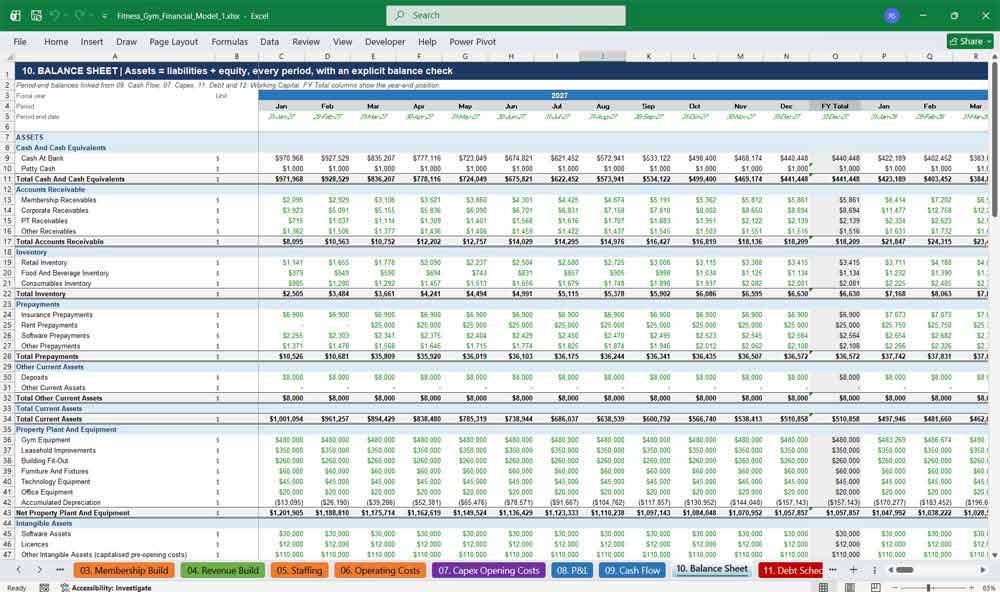
10. Balance Sheet
The Balance Sheet tab delivers a fully integrated statement of assets, liabilities and equity every month and year. It links cash, receivables, inventory, fixed assets, payables, debt and retained earnings, and a built-in check confirms it balances every period.
- Detailed current assets, PP&E, intangibles and security deposits
- Payables, accruals, deferred membership revenue and taxes payable
- Debt split between current and non-current portions
- Share capital, additional paid-in capital and retained earnings roll-forward
- Assets less liabilities and equity check in every period
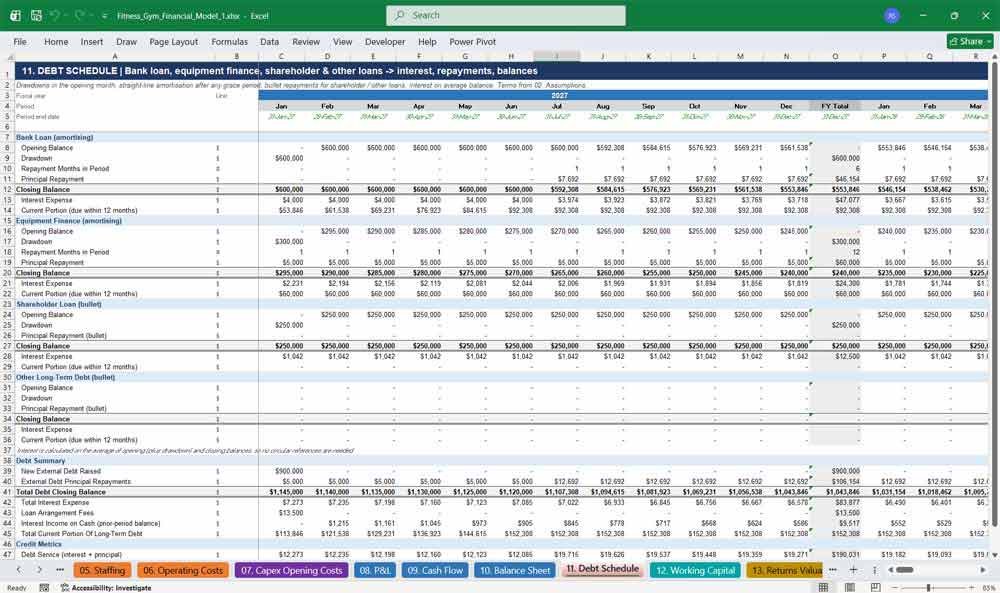
11. Debt Schedule
The Debt Schedule models every source of gym financing: bank loans, equipment finance, shareholder loans and other debt. It calculates drawdowns, grace periods, repayments, interest and balances automatically, and shows lenders your debt service coverage throughout the forecast.
- Amortising bank loan with a capital grace period
- Equipment finance with its own rate and term
- Bullet repayments for shareholder and other loans
- Current portion of long-term debt calculated for the Balance Sheet
- Debt service coverage ratio and net debt to EBITDA
12. Working Capital
The Working Capital tab calculates receivables, inventory, prepayments, payables, accruals and deferred revenue from simple days and months assumptions. It captures the cash benefit of members paying in advance, giving your gym cash flow forecast realistic, lender-grade accuracy.
- Membership, corporate, PT and other receivables
- Retail, F&B and consumables inventory days
- Prepaid and annual memberships held as deferred revenue
- Corporation tax payable roll-forward, with tax paid the following year
- Net working capital and its movement each period
Key Financial Metrics for a Fitness Gym
13. Returns Valuation
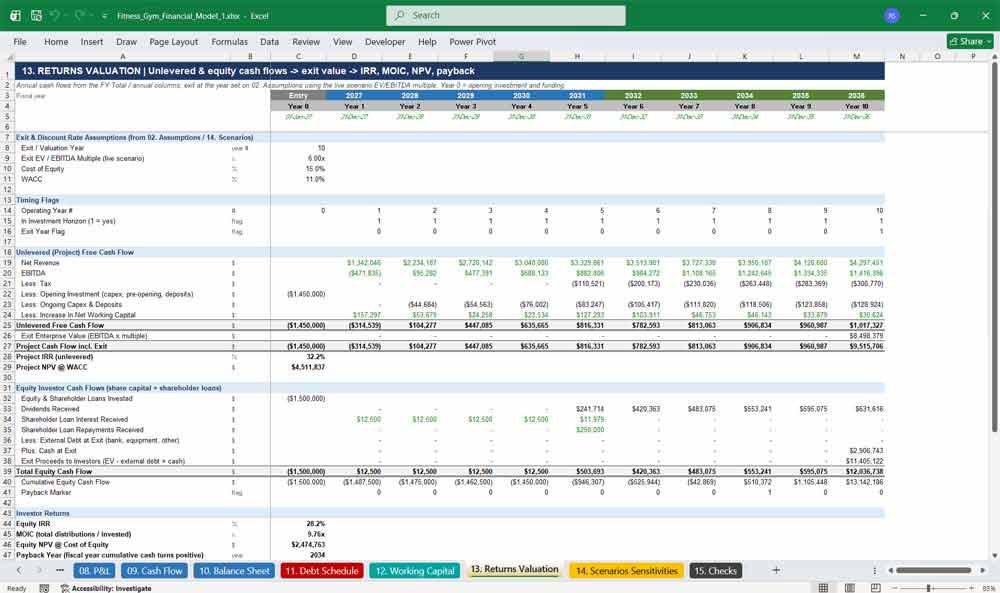
The Returns Valuation tab shows investors what your gym is worth and what they will earn. It calculates unlevered and equity cash flows, exit value from an EBITDA multiple, and IRR, MOIC, NPV and payback for any exit year.
- Project IRR and NPV on unlevered free cash flow
- Equity IRR, MOIC and NPV for shareholders
- Exit valuation using a scenario-driven EV/EBITDA multiple
- Selectable exit year from Year 1 to Year 10
- Payback year and implied EV-to-revenue multiple
14. Scenarios Sensitivities
The Scenarios Sensitivities tab lets you stress-test your gym business plan in seconds. Switch between Base, Downside and Upside cases, flex individual drivers, and use live Excel data tables to see the impact on EBITDA, IRR and cash.
- One-cell switch between Base, Downside and Upside scenarios
- Side-by-side comparison of all three cases
- Two-way sensitivity tables: EBITDA, equity IRR and minimum cash
- Flex inputs for new members, churn, pricing, ancillary revenue, opex and capex
- Scenario-specific exit multiples
15. Checks
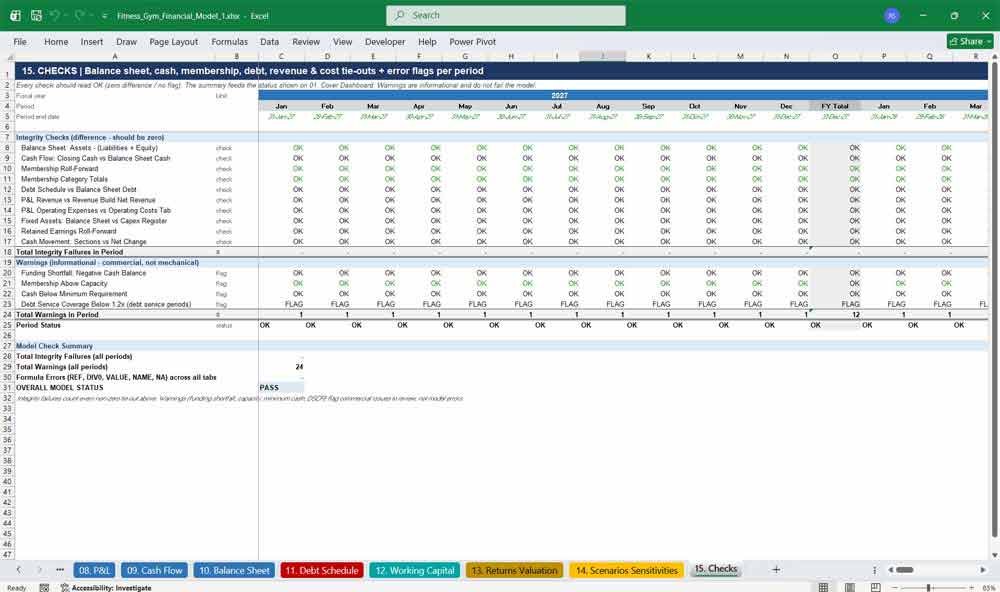
The Checks tab gives you confidence that your gym financial model is accurate. It tests the balance sheet, cash, membership, debt, revenue, costs, fixed assets and retained earnings in every period, scans every tab for errors, and reports PASS.
- Ten integrity checks run for every month and year
- Formula error scan across all calculation tabs
- Warnings for funding shortfalls, capacity, minimum cash and debt coverage
- Period-by-period status plus an overall PASS / REVIEW result
- Status shown automatically on the Cover Dashboard
Why Buy This Model?
Building a credible gym financial model from scratch can take weeks, and one broken formula can undermine your pitch. This Fitness Gym Financial Model gives you a fully integrated, professionally formatted Excel model, ready to use straight away. It follows the standards lenders and investors expect: colour-coded inputs, a single assumptions tab, a three-statement structure, a balance sheet that balances every period, and transparent checks. Unlike generic templates, it is built specifically for gyms and fitness centers. It covers membership categories, churn, capacity, personal training, classes, retail, nutrition and corporate wellness. Change the start date and every date updates automatically. Switch scenarios to stress-test your plan, and show investors IRR, MOIC and NPV in a dashboard they will understand at a glance. Whether you are opening your first gym, raising a bank loan, seeking investors or testing an expansion, this model saves you time and money and helps you make better decisions.
Fitness Gym Frequently Asked Questions (Faq)
Can I use this model for my own gym, even if it’s different from the example?
Yes. The model is fully assumption-driven, so you can change membership prices, member numbers, churn, staffing, rent, costs, capex and funding on the Assumptions tab to match your own gym. The example figures are illustrative and are designed to be replaced with your own.
I’m opening a new gym. Does it handle startup and pre-opening costs?
Yes. The Capex Opening Costs tab covers gym equipment, leasehold improvements, fit-out, furniture, technology, software, licences, deposits and pre-opening costs such as launch marketing and staff recruitment. The model also forecasts the cash you need to fund the early loss-making months.
How far ahead does the forecast go?
Ten years. Years 1–5 are monthly, with an annual FY Total column for each year, and Years 6–10 are annual. This gives you the monthly detail lenders want in the early years and the long-term view investors need for valuation.
Can I change the start date?
Yes. Change the Model Start Date on the Assumptions tab and every date, year label, month header, seasonality pattern and schedule updates automatically across all 15 tabs.
Do I need advanced Excel skills to use it?
No. All inputs are on one tab and colour-coded blue on yellow, so you only change those cells. Everything else calculates automatically. The checks tab tells you if anything is out of balance.
Will the model show lenders that I can repay a loan?
Yes. The Debt Schedule models bank loans, equipment finance and shareholder loans with grace periods and repayments. It also calculates the debt service coverage ratio, and the Cash Flow tab shows your minimum cash balance and liquidity.
Does it include a full Balance Sheet and Cash Flow, or just a P&L?
It is a fully integrated three-statement model with a P&L, Cash Flow and Balance Sheet, plus Working Capital and Debt schedules. The Balance Sheet balances in every period, and this is verified on the Checks tab.
Can I model different types of memberships?
Yes. The model includes Standard, Premium, Student, Corporate and Family memberships, plus Day Pass / Casual visits and Free / Comp members. Each paid category has its own opening members, new joins, churn rate and monthly fee.
Does it cover revenue beyond memberships?
Yes. It includes personal training, group coaching classes, special workshops, day and guest passes, PAYG hourly and group rentals, induction and assessment fees, lockers, towel service, retail, nutrition, smoothies, coffee, food and corporate wellness contracts.
How do the scenarios and sensitivities work?
Select Base, Downside or Upside on the Scenarios tab and the whole model re-runs instantly. Live Excel data tables show how changes in pricing, new member volume, churn, operating costs, ancillary revenue and capex affect EBITDA, equity IRR and minimum cash.
What investor return metrics are included?
The Returns Valuation tab calculates project IRR, project NPV, equity IRR, MOIC, equity NPV, payback year and exit valuation. Exit value is based on an EV/EBITDA multiple, and you can choose any exit year from 1 to 10.
Is the model in US dollars? Can I use it in another country?
The model is set up in USD, but all values are inputs. You can enter your local prices, costs and tax rate and use it for a gym anywhere in the world.
Does the model work in Google Sheets or on a Mac?
The model is built for Microsoft Excel and works in Excel for Windows and Excel for Mac. Most features also work in Google Sheets. However, the live sensitivity data tables on the Scenarios tab need Microsoft Excel.
Can I add more membership types or cost lines?
Yes. The model uses clear, consistent formulas, so you can extend it. Unused lines can also be set to zero in the Assumptions tab if they don’t apply to your gym.
Is this suitable for a boutique studio or CrossFit box, rather than a large gym?
Yes. Set the capacity, membership categories, class volumes and costs to match your format. The model works for boutique studios, CrossFit boxes, yoga and Pilates studios, health clubs and large commercial gyms alike.
Final Notes on the Financial Model
This 5-Year Fitness Gym Financial Model must focus on balancing capital expenditures with steady revenue growth from diversified subscription-based and walk-in services. By optimizing operational costs, and efficiency, and maximizing high-margin services, the model ensures sustainable profitability and cash flow stability.