
Construction Company Financial Model Template
This Construction Company Financial Model is a professional Excel template for civil engineering and infrastructure contractors that need accurate, bank-ready financial projections. It combines three years of monthly historical financials with a five-year monthly forecast and annual totals. Twenty fully linked tabs produce an integrated income statement, balance sheet and cash flow statement. Built for highways, bridges, rail, water, utilities, energy, marine and flood defence contractors, it turns your project pipeline into revenue, margin, cash and funding forecasts.
Financial Model for a Construction Company
Unlike generic business plan templates, this construction financial model is driven by the way contractors actually earn and spend money. Revenue is recognised project by project using percentage-of-completion. Costs follow each contract’s budget, and work in progress, billings, contract assets, retentions and subcontractor balances are tracked every month. Backlog, tender pipeline probability, variations, claims, plant and fleet, headcount and overheads all flow through to the three financial statements. Lenders, investors and boards can trace every number back to its source.
The model is designed for construction business owners, finance directors, commercial managers, lenders and investors preparing budgets, bank facilities, acquisitions or strategic plans. Change one start date and the whole model re-dates automatically. Switch between eight scenarios from the cover page, and stress-test liquidity, covenants and margins in seconds. The model uses colour-coded inputs, more than 85,000 live formulas and built-in integrity checks. It gives you a reliable construction cash flow forecast and valuation-ready financial plan without building a spreadsheet from scratch.
What’s Inside: Tab-by-Tab Guide
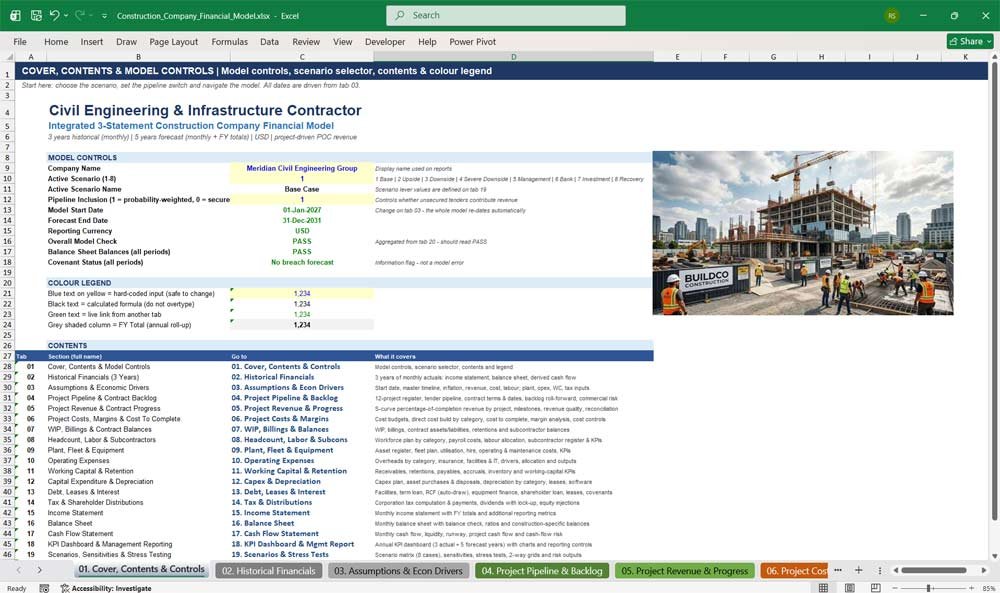
01. Cover, Contents & Model Controls
The control centre of the construction financial model. Choose the active scenario, switch pipeline revenue on or off, and confirm the model’s health at a glance. Hyperlinked contents and a colour legend make navigating all twenty tabs fast and intuitive for any user.
- Scenario selector with eight pre-built cases
- Pipeline inclusion switch (probability-weighted or secured work only)
- Live overall model check, balance sheet and covenant status
- Hyperlinked contents page and colour-coded input legend
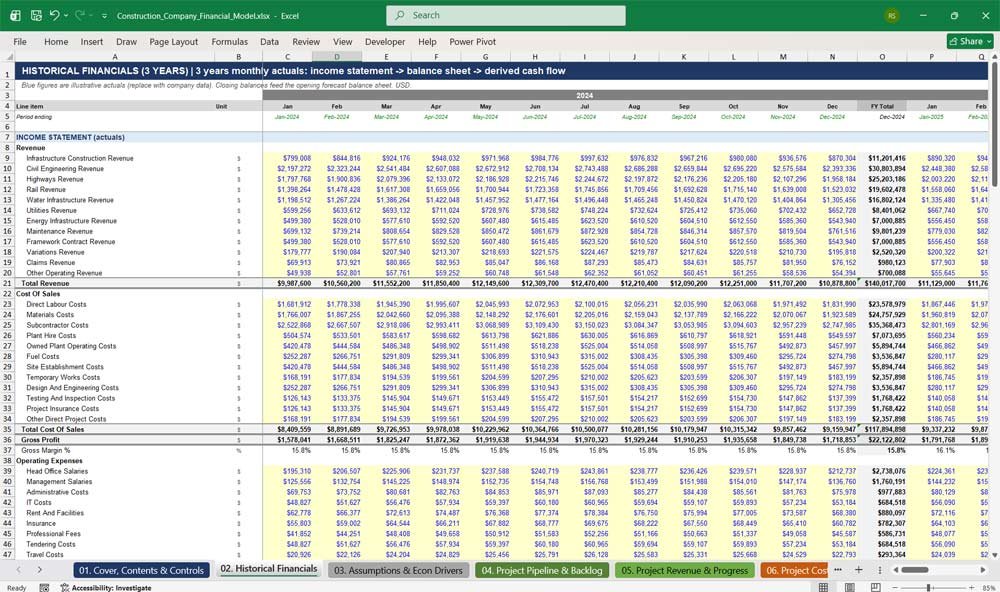
02. Historical Financials (3 Years)
Enter three years of monthly actuals, including the income statement, balance sheet and debt and asset detail. The model derives a historical cash flow automatically and checks that every month balances. The closing balances become the opening position for your five-year construction forecast.
- 36 months of historical income statement and balance sheet
- Automatic indirect cash flow derived from balance sheet movements
- Balance sheet check and cash reconciliation for every month
- Opening forecast balances linked directly from history
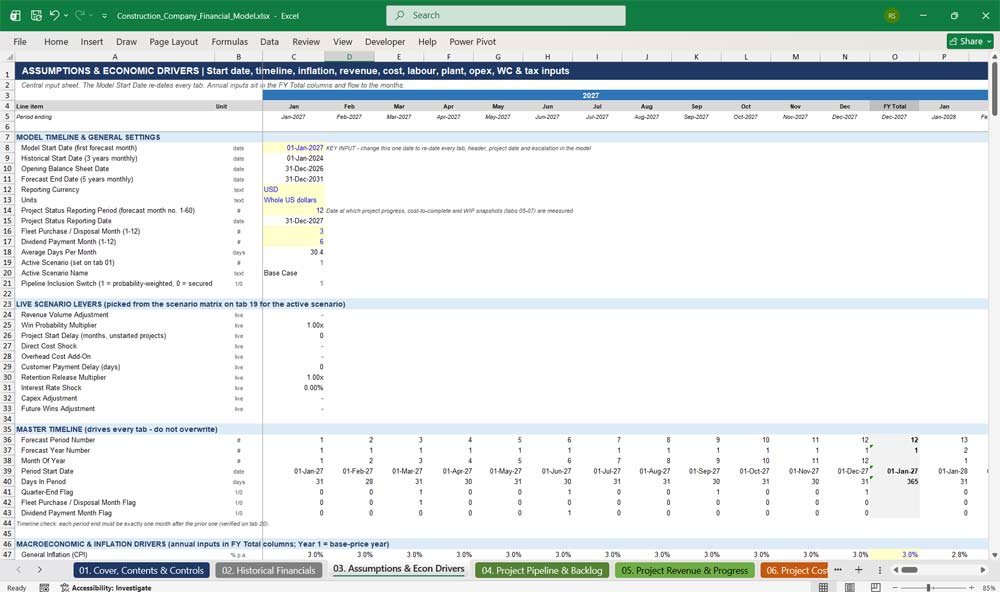
03. Assumptions & Economic Drivers
All key assumptions sit in one central input sheet. Change the single Model Start Date and every tab, header, project date and escalation updates automatically. Inflation indices, revenue drivers, cost mix, labour, plant, overheads, working capital and tax inputs are clearly organised and colour-coded.
- One start date re-dates the entire financial model
- Separate inflation indices for materials, labour, rent, insurance, software and plant
- Direct cost mix and sub-mix mapped to income statement lines
- Working capital, tax, dividend and treasury assumptions
Construction Company Revenues & Costs
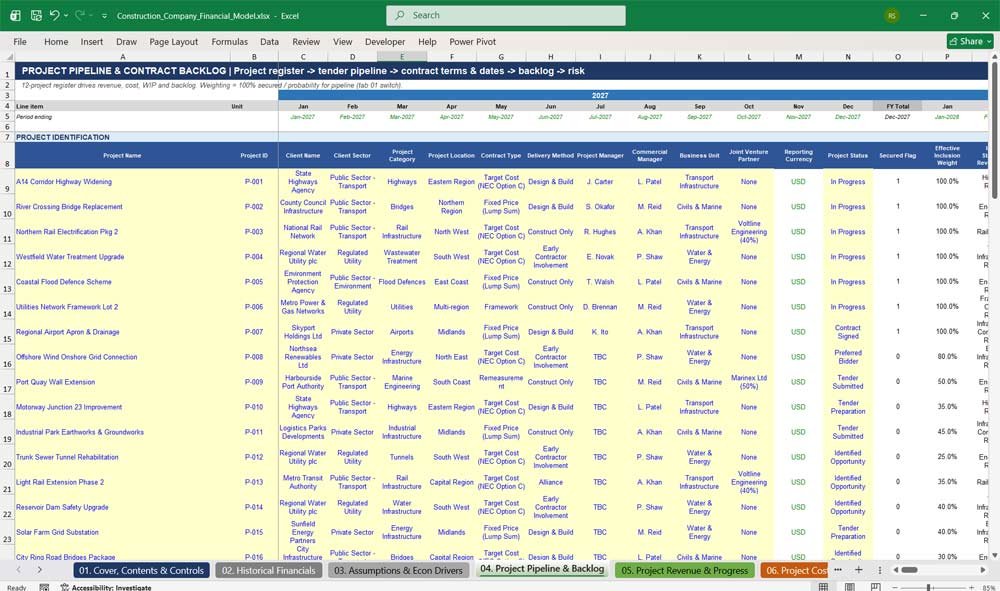
04. Project Pipeline & Contract Backlog
A complete construction project register covering identification, tender pipeline, contract details, key dates and commercial risk. Secured contracts count at 100% and pipeline tenders are probability-weighted. A monthly backlog roll-forward shows new awards, revenue burn and secured backlog coverage.
- 16-project register with client, sector, category and contract type
- Tender pipeline with probability-weighted values, tender costs and bid budgets
- Contract dates chained to the model start date, including extensions of time and delays
- Backlog analysis, coverage ratio and commercial risk exposure
05. Project Revenue & Contract Progress
Revenue is recognised over time using an S-curve percentage-of-completion method between each project’s revised start and forecast completion. Monthly revenue by project feeds every income statement revenue line. Milestones, revenue quality metrics and a full forecast reconciliation are included.
- S-curve percentage-of-completion revenue recognition (IFRS 15 / ASC 606 input method)
- Monthly revenue forecast by project with annual totals
- Future wins, recurring maintenance and framework revenue streams
- Milestone schedule, revenue quality and client concentration metrics
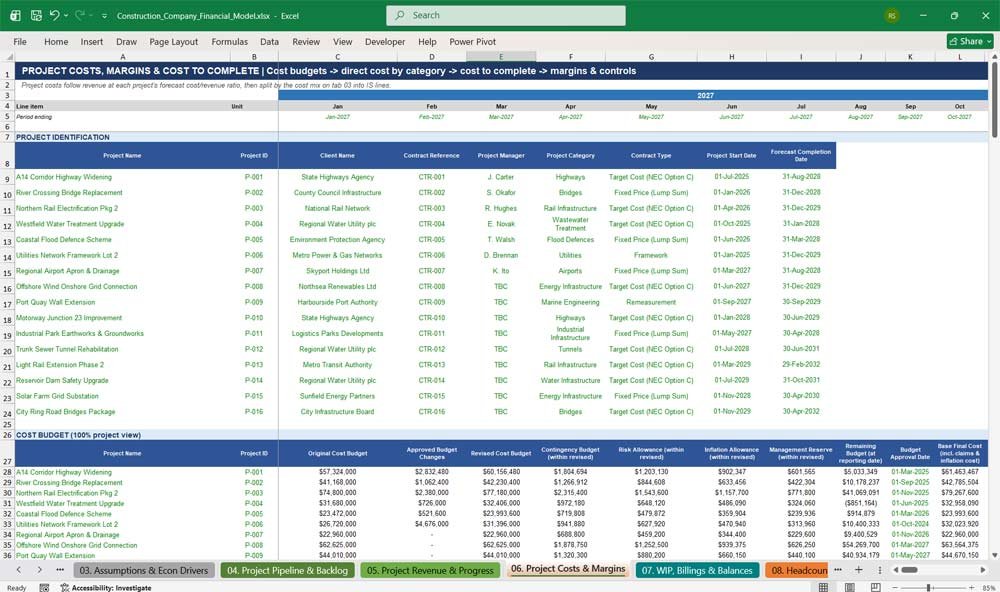
06. Project Costs, Margins & Cost To Complete
Project costs follow revenue at each contract’s forecast cost-to-revenue ratio, then split into labour, materials, subcontractors, plant, site and other direct costs. Cost budgets, cost-to-complete, margin erosion and cost controls give commercial teams a clear view of project profitability.
- Original, revised and forecast final cost budgets for every project
- Detailed direct cost build across more than 60 cost lines
- Cost-to-complete, open purchase orders and uncommitted cost exposure
- Margin erosion, cost overrun and forecast loss provisions
07. WIP, Billings & Contract Balances
Track work in progress, applications for payment, certified billings, contract assets and contract liabilities each month. Customer retentions and subcontractor balances are modelled separately, and a full contract reconciliation confirms that cumulative revenue, billings and balances always tie together.
- Monthly WIP roll-forward and WIP ageing
- Customer billings, milestone invoices and advance payments
- Contract assets, contract liabilities and customer retentions
- Subcontractor accruals, retentions and payments
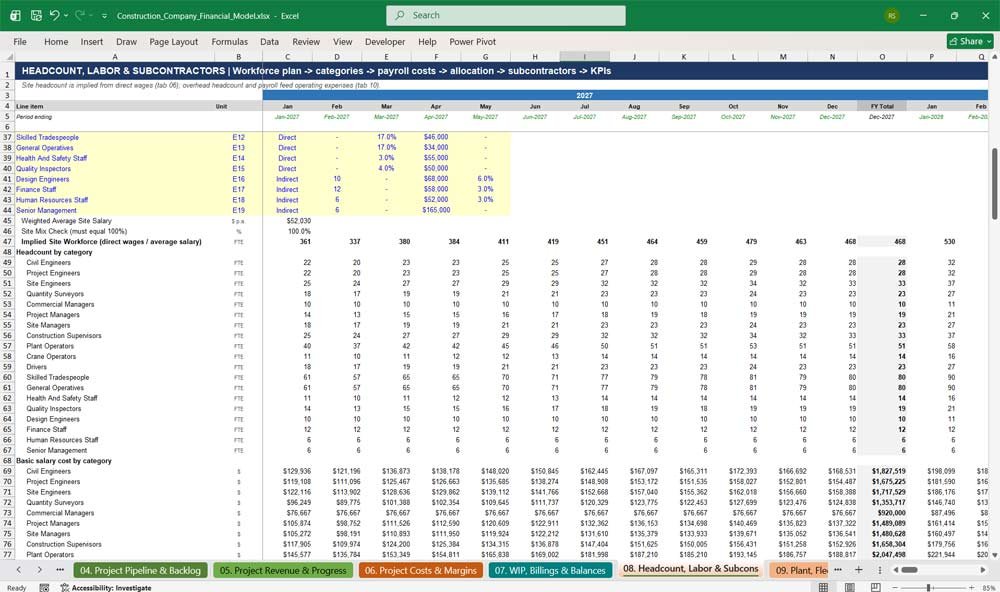
08. Headcount, Labour & Subcontractors
Plan the workforce across 19 employee categories, from civil engineers and quantity surveyors to plant operators and senior management. Site headcount is implied from direct wages, while overhead payroll feeds operating expenses. A subcontractor register and performance tracker are included.
- Workforce planning with hires, leavers, temporary staff and apprentices
- Payroll costs including National Insurance, pension, bonuses and benefits
- Labour allocation, utilisation and cost per productive hour
- Subcontractor register, performance ratings and workforce KPIs
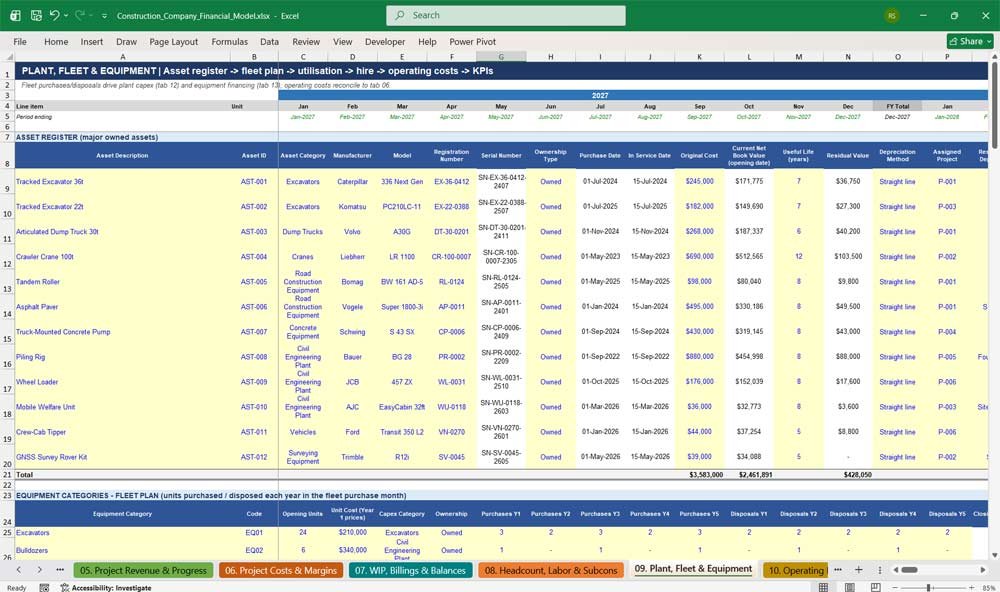
09. Plant, Fleet & Equipment
Manage owned plant and fleet across 20 equipment categories, from excavators and cranes to vans and surveying equipment. Planned purchases and disposals drive capex and equipment financing. Utilisation, hire agreements, operating costs, maintenance planning and equipment KPIs complete the picture.
- Asset register and fleet plan by equipment category
- Utilisation, availability and downtime analysis
- Plant hire register and owned-versus-hired cost comparison
- Operating cost, maintenance planning and cost recovery KPIs
10. Operating Expenses
Build overheads line by line across expense categories, management and support, insurance and compliance, and facilities and technology. Fixed costs escalate with their own inflation index, payroll lines link to headcount, and variable costs follow revenue for a realistic overhead forecast.
- More than 60 overhead lines mapped to the income statement
- Separate insurance, compliance, facilities and IT schedules
- Cost saving initiatives, one-off and exceptional expenses
- Overhead allocation, budget variance and growth analysis
Construction Company Financial Statements Excel
11. Working Capital & Retention
Model receivables, retentions, payables, accruals and inventory using days-based assumptions that reflect construction payment cycles. Certification delays and payment terms flow directly into cash. Working capital outputs include cash conversion cycle, DSO, DPO and net contract working capital.
- Trade receivables with certification and processing days
- Customer and subcontractor retention modelling
- Accruals, inventory, VAT and payroll taxes payable
- Cash conversion cycle and working capital as a percentage of revenue
12. Capital Expenditure & Depreciation
Plan capex across 16 asset categories, including plant, vehicles, IT, software, buildings and right-of-use assets. Fleet purchases flow in from tab 09. Depreciation is calculated by category, with asset disposals, gains on disposal, lease assets and capitalised software fully modelled.
- Capex planning with approved, committed and deferred budgets
- Asset purchase and disposal schedules
- Depreciation by category with useful life and residual value inputs
- Right-of-use lease assets, software amortisation and capex KPIs
13. Debt, Leases & Interest
Model term loans, a revolving credit facility, equipment financing and a shareholder loan with PIK interest. The revolver draws automatically to protect minimum cash, without circular references. Lease liabilities, interest, debt repayment and monthly covenant testing are all included.
- Facility register covering limits, rates, spreads, fees and maturities
- Automatic revolving credit facility draw and repayment
- Lease liabilities, arrangement fee amortisation and interest calculation
- Net leverage, interest cover, DSCR and liquidity covenant tests
14. Tax & Shareholder Distributions
Calculate corporation tax from profit before tax, including non-deductible expenses, with quarterly instalment payments. Dividends are paid from prior-year profit using a payout ratio. They are subject to leverage and minimum cash lock-up tests, alongside optional shareholder equity injections.
- Corporation tax computation and tax payable roll-forward
- Dividend payout ratio with covenant-based lock-up test
- Equity injections and shareholder loan movements
- Dividend cover and net distributions
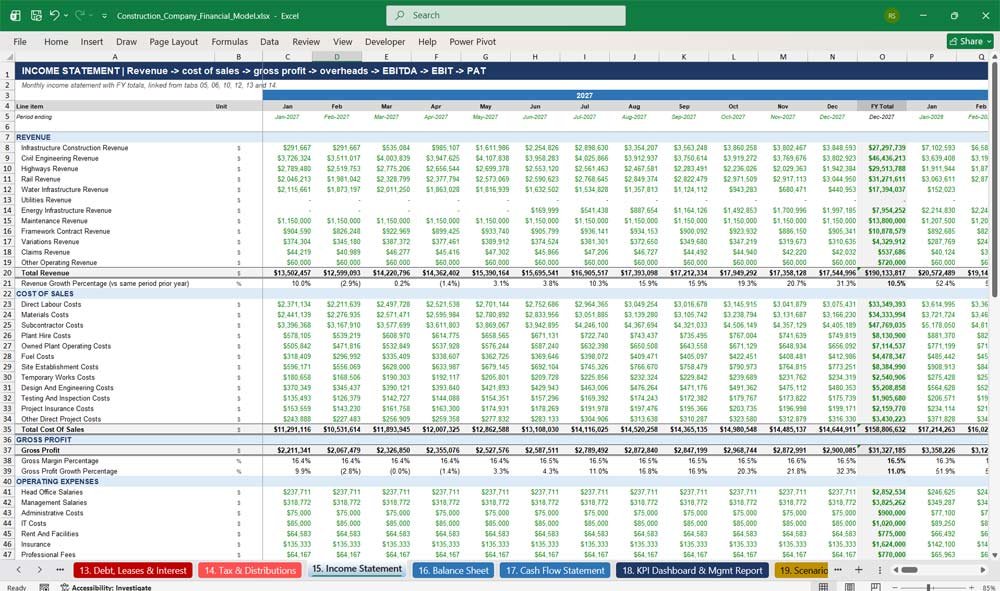
15. Income Statement
A monthly construction income statement with annual totals, from twelve revenue lines through cost of sales, gross profit, overheads, EBITDA, EBIT, finance costs and tax to profit after tax. Additional reporting includes adjusted EBITDA, cost ratios and year-on-year growth.
- Twelve revenue lines and twelve cost of sales lines
- Gross profit, EBITDA, EBIT and net profit margins
- Finance costs including leases, fees and interest income
- Revenue and gross profit per employee and year-on-year growth
16. Balance Sheet
A fully balanced monthly balance sheet showing assets, liabilities and equity, with a balance check for every period. Construction-specific balances highlight work in progress, unbilled revenue, retentions, contract assets and liabilities, and performance bond exposure.
- Balances in every month, with an automatic check
- Net working capital, net debt and liquidity ratios
- Current ratio, quick ratio, equity ratio and net tangible assets
- Construction-specific WIP, retention and bond exposure analysis
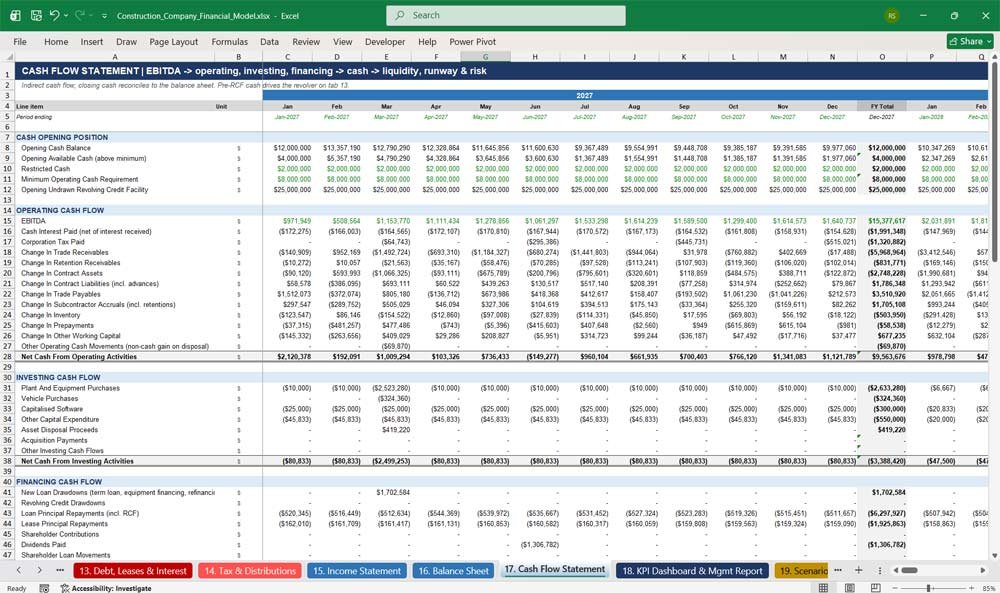
17. Cash Flow Statement
A monthly indirect cash flow statement reconciling to the balance sheet, plus liquidity, cash runway and project cash flow analysis. Cash flow risk scenarios quantify the impact of delayed receipts, retention delays, cost overruns and covenant breaches on funding needs.
- Operating, investing and financing cash flows
- Liquidity headroom, peak borrowing and funding gap
- Cash runway and forecast cash exhaustion date
- Project cash flow and downside cash flow risk analysis
Key Metrics & Ratios for a Construction Company
18. KPI Dashboard & Management Reporting
An annual management dashboard combining three actual years with five forecast years. It covers revenue, backlog, profitability, project delivery, cash flow, working capital, operations and debt KPIs. Charts and reporting controls make board packs and lender reports simple to produce.
- Over 100 KPIs across eight performance areas
- Revenue by project, client, business unit, contract type and sector
- Revenue, EBITDA, cash flow, net debt and backlog charts
- Red flag indicators, management actions and automated commentary
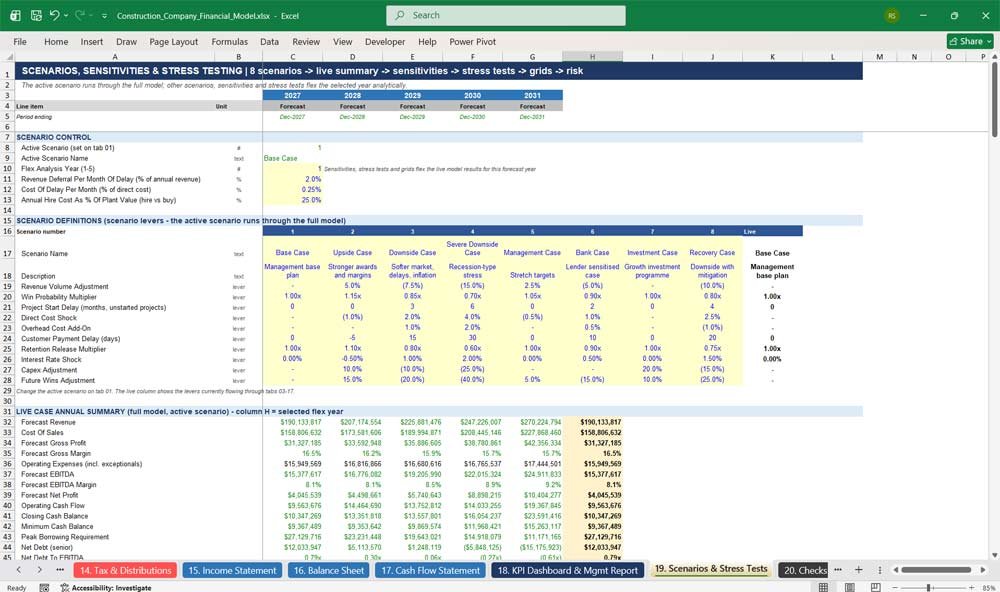
19. Scenarios, Sensitivities & Stress Testing
Eight scenarios, including the bank, downside and recovery cases, run through the full model. Over 50 sensitivities, 16 stress tests and nine two-way sensitivity grids flex revenue, margins, working capital, interest rates and capex to reveal liquidity and covenant risk.
- Eight scenario definitions with ten adjustable levers
- Revenue, cost, working capital, financing and capex sensitivities
- 16 pre-built stress tests with funding gap and covenant impact
- Two-way sensitivity grids and a risk outputs summary
20. Model Checks & Reconciliations
Every reconciliation in the model is gathered in one place, with PASS or REVIEW flags for each period. It checks the balance sheet, cash, revenue, costs, backlog, WIP, fixed assets, debt and headcount, giving users and lenders confidence in the integrity of the forecast.
- Monthly integrity checks with a period status flag
- Static checks on historical data, cost mixes and project tie-outs
- Overall model check displayed on the cover page
- Covenant and minimum cash information flags
Why Buy This Model
Building a reliable construction financial model from scratch can take weeks, and generic templates rarely handle percentage-of-completion revenue, WIP, retentions, backlog or plant fleets properly. This model gives civil engineering and infrastructure contractors a complete, integrated and bank-ready forecast from day one. Every tab is linked, every balance sheet balances and every check is visible, so you can present to lenders, investors and boards with confidence. Simply replace the illustrative data with your own projects, history and assumptions. You then have a professional construction cash flow forecast, a three-statement model and a scenario analysis tool in one Excel workbook.
Construction Company Frequently Asked Questions (Faq)
Is this model suitable for my type of construction business?
Yes, if you deliver contract-based work. The model is designed for civil engineering and infrastructure contractors, including highways, bridges, rail, water, wastewater, utilities, energy, marine, tunnels, airports and flood defence. The project categories, contract types and cost lines can be relabelled to suit your business.
Do I need advanced Excel skills to use it?
No. Inputs are blue on a yellow background, calculations are black and links are green, so you always know which cells to change. Most users work mainly in the Assumptions tab and the Project Register, and the rest of the model updates automatically.
Which version of Excel do I need?
The model is built for Microsoft Excel 2019 or Microsoft 365, on Windows or Mac. It contains no macros or VBA, so there are no security warnings when you open it.
Can I change the start date and the years shown?
Yes. Change the single Model Start Date on tab 03 and every date, year heading, month label, project date and escalation in the model updates automatically, including the three historical years.
Can I use a currency other than US dollars?
Yes. The model is set up in USD, but you can change the currency label on the Assumptions tab and enter your figures in any currency. All calculations work the same way.
How is revenue recognised?
Revenue is recognised over time using a percentage-of-completion S-curve between each project’s start and forecast completion dates. This is consistent with the IFRS 15 and ASC 606 input method. Pipeline tenders are included at their probability of award, or excluded using a single switch.
How many projects can I enter?
The project register includes 16 project slots, each with full tender, contract, date, risk, revenue and cost detail. Unidentified future work is captured separately through annual future wins targets, so your forecast can grow beyond the named projects.
Does it handle retentions, WIP and contract assets?
Yes. Customer and subcontractor retentions, work in progress, applications for payment, certified billings, contract assets and contract liabilities are all modelled monthly. They are reconciled on tab 07 and flow into the balance sheet and cash flow.
Is the model suitable for bank or investor presentations?
Yes. It produces a fully integrated monthly income statement, balance sheet and cash flow, along with covenant calculations, a bank case scenario, stress tests and a KPI dashboard. Integrity checks confirm that the balance sheet balances in every period.
Can I run different scenarios?
Yes. Choose from eight scenarios on the cover page, including base, upside, downside, severe downside, management, bank, investment and recovery cases. You can edit each scenario’s ten levers on tab 19. Sensitivities, stress tests and two-way grids show the impact instantly.
Does the model include debt and covenant analysis?
Yes. It covers a term loan, a revolving credit facility that draws automatically to protect minimum cash, equipment financing, a shareholder loan and leases. Net leverage, interest cover, debt service cover and minimum liquidity covenants are tested every month, with breach flags.
Does it include plant, fleet and headcount planning?
Yes. The model includes a 20-category fleet plan with purchases, disposals, utilisation and operating costs. It also includes workforce planning across 19 employee categories, with payroll costs, labour allocation and a subcontractor register.
What happens if I make a mistake?
The Model Checks tab monitors every key reconciliation and flags any issue as REVIEW, and the overall status is shown on the cover page. Calculated cells are clearly separated from inputs, so formulas are protected from accidental overwriting.
Does the model contain real company data?
No. All figures are illustrative examples for a fictional contractor, showing how the model works. Replace them with your own historical results, projects and assumptions to create your forecast.
Summary Of The Financial Model
This 5 Year financial model for a construction company is dynamic and project-driven, allowing for:
- Scenario analysis for delays, cost overruns, or economic downturns.
- Cash flow forecasting to manage liquidity.
- Project-specific profit analysis.
- Debt management planning.